


Most absence benchmarking falls apart the moment someone on the finance side asks a simple question: "Compared to what?"
That question kills more absence-improvement programs than any budget cut. An HR lead walks into the room with a clean-looking number — "our absence rate is 4.1%" — and a CFO who's seen a dozen vendor decks immediately asks whether that's good, bad, seasonal, inflated by one bad warehouse, or just different accounting than last year. If the answer is a shrug, the whole business case loses credibility in about eight seconds.
The problem isn't that benchmarks don't exist. It's that most published benchmarks are useless for actual decisions. They mix a 40-person software company with a 4,000-person distribution network, lump call centers in with field sales, and report a single national average that no real operation actually matches. When you try to set a target against a number like that, you're guessing with extra steps.
This piece lays out how to build benchmark bands that are sector- and size-specific, a methodology you can reproduce and defend under audit, heuristics for setting targets that won't get laughed out of the room, and a business-case template with sensitivity scenarios tied to actual decision thresholds. The goal is that you walk into the exec meeting with ranges, not a lonely single number.
Why a single "industry average" absence number is close to worthless
The core issue with treating absence benchmarks by industry as one figure: variance inside an industry is almost always larger than variance between industries.
Take retail. A regional grocery chain and a boutique apparel retailer are both "retail," but their absence profiles look nothing alike. Grocery runs 24/7, has heavy frontline hourly staffing, physical work, and seasonal spikes — you'll routinely see absence rates in the 4.5–6.5% band. Apparel, with more part-time flex and less physically punishing work, might sit closer to 2.8–3.8%. Report "retail = 4.9%" and you've built a target that's too soft for one and unreachable for the other.
Three things drive most of the real variance, and none of them show up in a headline average:
-
Workforce mix — ratio of hourly frontline to salaried, full-time to part-time, and how physical the roles are.
-
Operating model — single-shift office vs. multi-shift continuous operations. Continuous operations structurally carry more absence because coverage pressure itself generates no-shows and burnout.
-
Measurement definition — whether you count partial days, intermittent leave, approved FMLA/statutory leave, and whether you measure scheduled hours or paid hours in the denominator.
That last one quietly wrecks more benchmarking exercises than anything else. Two sites inside the same company can report absence rates 1.8 points apart purely because one included approved intermittent leave in the numerator and the other didn't. Before you benchmark against anyone, you have to normalize against yourself.
The metrics that actually belong in a benchmark set
Absence rate alone is too blunt. A proper benchmark set needs a small spine of normalized metrics so that when one moves, you can tell why.
Stop managing absences manually.
Absencely simplifies leave requests, approvals, and absence monitoring for your entire workforce.
- Automated leave tracking
- Manager approval workflows
- Compliance & reporting tools
No credit card required
| Metric | What it captures | Why it belongs in the set |
|---|---|---|
| Absence Rate | Lost scheduled hours ÷ total scheduled hours | The headline. Useless alone, essential in context. |
| TACR (Time-Adjusted Capacity Reduction) | Effective capacity lost including partial days + coverage drag | Catches the hidden cost absence rate misses |
| CPAD (Cost Per Absence Day) | Fully-loaded cost of one absence day (wages + coverage premium + productivity loss) | Translates HR metrics into finance language |
| FTE-Impact Percentile | Where a team sits vs. peers on FTE-equivalent capacity lost | Lets you rank teams fairly across different sizes |
| Bradford-style frequency | Short, frequent absences vs. long continuous ones | Distinguishes a disengagement problem from a chronic-illness one |
The reason you want TACR and CPAD alongside raw absence rate is that two operations with an identical 4% absence rate can have wildly different pain. If one absorbs absence through existing slack and the other backfills every shift with overtime at 1.5x, the second one is bleeding money the raw rate never shows. CPAD is what makes the case legible to finance — and if you want to go deeper on that translation layer, the absence cost-allocation and showback framework for finance teams walks through how to push those numbers back to the cost centers that own them.
A reproducible benchmarking methodology
If your benchmarking can't be reproduced by someone else six months from now, it's an opinion, not a benchmark. Here's a sequence that holds up under scrutiny.
-
Freeze your definitions first. Write down — in one page — exactly what counts as an absence, what's in the numerator, what's in the denominator, and how partial days are handled. Everything downstream inherits from it.
-
Segment before you aggregate. Split by business unit, role family (frontline / support / professional), employment type, and shift model. Never benchmark a blended company-wide number against an external figure — benchmark segment-to-segment.
-
Normalize to scheduled hours, not headcount. Headcount-based rates distort the moment you have part-timers. Scheduled hours is the denominator that survives a workforce-mix change.
-
Build percentile bands, not point estimates. For each segment, compute the 25th, 50th, and 75th percentile across your sites or peer set. A band ("your warehouse sits at the 68th percentile of comparable warehouses") is defensible in a way a single average never is.
-
Strip the outliers, then explain them. One site with a 14% rate because of a plant closure will drag your median. Remove it from the band — but keep a note explaining why, because the outlier is often the most important story.
-
Re-run on a fixed cadence with locked definitions. Quarterly is usually right. The danger is silent definition drift: someone changes how intermittent leave is coded, and suddenly your "improvement" is an accounting artifact.
Here's a quick visual of the workflow if you want to show it in a presentation.
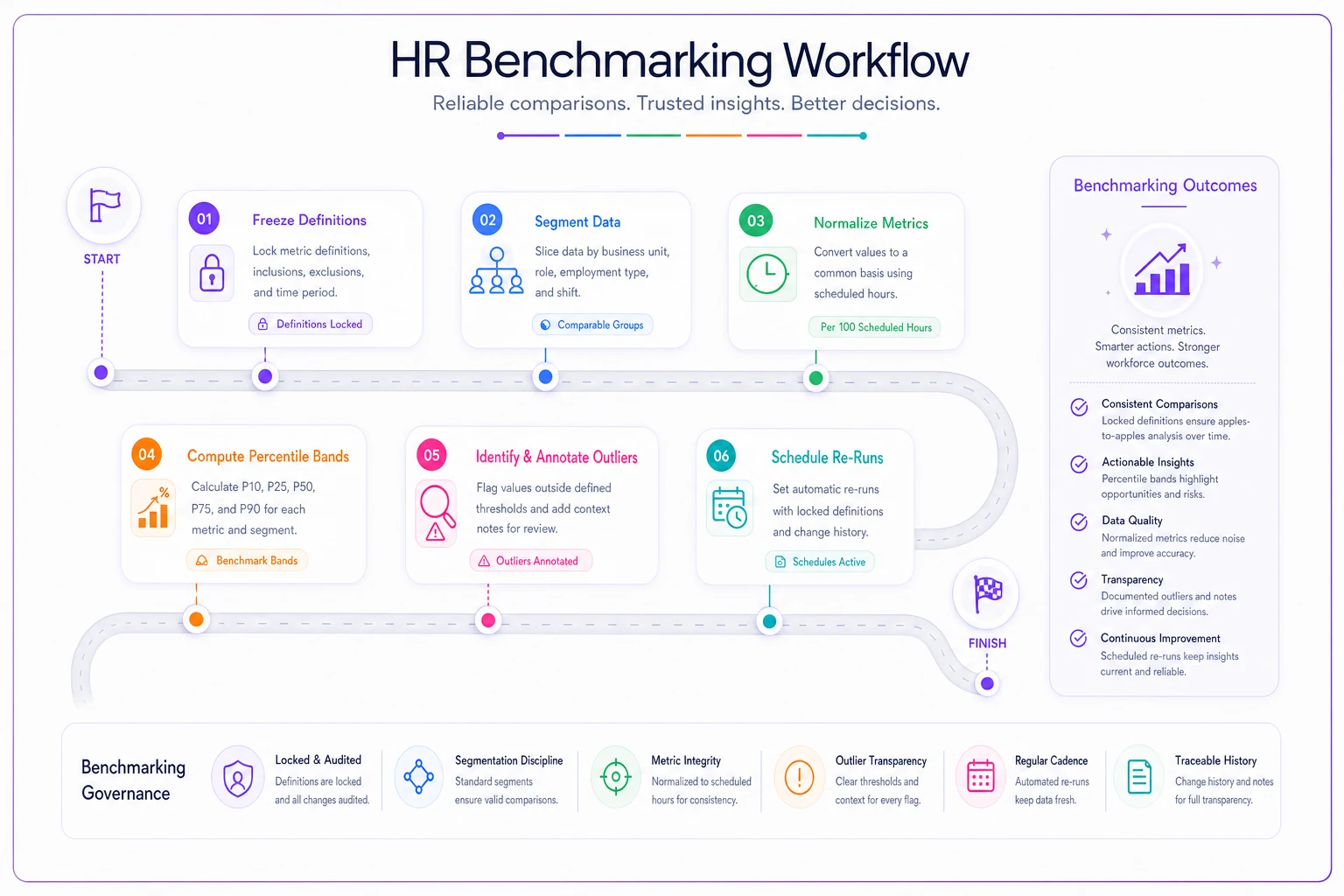
Keep the one-page definitions document versioned in the analytics repo so every re-run references the same source of truth.
The whole thing lives or dies on step one. In practice, the most common failure isn't bad math — it's that two quarters of data were built on two different definitions and nobody noticed until the trend line did something impossible.
Normalized KPI bands by sector and size
Below are illustrative band ranges to anchor your own calibration. Treat these as starting brackets to validate against your own data, not gospel. The point is the shape: notice how size and operating model shift the bands more than the industry label does.
| Sector / Segment | Small (<200) | Mid (200–1,500) | Large (1,500+) | Typical driver |
|---|---|---|---|---|
| Retail — frontline hourly | 3.0–4.2% | 3.8–5.2% | 4.5–6.5% | Shift coverage, seasonality |
| Manufacturing / warehouse | 3.5–4.8% | 4.2–5.8% | 5.0–7.0% | Physical load, multi-shift |
| Healthcare — clinical | 4.0–5.5% | 4.8–6.4% | 5.5–7.5% | Burnout, exposure, continuous ops |
| Professional / office | 1.8–2.6% | 2.2–3.2% | 2.6–3.8% | Lower physical strain |
| Contact / call center | 4.0–5.6% | 4.8–6.8% | 5.5–8.0% | High attrition, schedule rigidity |
A pattern worth sitting with: absence rates almost always climb with size, even within the same industry. Larger operations carry more coordination distance between the employee, the scheduler, and the manager, and that distance generates both real absence and measurement noise. If your 3,000-person operation is beating the small-company band, double-check your definitions before you celebrate.
For FTE-impact percentiles, the useful move is to convert each team's lost hours into FTE-equivalents and rank them. A team losing "only 3.5%" might land in the 80th percentile of impact if it's small and the absences cluster on critical roles. Raw rate hides that; percentile ranking surfaces it.
Target-setting heuristics that survive contact with reality
The fastest way to lose credibility is to set a target of "best-in-class" when you're sitting at the 70th percentile. Nobody closes a 30-point gap in a year, and finance knows it.
-
Target one band, not the frontier. If you're at the 70th percentile, aim for the 50th within 12 months. Moving one quartile is ambitious but credible.
-
Set the target as a band, too. "Reduce absence rate to 4.0–4.4%" is more honest than "4.1%." It signals you understand variance and leaves room for a bad flu season without the program looking like a failure.
-
Tie the target to a CPAD-denominated savings number. A rate target alone doesn't move a budget. "Closing half the gap to median saves roughly $190k–$240k annually at current CPAD" moves a budget.
-
Separate structural from behavioral absence. Some of your rate is statutory leave you cannot and should not reduce. Carve that out before setting a target, or you'll be chasing a number you're legally obligated to keep.
If you're formalizing how these targets feed into executive reporting, the methodology pairs cleanly with the executive absence scorecard and target-setting template, which handles the one-page reporting layer that sits on top of these bands.
When aggressive targets actually make sense
Push hard when your rate sits above the 75th percentile, the gap is clearly behavioral (short-frequent absences, not chronic illness), and you have manager coverage workflows that can absorb the change. In that situation, a half-quartile move in two quarters is realistic.
When aggressive targets are a bad idea
Hold back when most of your excess absence is statutory or medical leave, your measurement definitions changed in the last two quarters, or you're in the middle of a reorg. Setting a stretch target on unstable data just manufactures a miss.
Who should not benchmark externally yet
If you can't yet produce a clean, consistent internal absence rate across your own sites, external benchmarking is premature. Fix internal consistency first. The absence program maturity model is a useful gut-check here — if you're in stage one, your energy belongs on data hygiene, not peer comparison.
The executive business case: a worked scenario
This is where benchmarks earn their keep. A band is interesting; a dollar figure tied to a decision threshold is what gets funded.
Scenario — mid-sized distribution operation, roughly 1,100 employees.
-
Current absence rate
5.6%, which lands around the 71st percentile of comparable mid-size warehouse operations.
-
Median for that segment
4.9%. Closing half the gap puts the target at ~5.25%.
-
Fully-loaded CPAD, including overtime backfill
around $310 per absence day.
-
Total scheduled days lost at 5.6%
roughly 15,400 days/year. At target, about 13,500 days — a reduction of ~1,900 days.
-
Gross annualized saving
~$590k. Program cost (tooling, manager time, intervention program): around $180k–$210k.
That's a net case somewhere in the $380k–$410k range, which clears most mid-size capital thresholds comfortably. But a single number is fragile — so you run sensitivities.
| Scenario | Gap closed | Days reduced | CPAD | Gross saving | Net (after ~$195k cost) |
|---|---|---|---|---|---|
| Conservative | 30% of gap | ~1,150 | $280 | ~$322k | ~$127k |
| Base | 50% of gap | ~1,900 | $310 | ~$589k | ~$394k |
| Optimistic | 65% of gap | ~2,470 | $330 | ~$815k | ~$620k |
The honest part of this table is the conservative row. If you only present the base case, a skeptical CFO assumes you're sandbagging the other direction. Showing that even the conservative scenario is net-positive is what actually moves the decision — it reframes the question from "will this work?" to "how much will it return?" For building the underlying assumptions and sensitivity logic, the cost-per-absence model and ROI workbook gives you the spreadsheet-ready structure to plug these numbers into.
The board-ready one-pager
Boards don't want your methodology. They want the decision framed in four blocks. Structure the single page like this:
-
Where we stand — current rate, percentile band, and the one sentence that says whether that's a problem.
-
The gap — the median, the realistic target band, and an explicit note on what's structural or statutory and therefore off the table.
-
The money — the sensitivity table above, with the conservative row doing the credibility work.
-
The ask — specific budget, specific decision threshold ("approve if net return exceeds $150k; conservative case clears it").
A quick checklist before that page goes anywhere near a board:
-
[ ] Every number traces back to the frozen definition document
-
[ ] Statutory/medical leave is explicitly carved out of the "addressable" figure
-
[ ] The percentile claim names the peer segment, not just "industry"
-
[ ] At least one sensitivity scenario is genuinely pessimistic
-
[ ] CPAD is fully loaded (wages + coverage premium + productivity), not just base wage
-
[ ] The target is a band, not a false-precision point estimate
-
[ ] There's a defined re-measurement cadence so "success" can be verified
The checklist exists for one reason: the questions a sharp board member asks are completely predictable. If every box is ticked, there's no eight-second credibility collapse.
Where this quietly breaks as you scale
Everything above works beautifully for one quarter, one analyst, one clean dataset. The failure mode is time.
By quarter three, someone has recoded intermittent leave, a new site came online with different scheduling software, and the "scheduled hours" denominator means something slightly different across two regions. Nobody did anything wrong individually — the definitions just drifted. And drift is invisible until your trend line shows an improvement nobody can explain or a regression nobody caused.
This is the real argument for pushing benchmark logic into your operational systems rather than rebuilding it in a spreadsheet every quarter. When absence data is captured against a locked schema — consistent definitions, consistent denominators, consistent leave coding — the benchmark re-runs itself on the same basis every time. AI-assisted absence platforms help mostly by holding that consistency and flagging when a segment's numbers move for a definition reason rather than a real one, which is exactly the distinction a benchmark needs to survive across quarters and sites without someone manually reconciling it each time. The value isn't fancy prediction; it's that the comparison stays honest.
That consistency is the whole game. A benchmark is only worth something if the number you're comparing this quarter was built the same way as last quarter. Get that right, and the bands, targets, and business case all hold. Get it wrong, and you're back to defending a lonely 4.1% that nobody believes.
Pulling it together
Good absence benchmarking isn't about finding the magic industry number — it's about building bands that respect how much sector, size, and operating model actually move the needle, then setting targets you can defend one quartile at a time. The business case gets funded not when the base scenario looks great, but when the conservative scenario still clears the threshold. Start with the definition freeze. Segment before you aggregate. Report bands and percentiles instead of point estimates. Carve out what you can't legally touch. And translate everything into CPAD so finance hears money, not HR metrics. Do that, and the next time someone asks "compared to what?", you'll have an answer that survives the follow-up question — which is the one that actually decides whether your program gets built.
Ready to optimize your workforce absence management?
Join 2,000+ HR teams using Absencely to reduce administrative burden, improve compliance, and boost employee satisfaction.