

Most companies discover their absence data governance problems the hard way. A VP storms into HR demanding to know why their department shows 18% absence rates when they swear it's closer to 5%. Payroll flags that someone's been marked absent for three weeks but still getting paid. Finance can't reconcile headcount forecasts because the absence data feeding their models keeps changing retroactively.
Absence data touches everything — payroll processing, workforce planning, compliance audits, operational forecasting — yet most organizations treat it like a simple checkbox field in their HRIS. They assume if someone marks "sick day" in the system, that data flows cleanly everywhere it needs to go. It doesn't.
What starts as minor inconsistencies compounds into major operational failures. Different departments define "absence" differently. Managers record things their own way. Systems don't talk to each other properly. By the time you realize there's a problem, you're looking at months of corrupted data affecting everything from budget forecasts to compliance reports.
The hidden complexity of absence records
Absence data governance breaks because organizations underestimate how complex absence records actually are. It's not just marking someone as "present" or "absent" — each absence type carries different implications for payroll, benefits, compliance, and forecasting.
Take a simple sick day. Sounds straightforward, right? Except that sick day might be:
-
Paid or unpaid depending on accrual balance
-
Protected under FMLA or state leave laws
-
Part of an intermittent leave pattern
-
Subject to different documentation requirements
-
Counted differently for attendance tracking versus benefits eligibility
Now multiply that complexity across vacation, personal days, bereavement, jury duty, military leave, disability, workers' comp, and every other absence type your organization tracks. Each one has different rules, different approval chains, different documentation needs, and different downstream impacts.
The problem gets worse when you realize absence data isn't created in one place. Managers enter some absences. Employees request others through self-service portals. HR adds retroactive adjustments. Payroll makes corrections. Third-party administrators handle disability claims. Without clear governance, each source follows its own rules, creating a data mess that becomes nearly impossible to untangle.
A 400-person manufacturing company I worked with discovered their absence data was so fragmented they couldn't answer basic questions. How many people called out sick last quarter? Depends which system you check. What's the average unplanned absence rate? Marketing said 3%, Operations said 8%, HR said 5.5%. Three different "sources of truth," none of them matching.
Why standard ETL approaches fail with absence data
Most organizations try to solve absence data problems with standard ETL (Extract, Transform, Load) processes. Pull data from the timekeeping system, transform it to match the HRIS schema, load it into the reporting warehouse. Simple enough in theory.
Stop managing absences manually.
Absencely simplifies leave requests, approvals, and absence monitoring for your entire workforce.
- Automated leave tracking
- Manager approval workflows
- Compliance & reporting tools
No credit card required
Except absence data doesn't behave like other HR data. Employee names and departments stay relatively stable. Compensation changes follow predictable patterns. But absence data is constantly shifting — retroactive corrections, policy interpretations, partial day calculations, overlapping leave types.
Here's what typically breaks:
Timing mismatches: Your timekeeping system records absences in real-time, but your HRIS processes them in batches. An employee marks themselves absent at 7 AM, their manager approves it at noon, HR reviews it the next day, and payroll processes it a week later. Each system shows different data depending on when you pull it.
Definition conflicts: The timekeeping system treats a half-day absence as 4 hours. The HRIS treats it as 0.5 days. Payroll calculates it based on scheduled hours. Your forecasting model needs FTE impact. Four different calculations for the same absence.
Retroactive chaos: Someone submits FMLA paperwork two weeks after their absence. Now you need to reclassify those days, adjust the payroll codes, update the compliance tracking, and recalculate your forecast models. Most ETL processes can't handle that kind of retroactive complexity.
Cross-system dependencies: An absence in your primary system might trigger updates in your benefits platform, compliance tracker, and workforce analytics tool. Miss one integration point and your data diverges permanently.
A retail chain I analyzed had built what they thought was a bulletproof ETL pipeline for absence data. Ran every night, validated records, generated exception reports. Looked great on paper. But they hadn't accounted for retroactive changes, so their historical data kept shifting. Monday's report showing 145 absences last month would show 152 by Friday. Their forecasting models were essentially running on random numbers.
Building an ownership matrix that actually works
The first step in fixing absence data governance is establishing clear ownership. Not the vague "HR owns absence data" declaration that appears in most data governance documents — specific accountability for every aspect of the data lifecycle.
Start by mapping who touches absence data and when:
-
Employees initiate absence requests
-
Managers approve and code absences
-
HR validates and adjusts classifications
-
Payroll processes financial impacts
-
IT maintains system integrations
-
Finance uses data for forecasting
-
Compliance monitors for audit requirements
Each touchpoint needs a defined owner with specific responsibilities. But most ownership matrices fail because they assign ownership without considering operational reality.
Your ownership matrix needs to account for common scenarios:
The retroactive adjustment: When an employee provides medical documentation two weeks late, who owns the process of updating historical records? Who ensures downstream systems get corrected? Who validates that forecast models get refreshed?
The classification dispute: Manager marks something as unpaid absence. Employee claims it should be protected sick leave. HR agrees but payroll already processed. Who owns the correction workflow? Who tracks that it actually happens?
The integration failure: Absence data doesn't flow from timekeeping to HRIS for three days due to a system error. Who owns the manual reconciliation? Who validates the catch-up process? Who communicates impacts to stakeholders?
Your matrix should specify primary owners, backup owners, escalation paths, and decision rights for each scenario. Include SLAs for critical processes — retroactive adjustments completed within 48 hours, classification disputes resolved within one pay period, integration failures escalated within 4 hours.
Document the handoff points explicitly. When does manager ownership end and HR ownership begin? What exactly gets handed off? What validation happens at each transition?
A distribution company with around 200 employees across six locations created an ownership matrix that finally stuck. They didn't just list names and departments. They documented specific scenarios — "Employee A is marked absent by mistake" or "Manager B forgets to approve a vacation request before payroll cutoff" — and walked through exactly who did what in each case. Clear ownership, clear process, clear accountability.
Record definitions that prevent interpretation chaos
Every absence data problem I've investigated traces back to inconsistent definitions. Different people interpret the same terms differently, systems calculate the same metrics differently, reports show the same numbers differently.
You need precise, technical definitions for every absence-related data element. Not the HR policy description — the actual data definition that systems and people can follow consistently.
Most companies define absence types but not absence attributes. That's where things fall apart.
Absence Type is just the starting point:
-
Sick leave
-
Vacation
-
Personal day
-
FMLA continuous
-
FMLA intermittent
But you also need clear definitions for:
Duration Calculations:
-
Full day = scheduled hours for that specific day (not a standard 8 hours)
-
Half day = 50% of scheduled hours, rounded up to nearest 15 minutes
-
Partial absence = exact hours missed, no rounding
Status Definitions:
-
Pending = requested but not approved
-
Approved = manager approved, not yet validated by HR
-
Validated = HR confirmed, ready for payroll processing
-
Processed = included in payroll run
-
Adjusted = retroactively modified after initial processing
Coverage Indicators:
-
Covered = replacement worker assigned
-
Partially covered = some duties reassigned
-
Uncovered = position vacant during absence
Compliance Flags:
-
Protected = covered under federal/state/local law
-
Documented = required paperwork on file
-
Exhausted = relevant entitlements depleted
Define calculation rules explicitly. If someone works 4 hours of an 8-hour shift then goes home sick, is that 0.5 days absent or 4 hours absent? If they're scheduled for 10 hours that day, how does that change the calculation? What about overtime implications?
Specify how overlapping absences work. Employee has approved vacation but calls in sick during it — which absence type takes precedence? How do you track both for different purposes?
Document edge cases that break standard rules. A holiday falling during FMLA leave. Bereavement leave extending into previously approved vacation. Sick leave during a notice period after resignation.
Your definitions need to be specific enough that two different people would record the same absence exactly the same way. Include examples, calculation formulas, and decision trees for complex scenarios.
ETL checkpoints for absence data integrity
Standard ETL processes assume data flows in one direction — extract from source, transform to target format, load into destination. Absence data doesn't work that way. It flows in multiple directions, changes retroactively, and affects numerous downstream systems. You need checkpoints that validate data integrity at each critical juncture.
Build checkpoints around these critical transitions:
Entry Point Validation: Before absence data enters your system of record, validate:
-
Employee is active in system
-
Absence date isn't in the future (unless advance request)
-
Absence type matches employee eligibility
-
Duration doesn't exceed balance (for accrued types)
-
Required fields are populated
Cross-System Synchronization: When data moves between systems, validate:
-
Record counts match between source and destination
-
Key fields (employee ID, date, type) transferred correctly
-
Calculated fields (duration, pay impact) compute identically
-
Timestamp shows successful transfer
-
No duplicate records created
Retroactive Change Tracking: When historical data gets modified, validate:
-
Original value preserved in audit table
-
Change reason documented
-
Downstream systems notified of change
-
Dependent calculations updated
-
Forecast models refreshed if needed
Aggregation Accuracy: When individual records roll up to summaries, validate:
-
Sum of parts equals the whole
-
No records double-counted
-
No records excluded incorrectly
-
Time period boundaries consistent
-
Department/location hierarchies current
The critical part — your checkpoints need to fail loudly. A quiet failure in absence data creates cascading problems. If Thursday's ETL run silently drops 20 absence records, you won't know until payroll is wrong, forecasts are off, or compliance audits fail.
Here's a simple workflow to visualize ETL checkpoints and alert escalation.
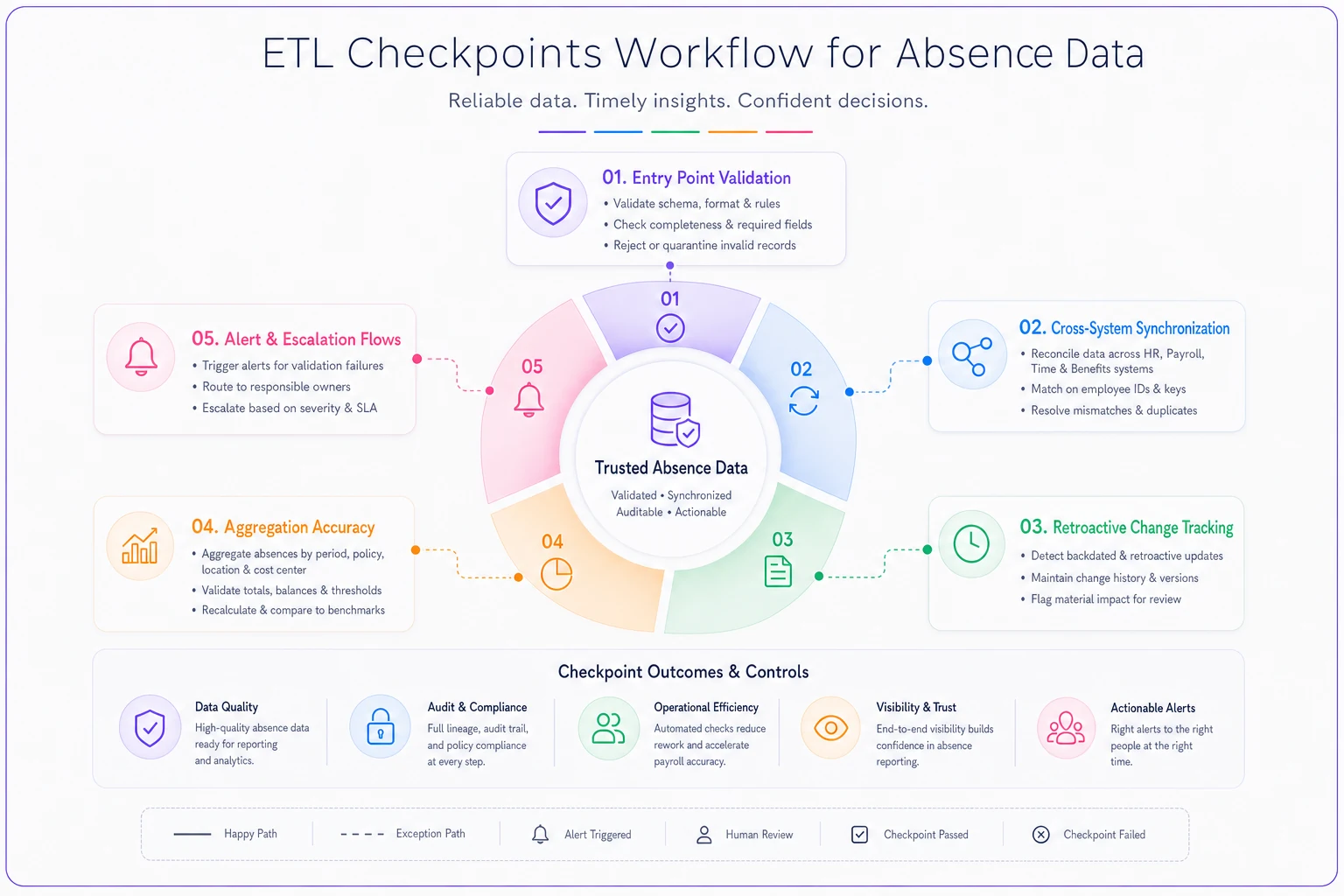
Set up escalating alerts:
-
Warning
Single record fails validation (notify IT)
-
Alert
5+ records fail or pattern detected (notify IT + data owner)
-
Critical
System-wide failure or key integration broken (notify IT + HR + Finance)
Track checkpoint performance over time. If certain validations fail repeatedly, you have a systematic problem that needs fixing, not just bad data that needs cleaning.
A healthcare staffing firm with around 800 employees built checkpoints that caught a critical issue. Their HRIS was calculating FMLA leave differently than their timekeeping system — off by a few hours per person, but across hundreds of employees it was adding up to significant forecasting errors. The checkpoint comparing calculated values between systems flagged the discrepancy before it affected their quarterly staffing plan.
Retention rules that balance compliance and performance
Absence data retention is a genuine mess of competing requirements. Legal says keep everything forever. IT says storage costs are killing them. Analytics wants five years of history. Privacy regulations say delete personal data. Auditors need detailed records. Operations needs quick query performance.
Most organizations either keep everything (drowning in data) or follow generic retention schedules (destroying data they actually need). You need retention rules that consider how absence data actually gets used.
Structure retention around data utility, not just compliance minimums:
Active Operational Data (0-13 months):
-
Full detail, all fields
-
Real-time access for managers
-
Daily backups
-
Immediate query response
Keep everything here. This is your working dataset for payroll processing, attendance tracking, and immediate operational decisions. Storage is cheap compared to the cost of not having data when you need it.
Historical Reporting Data (13-36 months):
-
Relevant fields only (drop system metadata)
-
Read-only access
-
Weekly archival
-
Sub-minute query response
This is your forecasting and trending dataset. Strip out fields you don't need for analysis but keep enough detail to identify patterns, validate forecasts, and respond to audit requests.
Compliance Archive (36+ months):
-
Compressed, encrypted storage
-
Limited access (audit only)
-
Quarterly verification
-
Retrieval within 48 hours
Keep what law requires, nothing more. Summary data for most absences, full detail for protected leaves, workers' comp claims, and anything litigation-related.
What most retention policies miss is the interconnected nature of absence data. You can't just delete absence records after three years if those absences affected:
-
FMLA running year calculations
-
Long-term disability claims
-
Workers' compensation cases
-
Accommodation tracking
-
Performance reviews that referenced attendance
Build your retention rules around data dependencies:
Legal holds: Any absence data connected to active litigation, EEOC charges, or labor disputes gets indefinite retention regardless of age.
Benefit implications: Absences that affected benefit eligibility, pension calculations, or service credit need retention aligned with benefit plan requirements (often six years or more).
Cascading deletion: When purging old absence records, also remove:
-
Related approval workflows
-
Attached documentation (unless separately retained)
-
Audit logs for those records
-
Cached calculations
Partial retention: For older records, consider keeping:
-
Summary counts by month/type
-
Compliance flags without personal details
-
Pattern indicators for long-term analysis
Document what gets retained at each stage. When someone asks for absence data from four years ago, you need to know exactly what's available and what's gone.
Audit sampling beyond random checks
Most absence data audits follow the same pattern: randomly sample 5% of records, check for obvious errors, declare victory if nothing looks catastrophically wrong. This approach misses the systematic problems that actually break operations.
Your audit sampling needs to target known failure points:
Boundary Conditions: Sample heavily around system boundaries:
-
Last day of pay periods
-
First/last day of month
-
Benefit year transitions
-
Policy effective dates
-
System upgrade dates
These are where absence data most often gets mangled. An employee absent on the last day of the month might get counted in both months or neither. New policy rules might not apply correctly to in-progress absences.
High-Risk Patterns: Don't sample randomly — target suspicious patterns:
-
Absences on Mondays/Fridays
-
Absences before/after holidays
-
Repeated intermittent patterns
-
Maximum duration leaves
-
Zero-balance situations
A transportation company discovered through pattern analysis that roughly 30% of their FMLA intermittent leave was being coded as regular sick time. Random sampling had never caught it because it only affected specific absence patterns.
Cross-System Discrepancies: Sample the same records across all systems:
-
Timekeeping entry
-
HRIS record
-
Payroll processing
-
Reporting warehouse
-
Analytics platform
Look for field-level differences, not just missing records. Does the timekeeping system show 8 hours absent but payroll processed 7.5? That's a systematic calculation error that compounds over time.
User-Specific Validation: Sample by user behavior:
-
New managers' first month of absence approvals
-
Employees with recently changed schedules
-
Departments with new policies
-
Locations with different rules
Focus on transition points where people are most likely to make errors. A manager promoted from a different department might not know the new team's absence coding conventions.
Downstream Impact Testing: Don't just audit the absence records — audit their downstream effects:
-
Did payroll calculate correctly?
-
Did accrual balances adjust properly?
-
Did forecasting models update?
-
Did compliance reports capture the absence?
-
Did replacement scheduling trigger?
Structure your audit calendar around business cycles:
| Audit Frequency | Focus Area | Time Investment |
|---|---|---|
| Monthly | High-risk patterns and boundary conditions | 2–3 hours |
| Quarterly | Deep dive by theme (FMLA, retroactive changes, integrations, year-end accruals) | Full day |
| Annual | Policy compliance, data lineage, forecast model validation | 2–3 days |
Document everything you find, even minor discrepancies. Patterns emerge over time that point to systematic issues. Three instances of half-day absences being calculated wrong might indicate a broader problem with partial absence handling.
Connecting governance to payroll processing
Payroll is where absence data governance failures become real money problems. An incorrectly coded absence might seem like a minor data quality issue until it results in overpayment, underpayment, or a compliance violation.
The challenge is that payroll processes absence data in a fundamentally different way than other systems. Your HRIS might track absences by day. Your forecasting model might aggregate by week. But payroll needs to know the exact financial impact down to the penny, considering:
-
Regular vs overtime implications
-
Shift differentials
-
Holiday pay interactions
-
Benefit deductions
-
Tax implications
-
Garnishment calculations
Build specific governance controls for the absence-to-payroll pipeline:
Pre-Payroll Validation: Before payroll runs, validate:
-
All absences in the period are approved
-
Absence types match payroll codes
-
Paid/unpaid status aligns with balances
-
No duplicate entries exist
-
Retroactive adjustments are flagged
Create exception reports that flag issues requiring manual review. An employee marked absent but clocking in/out. Approved vacation exceeding available balance. Protected leave missing documentation.
Payroll Code Mapping
| Absence Type | Payroll Code | Notes |
|---|---|---|
| Sick Leave | PAY CODE 120 | Regular pay |
| FMLA Unpaid | PAY CODE 900 | No pay, maintain benefits |
| Bereavement | PAY CODE 130 | Regular pay, max 3 days |
Never let payroll "figure out" which code to use. Define it explicitly, test it thoroughly, validate it constantly.
Impact Calculation Rules: Document exactly how each absence type affects pay:
-
Salaried exempt
no pay impact for partial day absence
-
Salaried non-exempt
deduct actual hours absent
-
Hourly
deduct scheduled hours
-
Variable schedule
use 4-week average
Include edge cases. What happens when someone is absent during an overtime shift? How do you handle absence during on-call periods? What about absences during travel time?
Reconciliation Requirements: After payroll processes, reconcile:
-
Hours paid matches hours worked plus approved paid absences
-
Deductions align with unpaid absences
-
Accrual balances decreased appropriately
-
Exception reports reviewed and resolved
A 300-person manufacturing company found that their absence data governance problems were costing them somewhere around $30,000 per quarter in payroll errors. Small mistakes — coding sick time as vacation, missing half-day calculations, forgetting to mark FMLA as unpaid — added up fast.
Forecasting dependencies most companies miss
Workforce forecasting relies on absence data more than most organizations realize. It's not just about predicting how many people will call in sick. Absence patterns affect hiring needs, project timelines, coverage requirements, and budget projections. Bad absence data produces bad forecasts, which produce bad business decisions.
The connection between absence data and forecasting outcomes goes well beyond simple averages. Your forecasting models need to account for:
Seasonal Patterns:
-
Summer vacation clustering
-
Flu season impacts
-
Holiday period coverage
-
School calendar effects
-
Weather-related callouts
Without clean historical data, you can't identify these patterns reliably. That July spike might be vacations or might be a data quality issue — you need governance to know which.
Department Variations:
-
Customer service
higher Monday/Friday absence
-
Warehouse
weather-dependent patterns
-
Accounting
end-of-month coverage critical
-
IT
project deadline impacts
Aggregate absence rates hide crucial department-level differences. Your governance needs to maintain clean department attribution to support granular forecasting.
Correlation Factors:
-
Overtime hours → increased sick leave
-
Mandatory overtime → higher unplanned absence
-
Shift changes → temporary spike in absences
-
Policy changes → behavioral adjustments
Track these relationships in your data model. When overtime increases 20%, how much does sick leave typically follow? Your governance structure needs to preserve these connections.
Cascading Effects:
-
One absence → overtime for others → more absences
-
Key person absent → project delay → resource reallocation
-
Coverage gap → customer service impact → revenue effect
Most organizations treat absence forecasting as a simple percentage — "We run 5% absence, so staff up 5%." But that assumes absence is randomly distributed. It's not. Absences cluster around specific times, specific people, specific circumstances.
Your governance structure needs to support more sophisticated forecasting:
-
Cohort Tracking
New employees have different absence patterns than tenured staff. Track hire date cohorts separately.
-
Type Differentiation
Planned vacation has different forecast implications than unplanned sick leave. Maintain clear type definitions.
-
Duration Categories
Single-day absences have different operational impacts than week-long absences. Track duration distributions.
-
Recovery Patterns
Someone returning from extended leave might have higher absence rates initially. Track return-to-work patterns.
A logistics company improved their staffing forecast accuracy by around 40% just by cleaning up their absence data governance. They weren't using fancy new models — they just finally had reliable data showing that dock workers had roughly 3x higher Monday absences after weekend overtime shifts. Simple pattern, huge operational impact, completely invisible with messy data.
Making governance stick in daily operations
Perfect absence data governance on paper means nothing if it falls apart when a manager is scrambling at 6 AM to cover an unexpected callout. The real test is whether people can correctly record absences under pressure, whether HR can quickly pull accurate data for a compliance audit, and whether your forecasting models can actually rely on what's in the system.
Most governance initiatives fail because they're designed in isolation from how work actually happens. They assume perfect compliance, infinite time, and zero operational pressure. Real operations are messy. People cut corners when they're rushed. Systems glitch at the worst possible moments.
Build your governance for how work actually runs:
-
Mobile-First Entry
Managers aren't at their desks when employees call out. Build governance that works from phones — simple screens, clear options, automatic validation.
-
Contextual Guidance
Don't make people remember complex rules. Build them into the workflow. When someone selects bereavement leave, automatically surface the policy excerpt, required documentation, and maximum duration.
-
Progressive Validation
Check data quality at every step, not just at the end. Flag issues immediately while people still remember the context. An error caught at entry takes 30 seconds to fix. An error caught during audit takes 30 minutes.
-
Automatic Documentation
Capture the why, not just the what. When someone makes a retroactive change, require a reason selection. When patterns emerge over time, you'll understand whether it's a training issue or a system problem.
The key is making good governance easier than bad governance. If following the rules takes twice as long as working around them, people will work around them.
Smart organizations are implementing AI-powered operational systems that handle this complexity automatically. Instead of requiring managers to remember which absence types need which documentation, the system guides them through it. Instead of manually validating data transfers between systems, automated workflows handle the checks and only escalate exceptions. Governance that works with operations, not against it.
Building for scale without adding complexity
Absence data governance gets exponentially harder as organizations grow. What works for 50 employees breaks at 500. What works at one location fails with five. What handles standard absences crumbles under complex leave laws across multiple jurisdictions.
The instinct is to add more rules, more checks, more processes as you scale. That's exactly wrong. Complexity doesn't scale. The organizations that successfully manage absence data governance at scale are the ones that simplified as they grew.
Three principles that actually hold up:
-
Standardize the core, customize the edges
Have one core way to record absences that works everywhere. Handle local variations through configuration, not different processes. California might require different meal break tracking, but the absence entry process should work the same way regardless of location.
-
Automate validation, not entry
Don't try to prevent every possible error at the point of entry — that makes the system unusable. Let people enter data naturally, then use automated validation to catch and flag issues for resolution.
-
Build once, deploy everywhere
When you solve an absence data problem for one location or department, package that solution so it can be used elsewhere. Don't let every team reinvent the wheel.
The goal is maintaining data quality without creating operational burden. Every governance requirement should make someone's job easier, not harder. If it doesn't, question whether you actually need it.
Absence data governance isn't about perfect data — it's about reliable data that supports business operations. Focus on the data quality that matters for payroll accuracy, forecast reliability, and compliance confidence. Let go of perfection in areas that don't drive real business impact.
Absence data governance might not be the most exciting part of HR operations, but it's foundational to everything else working correctly. You can't run accurate payroll without clean absence data. You can't forecast staffing needs without reliable patterns. You can't pass compliance audits without proper documentation.
Start with the basics. Define your absence types clearly. Establish ownership for each part of the data lifecycle. Build checkpoints that catch problems early. Create retention rules that balance compliance and performance. Connect your governance to the systems that actually use the data — payroll and forecasting.
Modern operational platforms with AI automation can shift how you handle all of this. Instead of manually checking data quality, automated workflows validate everything in real-time. Instead of hoping managers follow the right process, the system guides them through it. Instead of discovering problems during audits, you catch them as they happen.
The companies that get absence data governance right aren't the ones with the most detailed policies — they're the ones that built systems aligned with how their operations actually run. They made good governance the path of least resistance. They automated the complex parts and simplified the human parts.
Your absence data will never be perfect. But with the right governance structure, it can be reliable enough to trust when payroll runs, when forecasts are due, and when auditors come knocking.
Ready to optimize your workforce absence management?
Join 2,000+ HR teams using Absencely to reduce administrative burden, improve compliance, and boost employee satisfaction.