


A manufacturing company just paid $47,000 in fines. Not for denying legitimate leave requests or violating FMLA requirements. They got hammered because their leave documentation looked like someone dumped a filing cabinet into a blender.
The evidence gap that kills every leave audit
When the auditor requested documentation on 23 leave cases, the HR manager produced medical notes saved as "scan0001.pdf" through "scan0089.pdf," leave requests scattered between email threads and Teams messages, and certification documents where someone had whited out dates with correction fluid before scanning. No clear way to match documents to cases.
A routine audit became a compliance nightmare.
Why leave documentation falls apart
Most companies collect leave documents like baseball cards — grab whatever comes in, stick it somewhere, hope you can find it later. The problem isn't that HR teams don't care about documentation. Nobody ever showed them what "audit-ready" actually looks like.
Stop managing absences manually.
Absencely simplifies leave requests, approvals, and absence monitoring for your entire workforce.
- Automated leave tracking
- Manager approval workflows
- Compliance & reporting tools
No credit card required
Employee submits leave request. Manager forwards it to HR. HR requests medical certification. Doctor sends documentation. Employee provides additional forms. Each document lands somewhere different — HRIS, email, physical files, shared drives. Six months later, an auditor asks for Case #2023-147. Good luck finding the eight documents across four systems that make up that case file. Companies optimize for "easy to file" instead of "easy to audit." That's backwards.
The one-page audit checklist that changes everything
After watching dozens of leave audits go sideways, I tracked what auditors actually look for. Not what regulations say — what they physically check when opening a case file.
Required Evidence Chain
-
1. Initial request documentation - Employee's written request (email/form/system entry) - Date and time stamp of submission - Specific leave type requested - Requested dates (start and anticipated return)
-
2. Manager acknowledgment - Written confirmation of receipt - Initial approval/denial/pending status - Coverage plan documentation - Date stamp within 2 business days
-
3. Medical certification (if applicable) - Healthcare provider certification on official letterhead - Diagnosis codes properly redacted - Duration and frequency clearly stated - Provider signature and license number visible
-
4. Employer response - Designation notice sent within 5 business days - Clear statement of approval/denial/additional info needed - Rights and responsibilities documentation provided - Return-to-work requirements specified
-
5. Ongoing case management - Status updates every 30 days for extended leave - Recertification requests and responses - Any modifications to original request - Communication log with dates
-
6. Return documentation - Fitness-for-duty certification (if required) - Actual return date - Any accommodation requests - Manager confirmation of return
File Naming Convention
Every document needs this structure:
[YYYY-MM-DD][CaseID][DocType][Sequence]
Example: 2024-03-15LV2024-089MedCert01.pdf
-
InitReq- Initial request -
MgrAck- Manager acknowledgment -
MedCert- Medical certification -
DesigNot- Designation notice -
StatusUp- Status update -
RetWork- Return to work -
CommLog- Communication log
This means date of document (not date filed), unique case identifier, document type code, and sequence number for multiple versions.
The folder structure that survives scrutiny
Stop organizing by employee name. Stop organizing by leave type. Auditors care about finding complete case files fast.
| Folder Structure |
|---|
| /Leave_Documentation |
| /2024ActiveCases |
| /LV2024-001SmithFMLA |
| /01RequestInitiation |
| /02MedicalDocumentation |
| /03EmployerNotices |
| /04CommunicationLog |
| /05ReturnDocumentation |
| /LV2024-002JohnsonShortTerm |
| [same subfolder structure] |
| /2024ClosedCases |
| [same structure, moved here after case closes] |
| /2023_Archive |
| [previous year cases, compressed] |
| /MasterTemplates |
| /Designation_Notices |
| /Request_Forms |
| /Certification_Templates |
| /AuditPrep |
| /CaseSummarySheet.xlsx |
| /Document_Checklist.pdf |
| /Retention_Schedule.xlsx |
Each case folder contains a _CaseSummary.txt file with employee name and ID, leave type and dates, current status, key milestones, and document inventory.
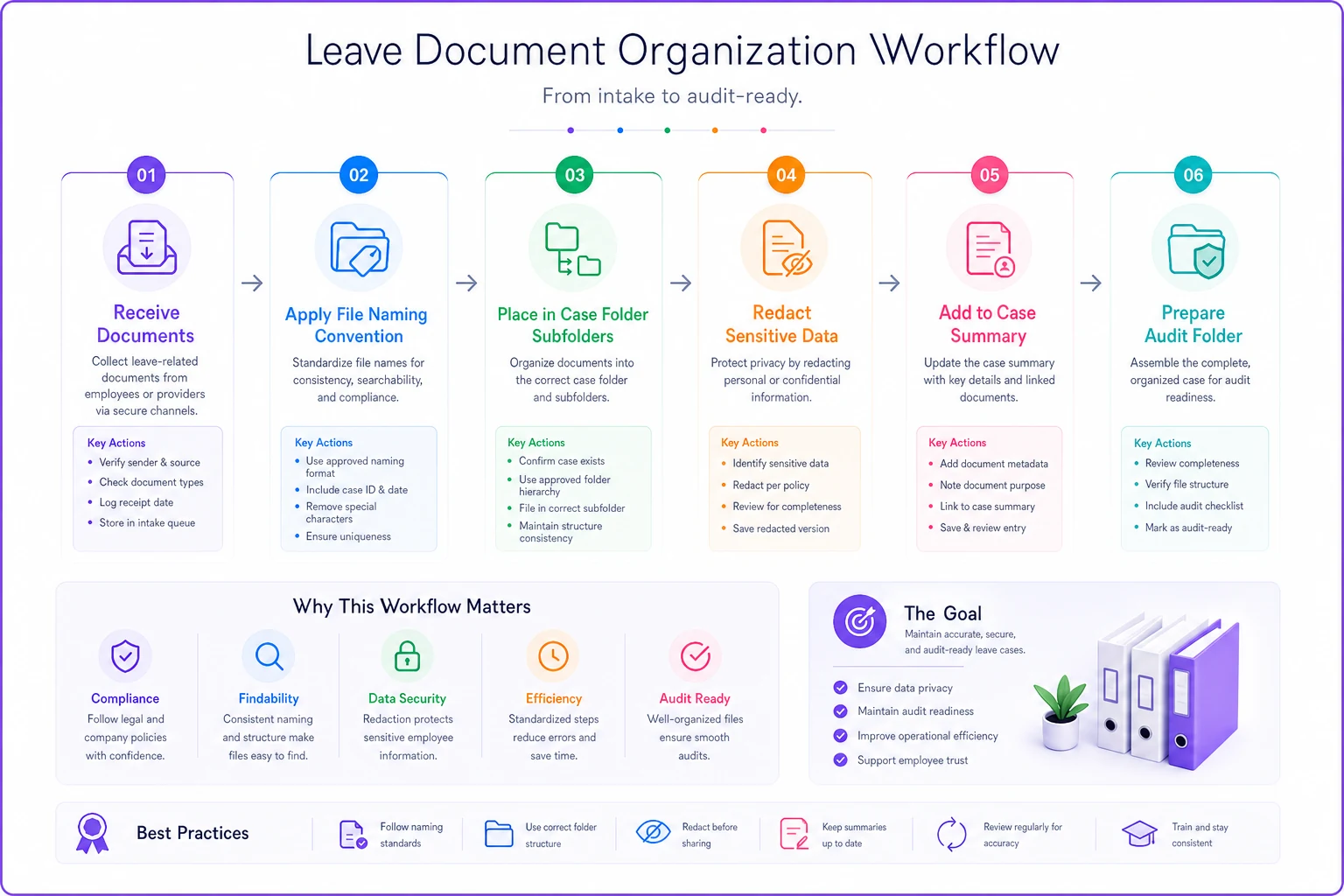
This structure lets auditors navigate directly to any case without explanation. No hunting, no "let me check with Sarah who handles medical leave."
Redaction rules that keep you safe
The biggest documentation mistake? Over-sharing medical information. HR keeps full medical records "just in case" but that creates more risk than protection.
Always redact:
-
Specific diagnosis details beyond what's required
-
Treatment details unrelated to work limitations
-
Mental health provider notes
-
Prescription information
-
Insurance claim numbers
-
Social Security numbers on medical forms
Keep visible:
-
Healthcare provider name and credentials
-
Dates of treatment/examination
-
Work limitation descriptions
-
Expected duration of limitations
-
Provider signature and date
Redaction method:
Don't use markers — they're not permanent in digital files. Use proper PDF redaction tools that remove underlying data. Adobe Acrobat Pro works. So does PDFPen. Free tools usually just hide data, not remove it.
Mark redacted documents clearly: [REDACTED] in the filename. Keep both versions — original secured separately, redacted in the case file.
Sample case files that show the standard
Examples work better than theory. Three sanitized case structures from audits that passed without issues:
Case 1: Intermittent FMLA for chronic condition
-
1. Initial request email dated 01/15/2024
-
2. Manager acknowledgment same day
-
3. WH-380-E certification from rheumatologist (received 01/22/2024)
-
4. Designation notice sent 01/24/2024
-
5. Monthly status emails from employee
-
6. Recertification request sent 07/10/2024
-
7. Updated certification received 07/18/2024
-
8. Communication log showing 47 separate absence notifications
-
9. Annual summary showing 31 days used across 11 months
Key detail: Each single-day absence had simple email notification referencing the case number. Not a new request — just "Taking approved FMLA day tomorrow, Case LV2024-033." Documented, connected, simple.
Case 2: Continuous leave for surgery
-
1. Surgery scheduling notice submitted 03/01/2024
-
2. Manager coverage plan documented 03/02/2024
-
3. Surgeon's certification on practice letterhead (03/08/2024)
-
4. Designation notice with STD coordination info (03/11/2024)
-
5. Week 2 status check — employee confirmed surgery completed
-
6. Week 4 status check — PT started, on track
-
7. Week 6 status check — requesting 2-week extension
-
8. Updated certification for extension (received week 6)
-
9. Fitness-for-duty clearance from surgeon
-
10. Return-to-work meeting notes with temporary limitations
What made this clean: Everything tied to the original case number. The extension wasn't new — it was modification of existing case with supporting documentation.
Case 3: Denied leave request
-
1. Initial request form dated 05/20/2024
-
2. Manager acknowledgment and coverage concerns
-
3. HR request for medical certification
-
4. Doctor's note confirming elective procedure
-
5. Designation notice explaining this doesn't qualify for FMLA
-
6. Employee's request to use vacation time instead
-
7. Approval for vacation time usage
-
8. Case closed notation with cross-reference to vacation records
Critical point: Denied FMLA requests still need full documentation. Auditors check denials as carefully as approvals.
Security notes that matter
Leave documentation contains some of the most sensitive employee data in your company. Medical information, personal situations, family details. One breach destroys trust forever.
Physical security:
-
Leave files in locked cabinets, not desk drawers
-
Limit key access to designated HR staff
-
Log every access to physical files
-
Shred duplicates and drafts immediately
Digital security:
-
Password-protected folders aren't enough — use encryption
-
Implement access logs that track who opened what
-
Set automatic lock timers on shared drives
-
Never email medical documentation without encryption
-
Block USB ports or monitor file transfers
The overlooked risk: printouts. That case file someone printed for a meeting? It's sitting on the printer. Notes from accommodation discussion? In recycling bin. Certification someone reviewed at home? Still on their kitchen table. Implement clean-desk policy for leave documentation. Nothing stays out overnight. Nothing goes home. Nothing gets discussed in open areas.
Common audit failures and their fixes
Watching audits fail teaches more than watching them succeed:
The email maze: Company manages leave entirely through email threads. Auditor asks for Case #44. HR produces 73 emails across 8 threads involving 6 people. Nobody can confirm if that's everything.
Fix: Create case file immediately. Every email gets PDF'd and added to case folder. Original emails stay in email. Case file becomes audit source.
Missing middle documentation: Perfect initial requests and return-to-work forms. But 12 weeks in between? Nothing. No status checks, no updates, no communication log.
Fix: Calendar reminder every 30 days to document status. Even "No change, employee still on leave" counts. Absence of documentation looks like absence of management.
Designation notice delay: Company takes 3 weeks to send designation notices because "we were waiting for medical documentation." Auditor sees non-compliance with 5-day requirement.
Fix: Send preliminary designation within 5 days. State what you're waiting for. Update when received. Clock starts when you know about leave, not when you get perfect documentation.
Redaction disaster: Company redacts so aggressively auditors can't verify anything. Or doesn't redact at all and violates privacy laws.
Fix: Create redaction template. Mark exactly what gets removed. Have one person do all redactions for consistency. Keep originals secured separately.
When documentation saves your business
A retail chain with 200 employees just survived a Department of Labor audit. The investigator pulled 31 leave cases spanning 18 months. Every single case had complete documentation. Every folder followed the same structure. Every document used the same naming convention.
The audit took 4 hours instead of 4 days.
That's what audit-ready documentation delivers — confidence. When you know every case file is complete, organized, and compliant, audits stop being terrifying. They become routine. The folder structure means new HR staff find anything immediately. The naming convention means documents never get misfiled. Redaction standards protect privacy without hiding required information. Security protocols keep sensitive data protected. Most importantly, employees see their leave requests get handled professionally. They trust the process because there IS a process. This is where operational software makes the biggest difference. Instead of manually maintaining folder structures and naming conventions, platforms automatically organize documentation as it arrives. Each leave request triggers proper workflow — manager notification, deadline tracking, document collection, compliant filing. The system enforces naming conventions, maintains audit logs, and creates case summary files automatically. When an auditor asks for documentation, you're not scrambling through emails and shared drives. You're pulling pre-organized case files that already meet every requirement. The software doesn't replace judgment — it eliminates administrative burden that makes documentation fail.
Making it stick
Building audit-ready documentation isn't about the audit. It's about running leave management as professional process instead of administrative burden. When documentation is this organized, everything improves — faster decisions, fewer disputes, better tracking, cleaner handoffs.
Start with five cases to pilot the folder structure and naming convention before scaling.
Start with five cases. Use the naming convention. Build the folder structure. Create summary files. Once those five are perfect, the next fifty feel manageable. The checklist isn't just for audits — it's for every single leave case from day one. You never know which case an auditor will pull. Every employee deserves to have their leave managed professionally, whether an auditor ever sees it or not.
The checklist isn't just for audits — it's for every single leave case from day one. You never know which case an auditor will pull. Every employee deserves to have their leave managed professionally, whether an auditor ever sees it or not.
Ready to optimize your workforce absence management?
Join 2,000+ HR teams using Absencely to reduce administrative burden, improve compliance, and boost employee satisfaction.