

Most companies figure out their critical role dependencies the hard way. A warehouse lead calls in sick during peak season and shipping grinds to a halt. The payroll specialist takes unexpected leave and nobody else knows the ADP password, let alone how to run bi-weekly processing. Meanwhile, three sales reps are out at once and operations barely flinches.
Why some absences break everything — and some barely register
Most companies figure out their critical role dependencies the hard way. A warehouse lead calls in sick during peak season and shipping grinds to a halt. The payroll specialist takes unexpected leave and nobody else knows the ADP password, let alone how to run bi-weekly processing. Meanwhile, three sales reps are out at once and operations barely flinches.
That difference isn't random. It comes down to understanding which roles actually keep your business running versus which ones just feel important. Building staffing resilience means knowing exactly where your operation breaks, having specific backup plans for those pressure points, and clear rules for when to hire versus outsource based on actual risk patterns — not gut feel.
Companies that survive staffing disruptions aren't the ones with the most headcount. They're the ones who already know their vulnerability points and have systematic responses ready before they need them.
The risk-tier matrix most companies never build
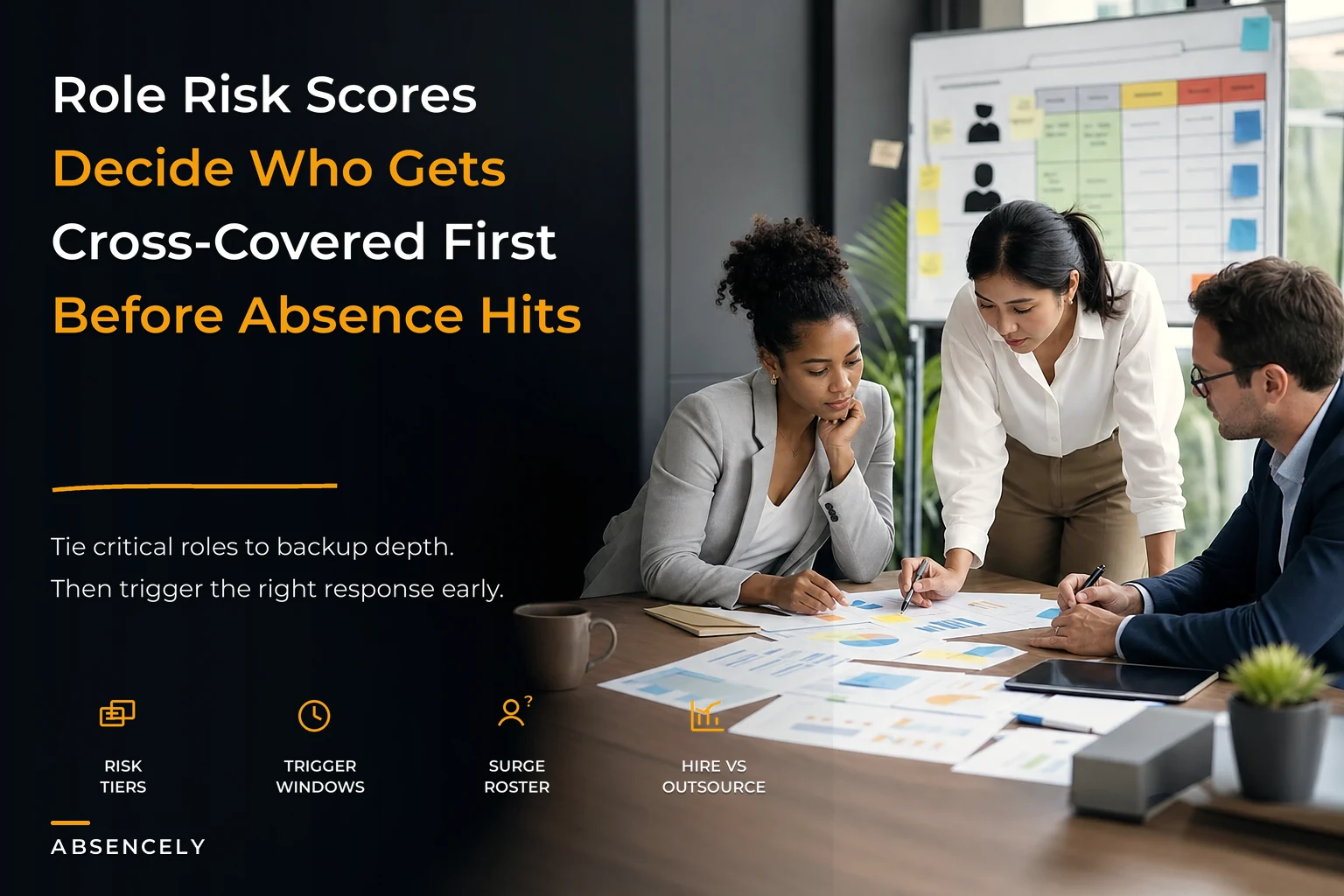
Roughly 15–20% of your roles are genuinely critical to daily operations. Another 30–40% are important but manageable with temporary coverage. The rest? Their absence creates inconvenience, not crisis.
Stop managing absences manually.
Absencely simplifies leave requests, approvals, and absence monitoring for your entire workforce.
- Automated leave tracking
- Manager approval workflows
- Compliance & reporting tools
No credit card required
What trips up most operations is that critical isn't always obvious. The CFO might seem essential, but their day-to-day absence rarely stops the wheels from turning. That part-time inventory coordinator who knows all the vendor contacts and reorder points? Their sudden departure can shut down fulfillment within 48 hours.
| Tier | Impact | Replacement Difficulty | Examples |
|---|---|---|---|
| Tier 1 (Critical — Immediate Impact) | Operations stop or severely degrade within 24–48 hours | No existing cross-coverage; Specialized technical or compliance requirements | sole IT admin, payroll processor, production floor supervisor |
| Tier 2 (Essential — Degraded Performance) | Quality or efficiency drops noticeably; Customer impact within 3–5 days | Limited backup coverage exists | senior customer service lead, purchasing manager, QA specialist |
| Tier 3 (Important — Manageable Gaps) | Work accumulates but doesn't stop; Impact visible after 5–7 days | Multiple people can provide partial coverage | marketing coordinator, junior accountant, sales rep |
| Tier 4 (Supportive — Minimal Disruption) | Tasks can be redistributed or delayed; Impact primarily on long-term projects | Minimal specialized knowledge required | administrative assistant, data entry clerk, social media manager |
Tier 1 (Critical — Immediate Impact):
-
Operations stop or severely degrade within 24–48 hours
-
No existing cross-coverage
-
Specialized technical or compliance requirements
-
Examples
sole IT admin, payroll processor, production floor supervisor
Tier 2 (Essential — Degraded Performance):
-
Quality or efficiency drops noticeably
-
Limited backup coverage exists
-
Customer impact within 3–5 days
-
Examples
senior customer service lead, purchasing manager, QA specialist
Tier 3 (Important — Manageable Gaps):
-
Work accumulates but doesn't stop
-
Multiple people can provide partial coverage
-
Impact visible after 5–7 days
-
Examples
marketing coordinator, junior accountant, sales rep
Tier 4 (Supportive — Minimal Disruption):
-
Tasks can be redistributed or delayed
-
Minimal specialized knowledge required
-
Impact primarily on long-term projects
-
Examples
administrative assistant, data entry clerk, social media manager
The uncomfortable part is actually placing your real people into these tiers. Nobody wants to be Tier 4. But pretending everyone is Tier 1 means you prepare for everything and protect nothing.
Surge roster templates that hold up under pressure
Traditional backup plans fail because they assume perfect conditions. "Sarah covers for Mike" works fine until Sarah's also out, or until you realize she hasn't touched Mike's job in two years and the systems have completely changed.
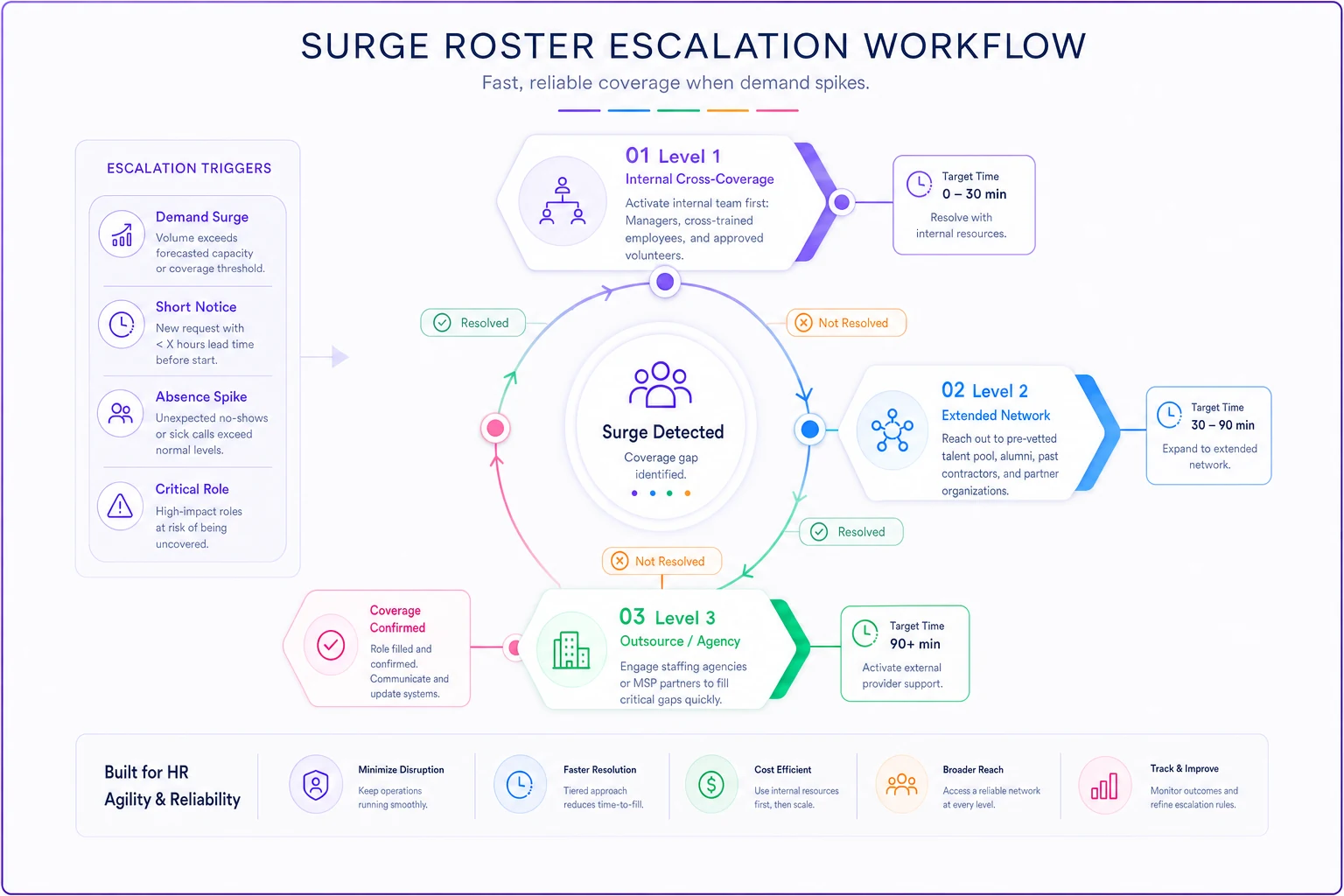
Effective surge rosters work on escalation levels, not single points of failure. For each Tier 1 and Tier 2 role, you need three levels of coverage.
Level 1 — Internal Cross-Coverage:
Someone currently employed who can handle 70–80% of critical tasks immediately. They don't need to be perfect — they need to keep operations moving for 3–5 days. This person should touch the role quarterly through deliberate cross-training. Not theoretical knowledge transfer — actual task execution.
Level 2 — Extended Network:
Former employees, reliable contractors, or part-time staff who know your systems. These aren't random temps. They're people who can step in with 24–48 hours notice and be functional within a day. Keep them engaged through occasional project work or quarterly check-ins. If the role is critical enough, pay them something for availability.
Level 3 — Outsource/Agency:
Pre-vetted external providers who can handle specific functions. Not generic temp agencies — specialized providers for critical functions. The accounting firm that can run payroll. The MSP that handles IT emergencies. The fulfillment service that can process orders. Have contracts ready, access procedures documented, and transition protocols actually tested at least once.
The part most companies skip: surge rosters need maintenance. Every quarter, randomly activate one coverage plan — not during an actual absence, but as a drill. You'll discover passwords changed, processes evolved, or your backup person left six months ago and nobody updated the roster.
Here's a simple workflow visualization of surge roster activation and escalation.
The part most companies skip: surge rosters need maintenance. Every quarter, randomly activate one coverage plan — not during an actual absence, but as a drill. You'll discover passwords changed, processes evolved, or your backup person left six months ago and nobody updated the roster.
Cross-training beyond "shadow for a day"
Cross-training usually means watching someone work for a few hours, taking notes you'll never reference again, then hoping you remember something useful when they're suddenly gone. That approach fails almost every time.
Functional cross-training follows progressive stages, documented in actual playbooks that assume zero memory retention.
Stage 1 — Observation with Documentation (Month 1):
The backup person observes the role for a few hours weekly, but instead of taking personal notes, they build the documentation. Screenshots of every system. Step-by-step processes for routine tasks. Contact lists with context about who does what and why. This documentation becomes the emergency playbook.
Stage 2 — Supervised Execution (Month 2):
The backup performs actual tasks under supervision. Start with low-risk, routine work — process one payroll run, handle five customer escalations, complete one inventory cycle. The primary person corrects mistakes in real time and the playbook gets updated with common errors and fixes.
Stage 3 — Independent Coverage (Month 3):
The backup covers planned absences — half days, then full days, then multiple days. They work from the playbook they built, noting gaps and confusion points. After each coverage period, both people update the documentation based on what actually happened.
Stage 4 — Quarterly Maintenance:
Every quarter, the backup spends a few hours executing core tasks. Not for skill development — to catch process changes, system updates, and relationship shifts that make old documentation obsolete.
The playbook itself needs specific structure. Not philosophical descriptions of the role, but literal step-by-step instructions for critical tasks. Login credentials stored properly. Escalation contacts with phone numbers, not just names. Decision trees for common scenarios. Examples of actual completed work, not blank templates.
Schedule quarterly, short live drills where backups execute core tasks from the playbook so documentation stays accurate and muscle memory is maintained.
Assume the person using this playbook is stressed, hasn't done the job in months, and has three other things on their plate. Make it hard to fail.
Trigger thresholds that force decisions
The biggest staffing resilience failure usually isn't lack of planning — it's paralysis when plans need activation. Teams wait too long, hoping situations resolve themselves. By the time they act, the easy options are gone.
Immediate Triggers (Act within 24 hours):
-
Tier 1 role absence extending beyond 48 hours → Activate Level 1 surge coverage
-
Two Tier 2 roles absent simultaneously → Escalate coverage planning to senior management
-
Any absence during identified crunch periods → Implement predefined surge protocols
-
Critical knowledge holder gives notice → Begin documented knowledge transfer immediately
Escalation Triggers (Act within 72 hours):
-
Tier 1 absence extending beyond 5 days → Activate Level 2 surge coverage
-
Coverage gaps causing measurable SLA violations → Authorize overtime or contractor spending
-
Three or more absences in the same department → Implement department contingency plan
-
Backup coverage person also becomes unavailable → Escalate to Level 3 external coverage
Strategic Triggers (Act within 1 week):
-
Absence patterns indicating a 30+ day gap → Begin formal replacement hiring
-
Multiple Tier 2 gaps lasting 2+ weeks → Authorize temporary staffing
-
Surge roster activation fails → Emergency outsourcing authorization
-
Department absence rate exceeds 15% → Mandatory cross-training acceleration
These triggers activate regardless of reason or optimism about return. A Tier 1 absence hitting 48 hours triggers action whether it's flu, a family emergency, or a vacation extension. You can always stand down coverage. You cannot recover lost operational time.
Log every trigger activation: date, trigger hit, action taken, outcome. After six months you'll see patterns. Maybe the 48-hour trigger is too aggressive for Tier 2 roles but too conservative for Tier 1. Adjust based on actual impact data, not gut feel.
Decision rules: when to hire vs. outsource
Every extended absence forces the same expensive question: hire someone new or pay for temporary coverage? Most companies guess based on budget availability or whoever argued loudest in the meeting. Having actual decision rules eliminates that.
The framework weighs four factors.
Duration Certainty:
-
Known return date within 12 weeks → Outsource or internal coverage
-
Uncertain return or beyond 12 weeks → Begin hiring process
-
Permanent departure → Immediate hiring unless role redundancy exists
Role Specificity:
-
Generic skills available in market → Outsource first, hire if pattern continues
-
Company-specific knowledge required → Hire and accelerate training
-
Mixed requirements → Outsource general tasks, hire for specialized needs
Historical Patterns:
-
First absence in a stable role → Temporary coverage
-
Third absence in 18 months → Permanent capacity increase
-
Seasonal absence patterns → Build outsource relationships for predictable gaps
Cost Thresholds:
-
Outsource cost below 1.5x fully loaded employee cost → Continue outsourcing
-
Outsource cost exceeds 2x employee cost → Trigger hiring evaluation
-
Coverage costs exceeding budget allocation → Force strategic role evaluation
A mid-size logistics company tracked these decisions over roughly two years and found they saved close to $200k annually just by having rules instead of making reactive hiring decisions during crisis moments. When you add up emergency agency markups, rushed onboarding, and the occasional bad hire made under pressure, it compounds fast.
One thing that often gets overlooked: hiring takes time. Even aggressive recruiting means 4–6 weeks minimum before someone's productive. If absence patterns suggest you'll need coverage in week 8, starting the hiring process in week 7 guarantees failure.
Absence forecasting that actually drives action
Forecasting absence patterns isn't about predicting who gets sick. It's about understanding your vulnerability windows and preparing before they hit.
Start with historical patterns. Most companies have predictable absence surges: flu season, school breaks, summer vacations, year-end holidays. Layer in your business cycles — quarterly inventory counts, annual audits, seasonal rushes. The question is where absence patterns intersect with critical operations.
Baseline Absence Rate:
Track your rolling 90-day absence rate by department and role tier. Most operations run 3–7% baseline. This becomes your planning foundation.
Surge Periods:
Identify when absence historically spikes — usually 2–3x baseline during flu season, 1.5–2x during summer, often double during holiday weeks. Mark these on your operational calendar.
Critical Intersection Points:
Map when high absence probability meets critical operations. Year-end close with holiday absence. Peak season with summer vacations. Audit period during flu season. These intersections need enhanced coverage plans, not just awareness.
Coverage Capacity:
Calculate actual coverage capacity during each period. How many people can cover Tier 1 roles? Who's available during summer? What's your agency's actual capacity during holidays?
The output isn't a complex model — it's a simple heat map showing when you're most vulnerable and which roles need protection during those windows. One manufacturing client discovered their highest risk wasn't December holidays but the first week of September, when parents took time off and summer temps returned to college.
When prevention beats resilience
Building elaborate backup systems for bad organizational design wastes resources. Sometimes the answer isn't better coverage — it's fixing the underlying brittleness.
Single points of failure exist because organizations let them develop. The accounting manager who handles all vendor relationships. The IT admin who's the only one with server access. The sales ops person who built all the Salesforce workflows. These aren't staffing resilience problems. They're organizational design failures wearing a staffing costume.
Before building surge rosters, ask harder questions.
Why does only one person know this process? Usually because documentation is treated as a luxury instead of operational insurance. Or because managers quietly hoard knowledge. Or simply because teaching takes time nobody ever allocates.
Could this role be streamlined through better systems? That payroll processor wrestling with spreadsheets might not need a backup if the company implements proper payroll software. The inventory coordinator might become less critical with automated reorder points.
Should this function exist internally at all? Running payroll for 50 employees might make sense. For 15? Probably cheaper and more resilient to outsource entirely. Same logic applies to specialized compliance work, benefits administration, or facilities management.
The most resilient staffing structure isn't the one with perfect backup plans. It's the one designed to handle normal absence without heroics.
Real scenario: distribution company saves their peak season
A regional distribution company with around 85 employees hit their breaking point during peak season last year. Three critical absences in five days nearly cost them their largest client.
First, their warehouse supervisor caught COVID. Then their backup — the assistant manager — had a family emergency. Then their inventory specialist quit without notice. Orders backed up, shipments went out wrong, and customer complaints piled up.
They survived by throwing money at the problem: overnight temps, expensive agency staff, management working 80-hour weeks. Total extra cost came to around $45,000 in additional labor, and they came close to losing a $2M annual contract.
The following year, they implemented the risk-tier framework. Warehouse supervisor and inventory specialist went to Tier 1. Assistant manager landed at Tier 2. They built surge rosters with former employees willing to work peak season for premium pay and cross-trained three current employees on critical warehouse systems, rotating them through weekly refreshers.
When peak season hit again, similar absences followed — supervisor out for surgery, two warehouse leads with COVID. But this time, activation was automatic. Tier 1 absence hit 48 hours, Level 1 coverage kicked in. A former employee came back at 1.5x rate, already knew the systems, kept operations running. Cross-trained staff handled inventory. Operations ran at roughly 85% efficiency instead of falling apart.
Total extra cost: around $8,000. The client noticed nothing. Management worked normal hours. The absence workflow system they implemented meant everyone already knew their role when coverage activated.
The compound effect of systematic preparation
Staffing resilience for critical roles isn't about building unlimited backup plans. It's about knowing exactly where your operation is vulnerable, having specific responses ready, and setting triggers that remove the "let's wait and see" temptation when problems actually hit.
Most companies learn these lessons through expensive failures. A ransomware attack reveals nobody else knows the IT systems. An HR complaint surfaces because nobody documented procedures. A key customer leaves because fulfillment collapsed during an absence nobody planned for.
The framework itself isn't complex: tier your roles honestly, build multi-level coverage for critical positions, create cross-training programs backed by real documentation, set triggers that force action, and use actual patterns to drive hiring versus outsourcing decisions.
What makes this hard isn't the framework — it's the discipline. Maintaining surge rosters when you haven't needed them in months. Running cross-training drills during busy periods. Updating playbooks for processes that feel stable. Following triggers that seem premature.
But across operations of all sizes, the pattern holds: companies with systematic staffing resilience spend less on emergency coverage, lose fewer customers to service failures, and have managers who actually take vacations without their phones blowing up. The upfront investment pays back the first time you avoid a crisis. Everything after that is protecting what you've already built.
Staffing resilience for critical roles isn't about building unlimited backup plans. It's about knowing exactly where your operation is vulnerable, having specific responses ready, and setting triggers that remove the "let's wait and see" temptation when problems actually hit.
But across operations of all sizes, the pattern holds: companies with systematic staffing resilience spend less on emergency coverage, lose fewer customers to service failures, and have managers who actually take vacations without their phones blowing up. The upfront investment pays back the first time you avoid a crisis. Everything after that is protecting what you've already built.
Ready to optimize your workforce absence management?
Join 2,000+ HR teams using Absencely to reduce administrative burden, improve compliance, and boost employee satisfaction.