



Your operations manager calls in sick Tuesday morning. Within four hours, three vendor approvals sit untouched, two critical purchase orders miss their deadline, and someone in accounting starts making executive decisions about a budget override they shouldn't touch. By Wednesday afternoon, you're dealing with a $12,000 mistake that could've been prevented with proper escalation protocols.
This exact scenario played out at a manufacturing company I worked with last year. They had 47 employees, decent systems in place, but zero documented procedures for manager coverage. When their operations lead got COVID and was out for nine days, the ripple effects hit every department. Purchase delays backed up production. Unapproved overtime ballooned their labor costs by $8,400 that week alone. Customer orders shipped late because nobody knew who could authorize expedited freight.
The frustrating part? They actually had capable people who could've handled these decisions. They just didn't have a clear playbook telling everyone who does what when someone's out.
Why manager absences create operational chaos
Most businesses treat manager absences like they're rare emergencies instead of regular operational realities. Managers take vacation. They get sick. They attend conferences. Family emergencies happen. Yet somehow we're always surprised when their absence grinds specific workflows to a halt.
The real problem isn't the absence itself—it's that critical decision rights and process knowledge live entirely in one person's head. When that person disappears, even temporarily, you discover all the invisible ways they held operations together.
Three patterns make this worse. First, companies wait until someone's already gone to figure out coverage. The scramble starts after the out-of-office email goes up. By then, you're already behind.
Second, they rely on informal coverage arrangements. "Sarah usually covers for Mike" works great until Sarah's also at that industry conference. Or she's swamped with her own quarter-end responsibilities and can't take on Mike's approval queue.
Third, nobody documents the actual decision thresholds. Can the assistant manager approve a $5,000 vendor payment? What about $15,000? Who can override the shipping schedule? Without clear escalation triggers, people either freeze up (creating bottlenecks) or make calls they shouldn't (creating expensive mistakes).
Building your manager absence workflow system
The system we implemented at that manufacturing company transformed how they handled coverage.
Stop managing absences manually.
Absencely simplifies leave requests, approvals, and absence monitoring for your entire workforce.
- Automated leave tracking
- Manager approval workflows
- Compliance & reporting tools
No credit card required
Step 1: Map critical decision points
Start by documenting every decision that requires manager approval. Not the obvious ones—the hidden ones that only surface when someone's gone.
For each decision type, capture the trigger for approval, normal turnaround time when the manager's present, maximum acceptable delay before operations suffer, dollar threshold or risk level, and who currently makes this decision.
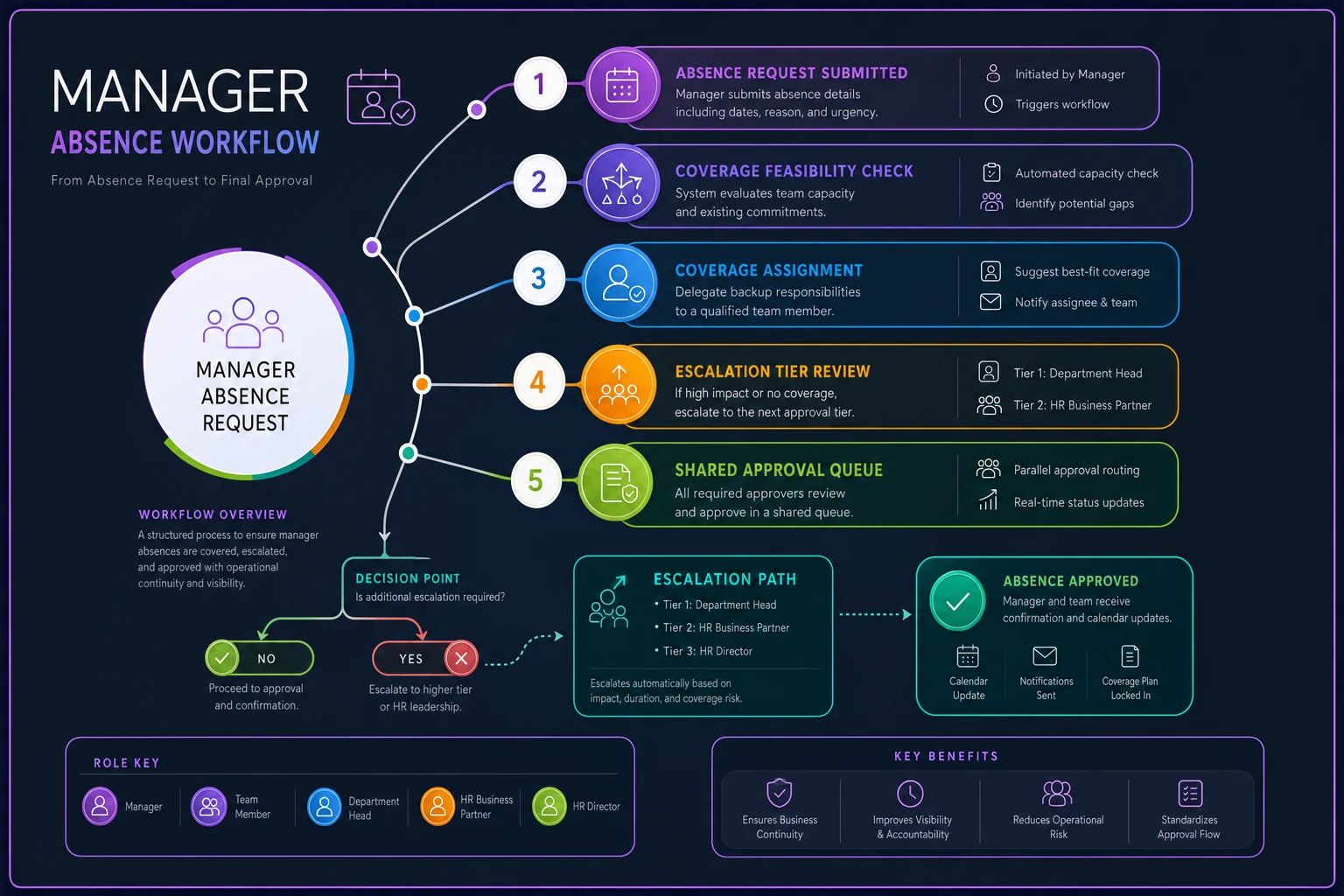
Their initial mapping revealed 23 decision types that could stall without proper coverage. Most weren't even on HR's radar.
| Decision Type | Normal SLA | Max Delay | Threshold | Current Owner |
|---|---|---|---|---|
| Vendor payment approval | 4 hours | 24 hours | >$2,500 | Operations Manager |
| Overtime authorization | 2 hours | 4 hours | >8 hours/week | Operations Manager |
| Customer discount approval | 1 hour | 2 hours | >15% | Sales Manager |
| Inventory adjustment | Same day | 48 hours | >$1,000 value | Warehouse Manager |
| Expedited shipping | 30 minutes | 2 hours | >$500 cost | Operations Manager |
Step 2: Create escalation triggers with specific thresholds
Generic escalation rules don't work. "Contact senior management for urgent issues" means nothing when you're staring at a vendor threatening to halt shipments over an unpaid invoice.
-
Tier 1 Escalation (Immediate backup) - Any customer-facing delay risk - Payment approvals approaching cut-off times - Safety or compliance decisions - Anything affecting today's operations
-
Tier 2 Escalation (Within 4 hours) - Non-critical vendor approvals - Standard inventory adjustments - Routine schedule changes - Regular maintenance approvals
-
Tier 3 Escalation (Within 24 hours) - Long-term planning decisions - Non-urgent budget adjustments - Quarterly reporting items - Strategic vendor negotiations
The key is linking each escalation tier to specific backup personnel with pre-set authority levels. No guessing, no "checking with corporate," just clear decision rights.
Step 3: Document coverage assignments before absences occur
Most playbooks fail here. They create beautiful escalation charts but never assign actual humans to coverage roles.
For that manufacturing company, we built a simple coverage matrix. Operations Manager Coverage had the Production Supervisor as primary for operational decisions up to $10K, CFO as secondary for financial decisions over $10K, and General Manager as tertiary for strategic or unusual decisions.
Key constraints had to be documented: Production Supervisor can approve overtime but not new hires. Can modify shipping schedules but not customer contracts. Can approve rush orders under $10K but not new vendor agreements.
We repeated this for every manager role. Adding temporal constraints made it work. Month-end meant Accounting Manager cannot cover Operations. Trade show weeks meant Sales team unavailable for cross-coverage. Holiday periods required specific rotation schedules. Summer months needed accounting for overlapping vacation schedules.
Step 4: Build intake workflows that don't depend on individuals
Emails to a manager's personal inbox create black holes when they're out.
The fix requires rethinking intake entirely. Instead of "Email Mike for purchase approvals," create a shared approval queue that multiple people can monitor. Could be as simple as a shared inbox like purchasing@company.com or a Slack channel like #approval-requests.
Each request needs standard information: request type, dollar amount or impact level, deadline for decision, consequences of delay, requestor and department.
This visibility change alone cut their approval delays by about 60%. Everyone could see what was pending, even if the primary approver was out.
Real-world implementation at a 50-person logistics company
A logistics company with around 50 employees kept hitting the same wall every summer. Their operations manager took a two-week vacation in July, right during peak season. Every year, chaos. Every year, promises to "document everything next time."
After a particularly brutal July where they lost a major client due to shipping delays nobody could authorize fixes for, they committed to building a proper absence workflow.
During their audit, they discovered their operations manager was the only person who could override the routing algorithm for expedited shipments, approve driver overtime beyond 10 hours, authorize equipment rentals for overflow capacity, sign off on temporary warehouse space, and adjust customer delivery windows. During peak season, these decisions came up multiple times daily.
They built a three-tier coverage system. Tier 1 was the Logistics Coordinator, pre-authorized to approve driver overtime, override routing for shipments under 500 miles, and handle equipment rentals up to $5,000 per week. Tier 2 was the VP of Operations, handling anything exceeding Tier 1 limits, making strategic capacity decisions, and approving customer contract modifications. Tier 3 was the CEO for major client escalations, decisions affecting multiple departments, and anything with legal implications.
The critical innovation: they created decision templates. Instead of forcing the Logistics Coordinator to think through complex routing optimization during a crisis, they built simple decision trees.
For Expedited Shipping Override decisions: If customer is flagged as strategic account, auto-approve override. If delay will cause contract penalty, approve when penalty exceeds $1,000. If overflow cost is under 20% of shipment value, approve. Otherwise, escalate to Tier 2.
This removed the guesswork and analysis paralysis that plagued their coverage before.
Common failure points in absence workflows
Despite good intentions, the same failures happen repeatedly.
Failure 1: The documentation exists but nobody can find it
One company had beautiful process documents. Detailed escalation charts. Comprehensive coverage plans. All stored in a folder on their shared drive that nobody knew existed. When their purchasing manager had emergency surgery, his backup spent two days trying to figure out approval limits instead of checking documentation that would've given answers in five minutes.
Fix: Make absence workflows visible. Pin them in Slack. Add them to employee handbooks. Reference them in regular meetings. Send quarterly reminders about where to find them.
Failure 2: Coverage plans ignore actual availability
A retail chain assigned their assistant managers as automatic backups for store managers. Seemed logical until they realized assistant managers work opposite shifts by design. When a store manager called in sick for Tuesday morning shift, the assistant manager backup was scheduled off until Thursday evening.
Fix: Coverage assignments must account for schedules, not just org charts. Map out when each backup is actually available, not just theoretically responsible.
Failure 3: Escalation without context
"If urgent, contact Sarah" means nothing if Sarah doesn't know what makes something urgent in that specific role. A marketing coordinator covering for their manager might not realize that a delayed campaign approval could trigger contract penalties with media partners.
Fix: Document the business context, not just the process. Why does this decision matter? What happens if it's delayed? What are the downstream impacts? This context becomes critical when people are making judgment calls outside their normal expertise.
Technology and systems that actually help
Most workflow management software makes this more complicated than necessary. You don't need complex automation for basic absence coverage. But a few things genuinely help.
Shared approval queues work whether it's a shared inbox, a Slack channel, or a simple spreadsheet. Centralizing requests prevents them from disappearing into someone's personal email.
Standard forms with required fields force people to provide the context needed for decisions. A purchase approval request without a deadline or budget impact is useless to someone covering unfamiliar territory.
Automated notifications work well for simple calendar reminders about upcoming absences and coverage assignments. "Mike's vacation starts Monday - Sarah has purchasing approval authority" sent Friday afternoon saves Monday morning panic.
Decision logs help track what decisions got made by whom during coverage periods. This helps refine escalation triggers and reveals patterns you might have missed.
Decision logs are particularly useful during post-absence debriefs to identify recurring decision bottlenecks.
Some companies have moved these workflows into operational software platforms that centralize all approval processes, making coverage seamless. The software automatically routes requests to the right backup based on the absence calendar, maintains audit trails, and ensures nothing falls through the cracks. But honestly, even a well-organized spreadsheet beats nothing.
Building checklists that people will actually use
Generic checklists gather dust. Specific, scenario-based checklists get used.
Bad checklists say things like "Review pending approvals, Check email, Handle urgent issues, Update team."
Useful checklists look different. Here's a Day 1 Coverage Checklist for Operations Manager:
-
Morning (by 9 AM)
- [ ] Check purchasing@ inbox for overnight vendor requests - [ ] Review driver overtime requests in scheduling system - [ ] Scan customer service escalation board for delivery issues - [ ] Verify all routes dispatched successfully
-
Afternoon (by 2 PM)
- [ ] Approve next-day inventory transfers - [ ] Review and sign equipment maintenance schedules - [ ] Check vendor payment queue for same-day requirements - [ ] Clear any pending discount approvals over 10%
-
End of Day (by 5 PM)
- [ ] Confirm tomorrow's staffing levels approved - [ ] Address any customer complaints escalated today - [ ] Send coverage status update to VP if any issues - [ ] Set out-of-office response with backup contact info
The second checklist could be handed to someone who's never covered before and they'd know exactly what to do.
When absence workflows make sense (and when they don't)
Not every business needs elaborate absence protocols. A five-person startup where everyone knows everything doesn't need formal escalation triggers. But you do need them when critical decisions concentrate in specific roles, your operation runs on tight timelines, mistakes or delays have significant cost impacts, you have specialized knowledge that's hard to transfer, or regulatory decisions require specific authority.
You probably don't need formal workflows if team members already have broad decision authority, your timelines are flexible, mistakes are easily reversible, or information flows naturally across the team.
Most businesses hit the inflection point around 15-20 employees. That's when informal coverage stops working and you need actual systems.
Implementation timeline that works
Don't try to build perfect coverage for every possible absence scenario. Start with your most critical, most frequent pain points.
Week 1-2: Audit and map. Identify your top 3 manager roles that cause chaos when absent. Map their critical decisions and current pain points.
Week 3-4: Design coverage structure. Create escalation triggers and assign backups for those 3 roles. Get buy-in from the people who'll actually provide coverage.
Week 5-6: Document and communicate. Build your checklists and decision trees. Share with the team. Run a practice drill.
Week 7-8: Test with planned absence. Use an upcoming vacation or conference to test the system. Document what breaks.
Week 9-10: Refine and expand. Fix the issues you discovered. Add the next tier of manager roles.
Most companies can have basic coverage for critical roles within 60 days. Perfect coverage for everyone might take six months, but you don't need perfect to avoid disasters.
Making it stick
The best absence workflow dies if nobody maintains it. What keeps them alive starts with quarterly reviews. Every three months, check if your escalation triggers still make sense. Thresholds change. New decision types emerge. People leave and join.
Post-absence debriefs matter too. After every significant absence, spend 15 minutes reviewing what worked and what didn't. The logistics company discovered their rental equipment threshold was too low only after their backup had to wake up the VP three times in one week for routine approvals.
Annual simulations work. Once a year, run a drill. Pretend your operations manager is suddenly unavailable. See how quickly people can find the documentation and start making decisions.
Your absence workflows should update automatically as part of other changes. New manager hired? Part of onboarding includes documenting their decisions and assigning backups. Process change? Update the relevant checklists.
The bottom line
Manager absences are operational realities, not emergencies. The difference between chaos and continuity isn't about having perfect people—it's about having clear systems that activate automatically when someone's out.
Most businesses lose thousands of dollars in delayed decisions, missed opportunities, and preventable mistakes during manager absences. Not because they lack capable people, but because those capable people don't know what authority they have or what decisions need to be made.
A proper absence workflow eliminates the scramble, the confusion, and the expensive mistakes that come from figuring things out on the fly. It transforms coverage from a reactive emergency response into a proactive operational capability.
Start with your biggest pain point. Map the decisions. Assign the backups. Document the triggers. Test the system. Within a few weeks, you'll have coverage that actually works when you need it. The next time a manager calls in sick, you won't need three emergency meetings to figure out who can approve what. You'll just activate the playbook and keep operations running.
Ready to optimize your workforce absence management?
Join 2,000+ HR teams using Absencely to reduce administrative burden, improve compliance, and boost employee satisfaction.