

Most short-term disability problems don't happen at the claim decision. They happen in that messy 21-to-45 day stretch before the decision, when nobody really owns the file and the employee is technically off work but the carrier hasn't said yes or no yet. That's the window where payroll overpays, employees panic about money, and HR ends up reconstructing dates from memory three weeks later.
This playbook walks the whole thing day by day: who touches the file, what payroll should be doing while adjudication is pending, the documentation you need to keep the claim from stalling, and the audit steps that make the file defensible if anyone questions it later.
Staying narrow on purpose here. This is not a leave-of-absence overview. It's the operational choreography of a single STD claim from notice to adjudication, with the payroll-bridge decisions that trip up most HR teams.
Why the pre-decision window is where things break
An employee reports they're going out — surgery, a difficult pregnancy, a mental health leave — the manager relays it to HR, HR opens the claim with the carrier, and then everyone waits.
The problem is that "waiting" isn't a neutral state. The employee is off the schedule, their last paycheck is winding down, and the carrier's approval typically takes anywhere from 10 to 30 days depending on how fast the treating provider returns the attending physician statement. STD benefits also almost always carry an elimination period — often 7 to 14 calendar days — where no benefit is payable at all.
-
The employee's income clock (they stop getting paid roughly when accrued PTO runs out)
-
The carrier's adjudication clock (decision pending, no benefit yet)
-
The elimination period clock (a chunk of days that will never be paid by STD)
When nobody maps those three clocks against each other on day one, you get the two classic failures: the employee goes weeks with zero income because payroll shut off and STD hasn't started, or payroll keeps paying full salary "to be safe" and the company has to claw back an overpayment once STD checks arrive retroactively.
Both are avoidable. Both come from treating the pre-decision window as dead time instead of an active workflow.
The day-by-day timeline
Below is the operational timeline for a standard STD claim. Adjust the day numbers to your carrier's actual turnaround, but keep the sequence — the order of these steps matters more than the exact dates.
Stop managing absences manually.
Absencely simplifies leave requests, approvals, and absence monitoring for your entire workforce.
- Automated leave tracking
- Manager approval workflows
- Compliance & reporting tools
No credit card required
Day 0 — Notice received
The employee or their manager reports the pending absence. The single most important thing on Day 0 is capturing the last day worked and the expected first day of disability, because every downstream calculation keys off those two dates.
Common mistake: logging the date HR heard about it instead of the actual last day worked. If those differ by even a few days, your elimination period math will be wrong.
Day 0–1 — Claim opened with carrier
HR or the employee files the claim. Whoever does it, HR should confirm the claim number the same day and record it in the case file. A claim without a recorded claim number is the number-one reason follow-ups go nowhere two weeks later.
Day 1–2 — Payroll notified with a hold instruction, not just an FYI
This is the step most teams skip. Payroll shouldn't just be told "Jordan is on STD." They need a specific instruction: continue paying accrued PTO through date X, then move to unpaid pending adjudication, and flag the record for reconciliation once STD payments post.
Day 2–5 — Documentation requests go out
The attending physician statement (APS) is the long pole in the tent. The carrier can't adjudicate without it, and providers are slow. Someone needs to own chasing it — usually the employee, but HR should track whether it's been submitted.
Day 7–14 — Elimination period runs
During this window no STD benefit is payable regardless of approval. This is exactly where PTO bridging usually happens.
Day 10–30 — Adjudication pending / decision
The carrier reviews. Approvals often come with a retroactive benefit start date, which is why payroll needs to have handled the gap correctly the whole time.
Day of decision — Reconcile
Approved: reconcile any overpaid wages against the benefit. Denied: the file converts to a different track entirely — appeal, other leave, or return to work.
| Phase | Day range | Who owns it | Key risk if skipped |
|---|---|---|---|
| Notice captured | Day 0 | Manager → HR | Wrong dates poison every calculation |
| Claim opened | Day 0–1 | HR / employee | No claim number = lost follow-ups |
| Payroll hold instruction | Day 1–2 | HR → Payroll | Overpayment or zero-income gap |
| APS chased | Day 2–14 | Employee (HR tracks) | Claim stalls indefinitely |
| Elimination period | Day 7–14 | Payroll | Employee surprised by unpaid days |
| Adjudication | Day 10–30 | Carrier (HR follows up) | Silent delays, no escalation |
| Reconciliation | Decision day | Payroll + HR | Uncollected overpayment |
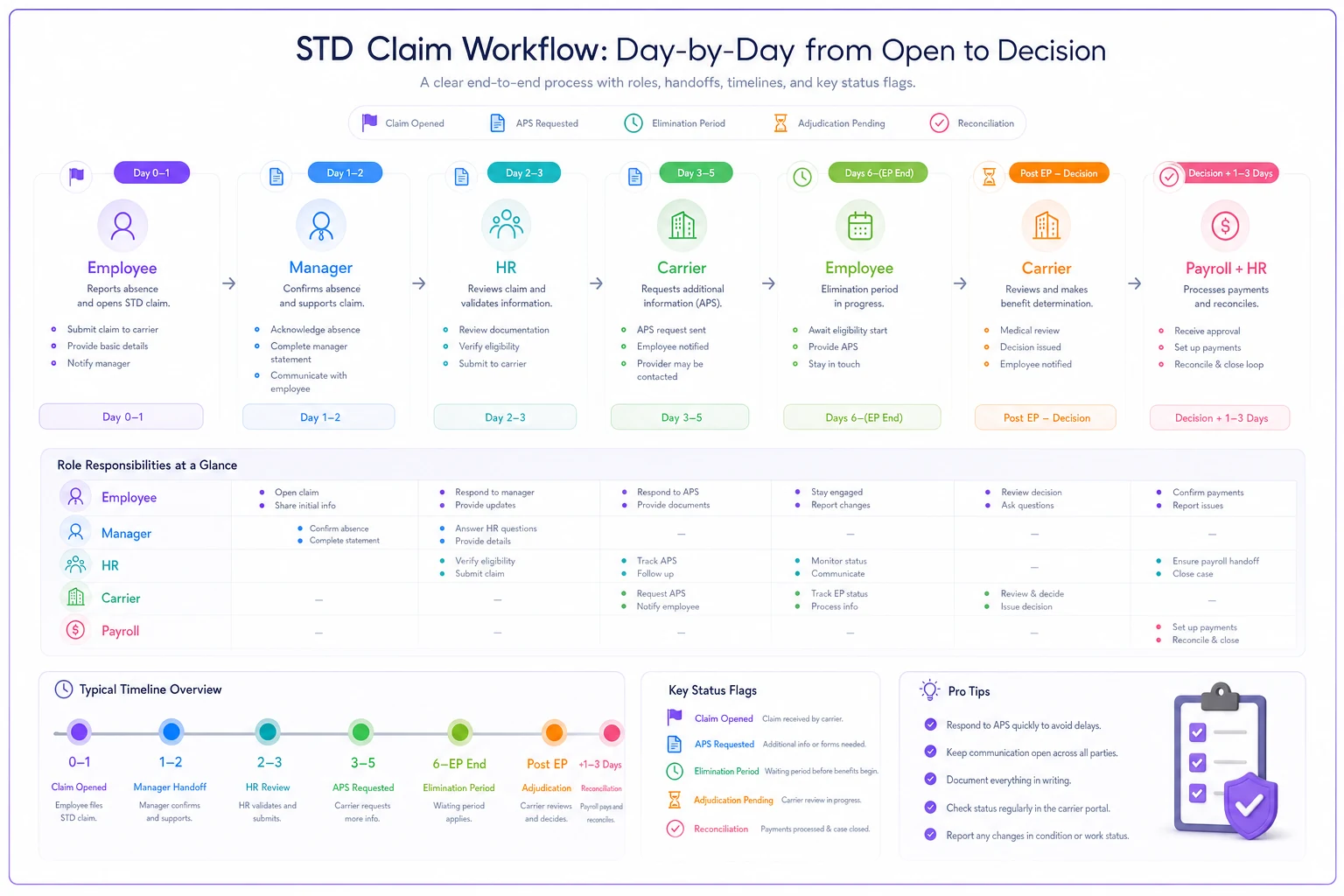
A simple visual like this helps teams see who owns each handoff and when the reconciliation trigger should fire.
The payroll-bridge rules
This is the part that generates the most confusion, so let's get specific.
The core question: what does the employee get paid while STD is pending? You generally have three options, and the right one depends on your policy and the employee's accrual balance.
-
Option 1 — Bridge with PTO, then unpaid. The employee uses accrued PTO to cover the elimination period and any pending days, then goes unpaid once STD begins paying. Clean, but only works if they have enough accrued time.
-
Option 2 — Pay nothing until STD approves. Lowest overpayment risk, worst employee experience. Generally not recommended unless the employee has zero accruals and explicitly understands the gap.
-
Option 3 — Advance/continue pay, then true-up. Company continues some pay and reconciles once STD posts. Highest overpayment risk — this is where clawbacks live.
> Never bridge with more pay than you can realistically recover, and never let PTO stack on top of an STD benefit for the same days unless your policy explicitly coordinates them.
That second part — coordination of PTO and STD for the same day — is where the quiet money leaks happen. STD often replaces around 60% of wages. If you also let the employee draw PTO for the same day to top up to 100%, that has to be intentional and documented, not accidental. What tends to happen in real operations is PTO and STD both getting applied to the same week because two different people processed two different systems and nobody reconciled the overlap.
A typical scenario: an employee earning roughly $1,400/week goes out. Payroll keeps paying full salary for three weeks while waiting on the carrier. STD approves retroactively at 60%, backdated. Now there's an overpayment of around $1,700 sitting in the company's lap, and an awkward conversation about recovering it from someone still recovering from surgery. Getting the bridge instruction right on Day 1–2 prevents the whole thing.
Required documentation checklist
Keep this in the case file for every STD claim. When a claim gets questioned six months later, you want to reconstruct exactly what happened without relying on anyone's memory.
-
[ ] Last day physically worked (dated)
-
[ ] Expected first day of disability
-
[ ] Carrier name and claim number
-
[ ] Date claim was opened
-
[ ] Attending physician statement — requested date and received date
-
[ ] Elimination period start/end dates
-
[ ] Payroll hold instruction (what was sent, to whom, when)
-
[ ] PTO bridging decision and the balance used
-
[ ] Adjudication decision date and outcome
-
[ ] Retroactive benefit start date (if approved)
-
[ ] Reconciliation record (overpayment/underpayment resolved)
-
[ ] Return-to-work date or extension notice
If you already have a folder convention for leave files, slot STD into it rather than building something from scratch. The structure worth following is the same one in our audit-ready leave documentation checklist — one file per employee, dated events in order, nothing living in someone's inbox.
Sample case notes (what "good" looks like)
Case notes are where most files fall apart. People write "waiting on carrier" and nothing else. That tells you nothing in three weeks. Good notes are dated, name the actor, and state the next action.
03/04 — Notice received via mgr (T. Ruiz). Last worked 03/01, disability start 03/04. Opened claim w/ carrier same day. 03/04 — Claim #STD-88214 confirmed. Elimination period 03/04–03/17. 03/05 — Payroll (K. Adams) instructed: PTO through 03/17 (bal ~48 hrs), then unpaid pending adjudication. Flag for reconciliation on approval. 03/06 — APS requested. Employee confirmed provider appt 03/09. 03/12 — APS still outstanding. Emailed employee reminder. 03/15 — APS received by carrier per portal. 03/24 — Carrier approved. Benefit start 03/18 @ 60%, backdated. No overpayment — PTO stopped 03/17 as instructed. 03/25 — Reconciliation confirmed clean. RTW target 04/28.
No overpayments to unwind here — because the payroll instruction on 03/05 included a specific stop date, not just "put them on STD." That one line is the difference between a clean file and a clawback conversation.
For the mechanics of moving these dated events cleanly from manager to HR to payroll, the handoff pattern in our day-by-day intermittent leave logging guide applies almost directly to STD — same discipline, different claim type.
Audit steps
Run these checks monthly or when a claim closes. They catch the errors that cost real money before they compound.
-
Date reconciliation. Confirm last-day-worked, disability start, and elimination period dates match across the case file, the carrier portal, and payroll. Mismatches here are the root cause of most benefit-timing errors.
-
PTO/STD overlap check. For every claim in the period, verify no days were paid by both PTO and STD unless the policy explicitly coordinates them.
-
Overpayment audit. Cross-check any continued wages against the retroactive benefit start date. Flag anything paid past the point STD kicked in.
-
Stalled-claim review. Any claim with APS outstanding past roughly two weeks, or adjudication pending past your carrier's normal turnaround, gets an escalation note and an assigned follow-up owner.
-
File completeness. Run the documentation checklist above against each closed file. Missing claim numbers and missing reconciliation records are consistently the two biggest gaps.
Run the documentation checklist above against each closed file. Missing claim numbers and missing reconciliation records are consistently the two biggest gaps.
Where software earns its keep here
Most of this can be run in a spreadsheet if you have the discipline. What breaks the spreadsheet is volume and handoffs — the moment more than one or two claims are active at once, and the moment the file has to move between a manager, HR, and payroll who all work in different systems.
The specific things worth automating aren't glamorous. It's the boring reliability stuff: a claim record that auto-computes the elimination period from the last-day-worked date so nobody does the math wrong; a payroll hold instruction tied to the claim so the stop date travels with it; a flag that fires when the APS has been outstanding past the two-week mark so a stalled claim doesn't sit silently while everyone assumes someone else is following up. An AI-assisted operational platform can watch those date thresholds and surface the pending-too-long claims without relying on someone to remember to check the carrier portal.
None of that replaces judgment — the adjudication decision is the carrier's, and the bridging decision is a policy call. But the tracking, the threshold alerts, and the reconciliation cross-checks are exactly the repetitive work where a system beats human memory every time.
When a strict day-by-day process is overkill
If you process one or two STD claims a year, this level of formality is more overhead than it's worth. Get the three dates right (last day worked, disability start, elimination period) and don't let payroll overpay. That's probably 80% of the value right there.
The full playbook starts paying off when you're running claims regularly, when payroll and HR are different people or different systems, or when you operate across multiple states with different coordination rules. That's when the silent overpayments and stalled claims start adding up to real money, and when a written, dated, owned process stops feeling like bureaucracy and starts being the thing that keeps your files defensible.
The one thing to fix first
If you do nothing else from this playbook, fix the payroll hold instruction on Day 1–2. Not an FYI — an actual instruction with a stop date and a reconciliation flag. That single step prevents the two most expensive STD failures at once: the employee stranded with no income, and the company chasing a clawback from someone who's still out on medical leave.
Everything else here is about making that instruction reliable, repeatable, and easy to prove later.
Everything else here is about making that instruction reliable, repeatable, and easy to prove later.
Ready to optimize your workforce absence management?
Join 2,000+ HR teams using Absencely to reduce administrative burden, improve compliance, and boost employee satisfaction.