

The messiest overpayments almost never come from big obvious mistakes. They come from a manager tweaking someone's leave dates two weeks after the fact, long after payroll already ran on the old numbers. Nobody notices until finance flags a variance — or worse, until the employee's already been paid for days they didn't actually take.
Retroactive leave adjustments are one of those problems that look tiny per instance and turn into a real number by year-end. A four-hour correction here, a full sick day reclassified there, a leave-without-pay day flipped to paid because the doctor's note came in late. Each one seems reasonable in isolation. But when your payroll close doesn't have a hard boundary around when those edits can affect pay, you're basically letting the past rewrite itself after the money's already gone out.
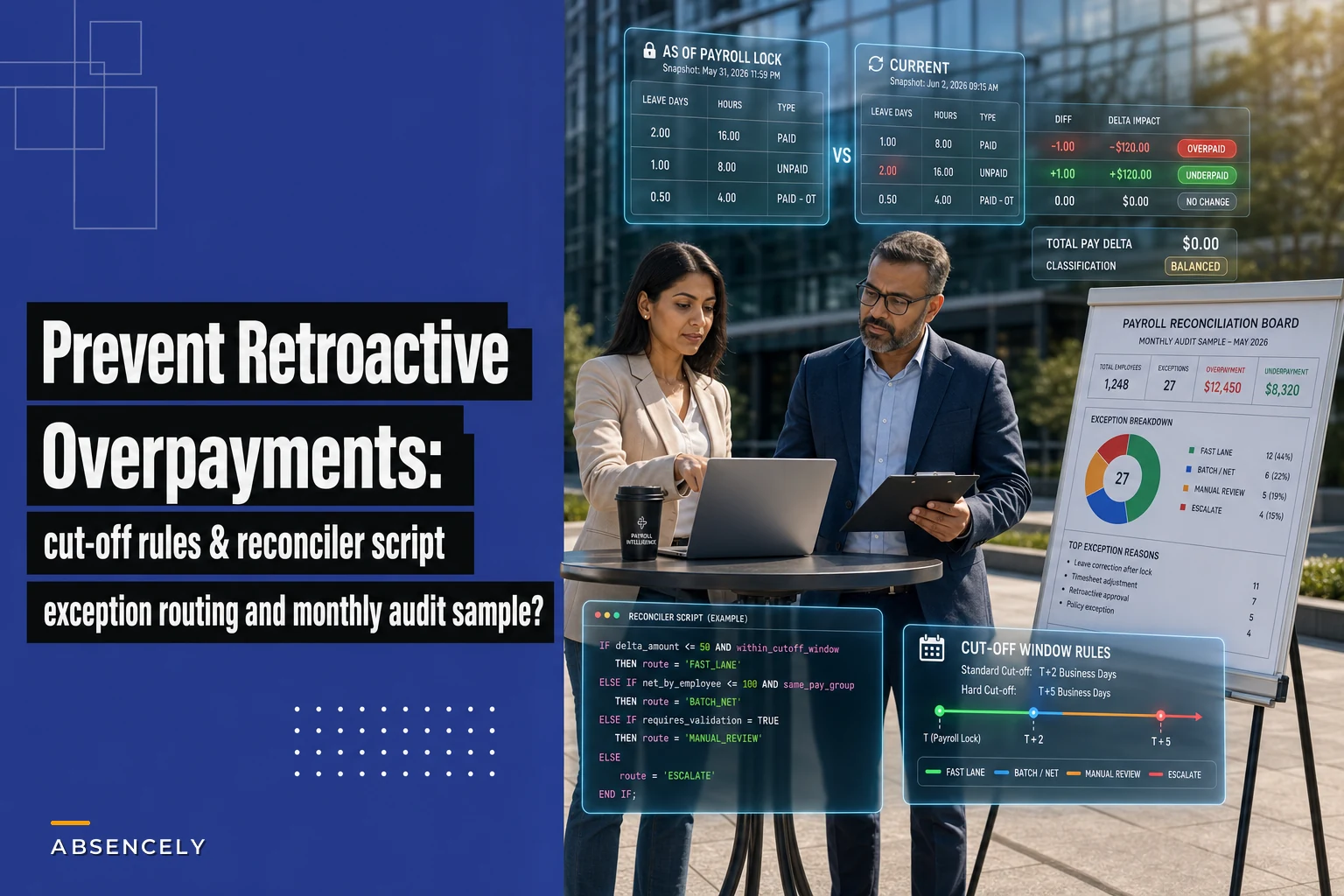
This post is narrow on purpose. It's only about the mechanics of stopping retroactive leave changes from becoming overpayments — the cut-off windows, the routing rules for edits that arrive after the window, and a reconciler logic you can run each cycle to catch what slips through.
Why retroactive leave edits turn into money you can't get back
The core issue is a timing mismatch. Payroll processes a snapshot. Leave records keep moving.
-
A manager approves or edits a leave request after the pay period lock, but the leave system backdates it to when the absence actually occurred.
-
An employee submits documentation late — a disability approval, an FMLA cert, a sick note — and HR reclassifies the day from unpaid to paid, retroactively.
-
A correction fixes an earlier error, and the fix crosses a period boundary, so now two pay cycles disagree about the same day.
The danger isn't the edit itself. Edits happen and most of them are legitimate. The danger is when the edit silently flows into gross pay without anyone deciding whether it's a current-period adjustment or a prior-period correction that needs recovery.
Once an overpayment leaves the building, you're no longer in "correct the record" territory — you're in "claw it back" territory. Clawbacks are governed by wage laws that vary by jurisdiction, sometimes require written employee consent, and almost always cost more in admin time than the actual dollars involved. A $180 overpayment can easily burn three hours across HR, payroll, and a manager conversation nobody enjoys.
The related failure — leave classified inconsistently across the handoff chain — is something we've covered in the context of logging and handing off intermittent leave day-by-day. Retroactive overpayment is what happens downstream when that handoff arrives late.
Step one: define a hard cut-off window (and a soft one)
Most teams have a payroll deadline. Very few have a documented leave cut-off — which is a different thing. The payroll deadline is when your processor needs the file. The leave cut-off is the last moment a leave change can affect this period's pay without special handling.
Stop managing absences manually.
Absencely simplifies leave requests, approvals, and absence monitoring for your entire workforce.
- Automated leave tracking
- Manager approval workflows
- Compliance & reporting tools
No credit card required
You want two boundaries, not one.
The soft cut-off — the last date managers can freely edit leave for the current period. Edits before this flow through normally. Usually 2–3 business days before payroll lock.
The hard cut-off — the payroll lock itself. After this, no leave edit touches the current run automatically. Everything routes to exception handling.
The gap between soft and hard is where you catch most of the mess. It's a review window, not an edit window.
Snapshot the leave data at the hard cut-off so your reconciler has a stable point of comparison.
A workable calendar for a semi-monthly cycle looks like this:
| Boundary | Timing | What's allowed |
|---|---|---|
| Open editing | Period start → soft cut-off | Managers edit leave freely |
| Review window | Soft cut-off → hard cut-off | HR reviews flagged changes only |
| Hard cut-off (lock) | Payroll file due | No auto-edits; exceptions route out |
| Post-lock | After processing | Retroactive edits queue for next cycle |
The single most useful rule here: any leave edit with an effective date earlier than the current period start is automatically a prior-period correction. It never touches the current run as a normal line — it goes to routing. That one rule kills the majority of silent overpayments because it stops the system from quietly reaching backward.
Step two: exception-routing rules for late edits
Once an edit lands after the hard cut-off or carries a backdated effective date, it needs a decision — not a default. The mistake most teams make is letting the leave system's default behavior (usually "apply and recalculate") make that decision for them.
Route every post-cutoff leave change through three questions:
-
Direction of impact — does this edit increase pay (unpaid → paid, added hours) or decrease it (paid → unpaid, removed hours)?
-
Size of impact — is the dollar delta above or below your review threshold?
-
Recovery risk — is this an overpayment already disbursed, or an underpayment owed to the employee?
Those answers determine the lane:
-
Underpayment, any size → fast lane. Pay the employee in the next cycle. Low legal risk, high goodwill cost if delayed.
-
Overpayment, below threshold (somewhere around $75–$150 depending on your team) → batch it. Net it against the next period's accrual or pay, with a note on the pay stub.
-
Overpayment, above threshold → manual review. Requires a written recovery plan and, depending on jurisdiction, employee acknowledgment before you touch anything.
-
Crosses a tax year or benefits boundary → escalate regardless of size. These are the ones that create W-2 corrections and genuinely expensive cleanup.
The threshold number matters less than having one. Below it, the cost of formal recovery often exceeds the recovery itself, so batching or writing it off is the operationally correct call — and yes, "write it off" is a legitimate line item when the admin cost is higher than the dollars at stake.
Step three: the reconciler logic, with worked examples
The reconciler is a per-cycle comparison. It answers one question: for every leave day that touched pay this period, does the current leave record still agree with what we paid?
You don't need sophisticated tooling to run the concept. You need two snapshots — the leave data as of payroll lock, and the leave data as of today — and a diff.
Here's the logic in plain steps:
-
Pull the leave record snapshot taken at the hard cut-off. This is why you snapshot — you can't reconcile against data that keeps changing.
-
Pull the current leave record for the same employees and same date range.
-
For each leave day, compare
paid/unpaid status, hours, and leave type.
-
Flag any day where the two snapshots disagree.
-
For each flagged day, compute the pay delta using the employee's rate at the time.
-
Tag each delta as overpayment or underpayment, and route by the rules above.
Here's a visual of that reconciler workflow.
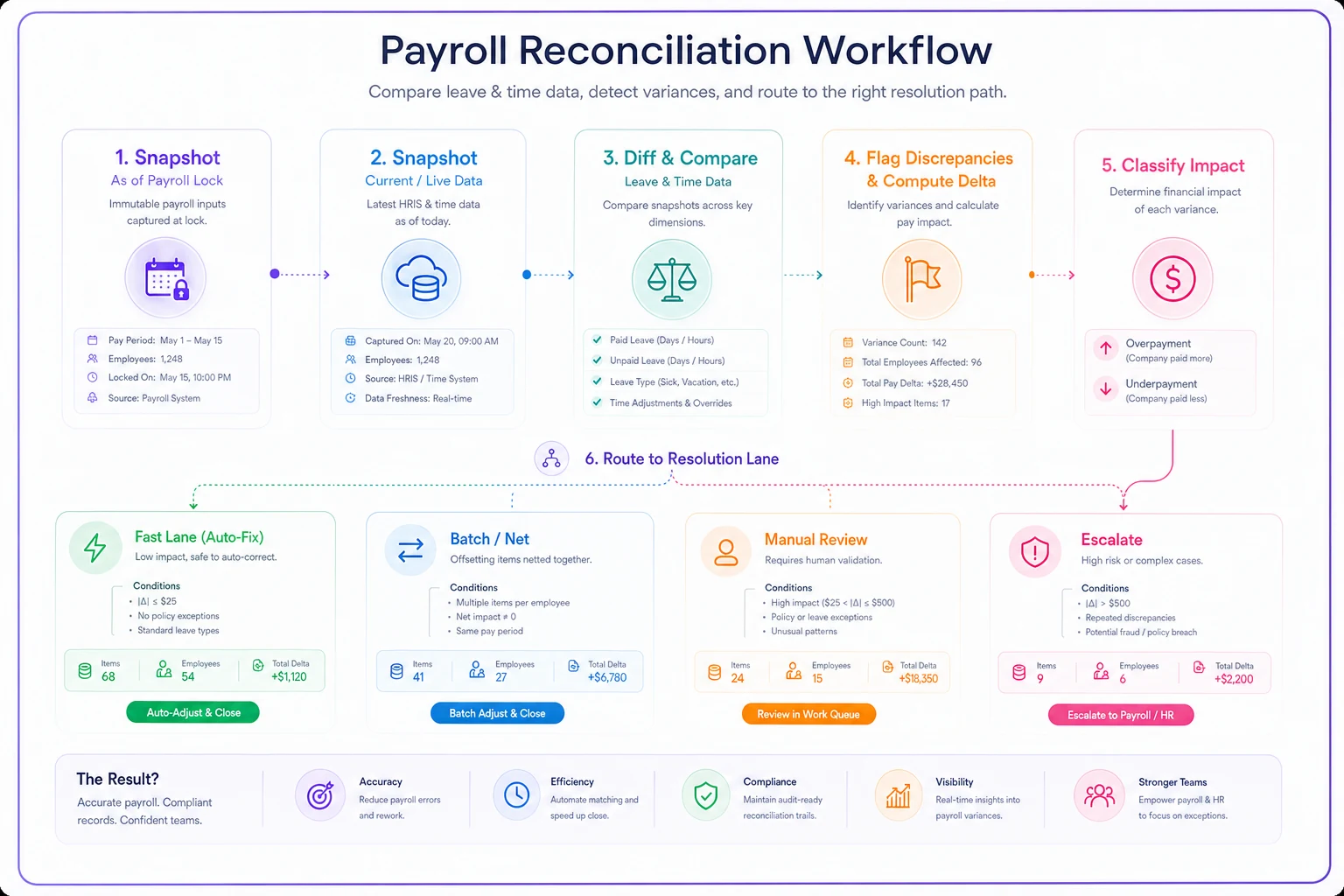
This maps snapshot → diff → flagging → classification → routing so you can see where exceptions land.
Worked example A — the backdated reclassification
Marcus, hourly at around $26/hr, took a full 8-hour day on the 9th, logged as unpaid pending his cert. Payroll locked on the 15th with that day unpaid. On the 22nd, his intermittent FMLA cert came through and HR flipped the day to paid.
-
Snapshot at lock
8 hrs unpaid
-
Current
8 hrs paid
-
Delta
+8 hrs × $26 = $208 underpayment
-
Direction
increases pay owed to employee
-
Route
fast lane, pay in next cycle
No overpayment here — but without the reconciler, this one disappears. The employee is quietly shorted $208 and might not notice for months. Reconciliation catches underpayments just as much as overpayments, and those hurt trust when they surface late.
Worked example B — the silent overpayment
Priya, salaried, had two sick days entered for the period. After lock, her manager realized she'd actually worked one of those days and edited the leave down to one. Because her sick balance was already exhausted, that second "sick day" had been paid from a leave-without-pay exception that shouldn't have applied.
-
Snapshot at lock
2 days leave, 1 improperly paid
-
Current
1 day leave
-
Delta
roughly $190 overpayment, already disbursed
-
Direction
decreases pay owed; money already out
-
Route
above threshold — recovery plan, netted next cycle with stub note
Priya's case is the exact scenario cut-off rules exist for. The edit was correct — she did work that day. But the correction arrived after the money left, so now it's a recovery, not a simple fix.
Worked example C — the cross-period tangle
A leave-without-pay day originally in the prior period got moved into the current period during a correction. Now both periods reference it. This is where accrual math quietly breaks, and it connects directly to the PTO accrual mistakes that hit mixed hourly and salaried teams — the same day counted in two windows throws off both the balance and the pay.
The reconciler flags this as a mismatch in both periods, which is your signal to escalate rather than auto-net.
A monthly audit sample you can actually run
The per-cycle reconciler catches this-period drift. The monthly audit catches slow leaks — patterns that individual cycles miss because the dollar amounts are small or the edits look routine.
Pull a sample rather than the whole population if your team is large. A practical approach: every retroactive edit above threshold, plus a random 10–15% of below-threshold retroactive edits. You want both the big ones and a taste of the small stuff, because small-and-frequent is often the bigger annual number.
For each sampled item, confirm:
-
[ ] The edit had a documented reason (cert arrived, manager error, employee correction)
-
[ ] The effective date and the entry date are both recorded
-
[ ] It routed to the correct lane (fast / batch / manual / escalate)
-
[ ] Any overpayment has a recovery status
recovered, netted, written off, or in progress
-
[ ] Any underpayment was actually paid, not just flagged
-
[ ] Cross-period items were reconciled in both periods
-
[ ] The dollar delta matches what payroll actually processed
The metric worth tracking month over month is straightforward: total retroactive overpayment dollars disbursed vs. recovered. If disbursed keeps climbing while recovered lags, your cut-off is too soft or your routing is leaking somewhere. A team processing a couple hundred leave days a month might see retroactive edits on 15–25 of them, with maybe 3–5 crossing the overpayment line. If that number creeps upward, the window is the first thing to tighten.
When tightening the cut-off is the wrong move
There's a temptation to solve all of this by making the cut-off brutally early. That usually backfires. Push the soft cut-off too far back and you force managers to guess at leave before it's finalized, which creates more retroactive edits, not fewer. You'd be trading silent overpayments for a flood of corrections.
The cut-off is the wrong lever when:
-
Your workforce has heavy intermittent or unpredictable leave — healthcare, field service — where same-week edits are normal and legitimate.
-
Documentation genuinely arrives late through no one's fault. Disability approvals often lag by design.
-
You don't yet have the routing lanes built, because then a hard cut-off just creates a pile of unprocessed exceptions with nowhere to go.
In those cases, the answer isn't an earlier wall — it's better routing and a reliable reconciler. Let edits happen late, but never let them touch pay silently.
Where software earns its keep here
This is one of the few problems where manual process genuinely struggles, because the whole thing depends on comparing two versions of the same record across a time boundary — exactly the kind of thing people forget to snapshot when they're also trying to close payroll. Leave and payroll platforms with AI-assisted reconciliation can lock a snapshot at cut-off automatically, diff it against live data each cycle, and route the deltas by your own thresholds without someone remembering to pull two reports and eyeball them against each other.
The practical value isn't automation for its own sake. It's that exceptions surface before the payroll file goes out, not three weeks later when the money's already been spent. When the system flags "this backdated edit will change already-processed pay — here's the delta, here's the lane," you're making a decision instead of discovering a problem. That shift from discovery to decision is the whole game with retroactive corrections.
The short version
Retroactive leave overpayments aren't a discipline problem or a people problem — they're a timing problem, and timing problems get solved with boundaries and reconciliation, not with more careful humans. Set two cut-offs so you have a review window, not just a deadline. Treat any backdated effective date as an automatic prior-period correction that routes to a decision instead of flowing through silently. Run a per-cycle reconciler off a locked snapshot so drift can't hide. Sample your retroactive edits monthly so the small frequent leaks don't quietly become your biggest line item. Do those four things and most overpayments stop before they ever leave the building — which is the only place they're actually cheap to fix.
Ready to optimize your workforce absence management?
Join 2,000+ HR teams using Absencely to reduce administrative burden, improve compliance, and boost employee satisfaction.