


When an absence policy or automation project stalls, leadership almost always blames the software. "The tool was clunky." "Managers didn't like the interface." But if you trace what actually happened week by week, the tool is rarely the problem. The rollout is.
What breaks is coordination. Nobody decided who approves the new rules. Training happened once, in a 45-minute all-hands nobody remembers. Payroll found out the accrual logic changed after the first pay run went sideways. Three months in, half the managers are still approving leave in the old spreadsheet because it's faster and nobody told them to stop.
This is the gap an absence policy change management playbook is supposed to close — and most companies don't have one. They have a launch date and a vendor demo. Those are not the same thing.
So treat this the way it deserves: as an operational change that touches managers, HR, payroll, and finance simultaneously, with real dependencies between them. Get the sequencing right and adoption feels boring. Get it wrong and you spend a quarter firefighting exceptions.
Why absence changes are unusually hard to roll out
Most software rollouts affect one team. A new CRM hits sales. A new ticketing tool hits support. Absence is different — it's a cross-functional workflow that runs through your entire org chart.
Think about who touches a single leave request. The employee submits it. A frontline manager approves it. HR checks eligibility against policy and jurisdiction. Payroll reflects it in accruals and pay. Finance sees the downstream cost. When you change the policy or automate the approval flow, you're not changing one team's habits — you're changing five handoffs at once.
That's the real reason these launches wobble. Every team has a different definition of "done," a different tolerance for exceptions, and a different reason to keep doing things the old way. Managers optimize for speed. HR optimizes for compliance. Payroll optimizes for not breaking the pay run. Left uncoordinated, each of those instincts quietly sabotages the rollout.
There's also the money and legal exposure angle. A misconfigured accrual rule isn't a cosmetic bug — it's a wage error that can compound across hundreds of employees before anyone catches it. So people are cautious, which means adoption is slow unless you actively manage it.
A change management approach isn't bureaucracy. It's the thing that keeps five teams moving in the same direction on a workflow where mistakes cost real dollars.
The RACI most companies skip (and pay for later)
Before anyone gets trained on anything, one question needs a clear answer: who owns what? Not vaguely. Specifically, per decision.
Stop managing absences manually.
Absencely simplifies leave requests, approvals, and absence monitoring for your entire workforce.
- Automated leave tracking
- Manager approval workflows
- Compliance & reporting tools
No credit card required
RACI — Responsible, Accountable, Consulted, Informed — sounds like consultant filler until you watch a rollout fail because two people thought the other one owned exception handling. In practice, the gaps that hurt most are:
-
Who signs off on the final approval logic before go-live?
-
Who owns the exception queue when automation can't decide?
-
Who has authority to pause or roll back the launch?
-
Who reconciles the first payroll run against the new rules?
Here's a workable ownership map for a mid-sized rollout. Adjust titles to your org, but keep the single accountable owner per row — that's the part people consistently get wrong.
| Decision / Task | Responsible | Accountable | Consulted | Informed |
|---|---|---|---|---|
| Final policy rules & thresholds | HR Ops lead | HR Director | Legal, Payroll | Managers |
| Approval automation config | Systems admin | HR Ops lead | Payroll, IT | Finance |
| Exception queue handling | HR Ops team | HR Ops lead | Managers | Finance |
| Manager training delivery | L&D / HR partner | HR Director | Managers | Execs |
| First payroll reconciliation | Payroll analyst | Payroll manager | HR Ops | Finance |
| Go/no-go and rollback authority | HR Director | COO / VP People | HR Ops, Payroll | Execs |
The most common mistake: multiple people listed as "Accountable" on the same row. If two people are accountable, nobody is. Every row gets exactly one name in that column, and that person's job is to make the call when things get ambiguous — not to do all the work themselves.
Make each RACI row have exactly one Accountable person to avoid decision deadlocks during launch.
One more thing worth sorting before launch: decide who owns the rollback decision and what triggers it. If reconciliation shows more than a handful of pay errors, or the exception queue balloons past what HR can clear in a day, someone needs the clear authority to hit pause. Deciding that mid-crisis is how a two-day setback becomes a two-week one.
The 90-day training sprint (not the one-day dump)
The single-session training model is where adoption goes to die. People sit through a demo, nod, go back to their desks, and forget most of it by the time they actually need it — which might be three weeks later when they get their first tricky leave request.
Days 1–30: Core mechanics and a controlled pilot
-
Week 1
HR Ops and payroll get deep training. They need to be the experts before anyone else, because they'll be fielding the questions.
-
Week 2
Pilot managers get hands-on sessions — real requests, real approvals, in the actual system, not slides.
-
Weeks 3–4
Pilot runs live. HR shadows the exception queue closely and logs every "wait, what do I do here" moment.
The questions your pilot managers ask are almost never the ones you anticipated. That's the whole point of running a pilot. Capture them, because those become your FAQ and your training script for everyone else.
Days 31–60: Broad rollout with reinforcement
Now you expand, informed by what the pilot revealed. This is where most of the org gets onboarded.
Roll out department by department, not all at once — staggering lets your support capacity keep up. Run short reinforcement sessions, around 20 minutes, focused on the mistakes the pilot surfaced. Publish a one-page quick-reference for managers: how to approve, how to flag an exception, who to escalate to.
If your team already runs on defined SLAs and escalation triggers, this is where you connect the new tool to those existing rules rather than inventing parallel ones. A manager absence workflow playbook makes this handoff far cleaner because managers already know the expected response times.
Days 61–90: Edge cases and handoff to business as usual
By now the basics are landing. This phase is about the weird stuff — intermittent leave, overlapping requests, jurisdiction-specific rules — and about weaning people off hand-holding.
Run an "edge case clinic" where managers bring the gnarly requests they've actually hit. Tighten the exception queue: which cases should automation now handle without a human in the loop? If you're moving toward auto-approving predictable, recurring leaves, day 60 or later is the right moment to switch those rules on — after people trust the system and you've got a rollback path proven. Formally hand off support from the launch team to steady-state HR Ops.
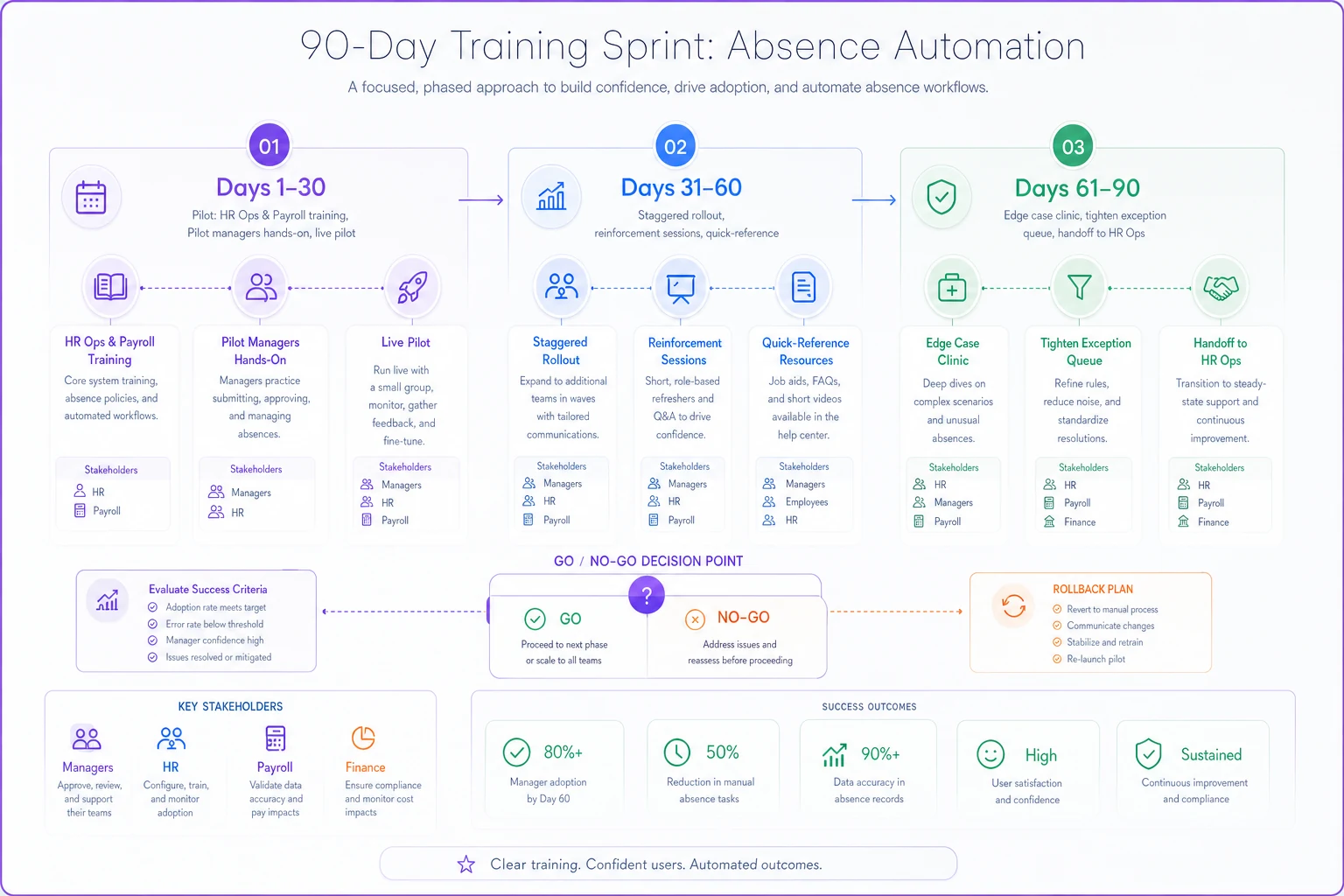
Here's a simple visual of the sprint phases and who owns each step.
Adoption isn't an event on your go-live date. It's a curve that flattens around day 90 if you reinforce it, and collapses around day 20 if you don't.
A comms calendar that actually gets read
People don't resist change because they hate it. They resist because nobody told them what changes for them specifically. Generic "we're excited to announce a new system" emails accomplish nothing.
Good absence-change comms answer three questions for each audience: what's changing, what do you have to do differently, and when. Everything else is noise.
-
T-minus 3 weeks Leadership announcement — the why. Short. Signed by someone senior. Sets the expectation that this is happening, not optional.
-
T-minus 2 weeks Manager-specific note — what changes in their approval flow, with the training dates.
-
T-minus 1 week Employee-facing note — how to submit leave under the new process. Screenshots beat paragraphs.
-
Launch day Short "we're live" message with the one link people actually need and a clear line on who to ask for help.
-
Weekly for the first month A two-line update — what's working, one common question answered, one reminder.
-
Day 45 and day 90 Progress notes with real adoption numbers, so people see momentum instead of silence.
The mistake to avoid: front-loading all communication before launch and going quiet after. The weeks after go-live are when people have real questions, and silence in that window is what pushes them back to old habits.
Adoption KPIs — measure behavior, not attendance
Plenty of rollouts declare victory because "95% of managers attended training." Attendance measures nothing. What you need to know is whether people are actually using the new process correctly and whether the workflow is cleaner than before.
-
Approval channel adoption — % of leave requests going through the new system vs. old spreadsheets or email. This is your primary signal. If it's stuck at 60%, adoption is failing regardless of what training reports say.
-
Approval cycle time — how long from request to decision. Should trend down as people get fluent.
-
Exception rate — % of requests kicked to manual handling. A high, sticky rate usually means your rules are misconfigured, not that people are misbehaving.
-
Payroll error rate — discrepancies between the system and actual pay. Watch this hard for the first two pay cycles.
-
Manager self-sufficiency — support tickets per manager per week. Should decline sharply after day 45.
A realistic target curve looks like channel adoption climbing toward 90%+ by day 90, cycle time dropping as managers stop second-guessing themselves, and payroll errors near zero after the first reconciliation catches the config mistakes.
One caution on targets — don't set them so aggressive that people game them. Push cycle time too hard too early and managers rubber-stamp approvals to hit the number, and your exception rate quietly becomes meaningless. Balance speed metrics against accuracy metrics so one can't be won by wrecking the other.
A short real scenario
A regional home-services company with around 240 employees across three states rolled out an automated leave-approval flow to replace a mess of email approvals and a shared spreadsheet. Their first attempt, six months earlier, had flopped — single training session, no ownership map, managers who quietly kept using email.
The second attempt used the structure above. Pilot with one region for 30 days, staggered rollout, weekly two-line comms, and a real RACI so payroll wasn't caught off guard.
Approval cycle time dropped from over two days to under a day for standard requests. The exception queue, which had been a dumping ground of "not sure, ask HR" cases, shrank once the rules were tuned during the pilot — HR estimated they cut the manual-review load by somewhere around 40%. And the first payroll run after go-live had a handful of small discrepancies instead of the dozens they'd braced for, because reconciliation had a named owner this time.
The tool was basically the same both attempts. The change management was the variable.
When this level of rigor makes sense — and when it's overkill
When it's worth it: You're changing policy and automating at the same time, you operate across multiple jurisdictions, or you have more than a handful of managers approving leave. Any of those conditions, and the coordination cost of a bad rollout dwarfs the cost of planning it properly.
When it's overkill: A ten-person company with one person handling all leave doesn't need a 90-day sprint and a RACI matrix. A single conversation and a shared doc covers it. Don't import enterprise ceremony into a team that fits in one room.
Who should slow down before launching: If you can't answer "who has rollback authority?" or "who reconciles the first pay run?" — you're not ready to pick a go-live date. Sort ownership first. Everything else in the playbook depends on it.
Bringing it together
The uncomfortable truth about absence automation is that the software is the easy part. Vendors have largely solved the technical side. What they can't solve for you is the messy, human, cross-team coordination of getting managers, HR, payroll, and finance to change how they work at the same time, without breaking pay or compliance in the process.
That's what a change management approach actually handles — ownership decided up front, training spaced across the weeks people are actively using the system, communication that keeps flowing after launch, and metrics that track real behavior rather than attendance lists. None of it is glamorous. All of it is the difference between a rollout that fades into normal operations and one you're still cleaning up at the end of the quarter.
Pick your accountable owners, run the sprint, watch the adoption curve, and keep a rollback plan in your back pocket. Do that, and the launch becomes the boring non-event it should be.
Ready to optimize your workforce absence management?
Join 2,000+ HR teams using Absencely to reduce administrative burden, improve compliance, and boost employee satisfaction.