


Three weeks ago, a 400-person manufacturing company nearly lost their HR director. Not to a competitor—to burnout from processing the same predictable leave requests every single week. Their welding team had negotiated compressed schedules (four 10-hour days), which meant every Friday generated 47 identical leave requests that required manual approval. Same people, same pattern, same rubber-stamp approval, week after week.
The breaking point came when she returned from her own vacation to find 188 pending requests, half of which had already passed their leave dates. Managers were texting her screenshots of the approval queue. Payroll was calling about missing timesheets. The CEO wanted to know why overtime had spiked—turns out supervisors were covering shifts while waiting for approvals that should have been automatic.
This scenario plays out across thousands of organizations dealing with predictable, recurring leave patterns. Compressed work schedules, religious observances, regular medical appointments, rotating shift patterns—these requests follow consistent rules that make them perfect candidates for SLA leave approval automation. The challenge isn't the technology. It's building governance structures that maintain control while removing friction.
Why manual approval of predictable leaves creates cascading failures
The operational damage from manually processing predictable leaves extends far beyond HR's workload. When you require human approval for leaves that follow established patterns, you're essentially asking someone to verify that Tuesday still comes after Monday.
A regional healthcare network with 1,200 employees discovered their manual approval process was costing them $340,000 annually in hidden operational overhead. Not from the leaves themselves—from the approval workflow. Their analysis revealed HR spent 31 hours weekly processing routine approvals, managers averaged 8 minutes per approval including system navigation, 23% of approved leaves still triggered payroll corrections, and coverage gaps occurred when approvals lagged, forcing last-minute scheduling.
The real killer was what they called "approval fatigue." After clicking "approve" hundreds of times for identical, policy-compliant requests, managers stopped actually reviewing anything. They'd approve in batches without reading, defeating the entire purpose of human oversight. One supervisor admitted he'd approved a request for "unicorn riding lessons" that an employee submitted as a joke to test if anyone was paying attention.
More concerning was the compliance risk. When approvals become routine clicking exercises, legitimate red flags get missed. The same healthcare network discovered they'd been approving FMLA leaves that exceeded entitlements, simply because the volume of routine approvals had numbed reviewers to anomalies.
Building your SLA threshold framework
SLA leave approval automation starts with defining what "predictable" actually means for your organization. This isn't about automating everything—it's about identifying patterns stable enough to codify into rules.
Stop managing absences manually.
Absencely simplifies leave requests, approvals, and absence monitoring for your entire workforce.
- Automated leave tracking
- Manager approval workflows
- Compliance & reporting tools
No credit card required
The most successful implementations segment leaves into three approval tracks:
-
Green Track (Auto-Approval) Leaves that meet all predefined criteria
-
Yellow Track (Expedited Review) Leaves requiring quick human verification
-
Red Track (Full Review) Complex or exception cases needing careful evaluation
A 600-person logistics company structured their thresholds like this:
| Leave Type | Auto-Approval Criteria | Review Triggers | Hard Stops |
|---|---|---|---|
| Compressed Schedule Days | Same day weekly, 6+ month history | Pattern change | Blackout dates |
| Medical Appointments | Under 4 hours, 48hr notice, documented condition | Over monthly limit | Coverage below 70% |
| Religious Observance | Registered annual dates | First-time request | None |
| Shift Swaps | Both parties confirmed, same week | Cross-department | Overtime impact |
The key insight: your thresholds should reflect operational reality, not aspirational policies. That logistics company initially set their medical appointment threshold at 2 hours, but data showed 78% of requests were 3-4 hours due to travel time. Fighting reality with rigid thresholds just pushes requests into manual review, defeating the automation purpose.
Exception governance that actually works
Every SLA leave approval automation system eventually faces the "VP's golf tournament" problem. You've built careful rules, established clear thresholds, then a senior executive wants their monthly golf league automatically approved as "professional development."
This is where exception governance becomes critical. Without it, your automated system becomes Swiss cheese—full of holes that undermine its credibility.
A software company with 320 employees developed what they call "exception budgets." Each department gets a limited number of override tokens annually:
-
5 executive overrides (C-suite only)
-
10 department head discretionary approvals
-
20 HR manual interventions
Once exhausted, all exceptions require documented business justification and CEO approval. This scarcity forces real evaluation of what deserves special treatment.
Their exception request form is deliberately friction-heavy and requires a business impact statement (minimum 100 words), alternative coverage plan with named backups, precedent risk assessment, compensation impact calculation, and sign-off from finance and HR.
The friction serves a purpose. As their HR director explained: "Making exceptions slightly painful ensures they remain exceptional."
They also built in sunset provisions. All exceptions expire after 90 days unless renewed with fresh justification. This prevents exception creep where temporary accommodations become permanent entitlements.
The audit trail that saves your job
When automation fails—and it will—your audit trail determines whether you're explaining a simple glitch or defending your judgment in court.
A retail chain learned this lesson after their automated approval system granted 73 consecutive Fridays off to an employee who'd gamed their compressed schedule policy. The employee technically met all criteria, but was effectively working a permanent four-day week while being paid for five. The lawsuit that followed hinged entirely on their audit capabilities.
Your SLA leave approval automation audit framework needs three layers: transaction layer (every approval, modification, override), decision layer (why the system made specific choices), and governance layer (who changed rules and when).
The minimum audit capture for each automated approval: Timestamp: 2024-03-15 09:23:47 UTC Employee: ID-7829 Request: Medical appointment / 3 hours Decision: AUTO-APPROVED Rule Applied: MED-APT-STANDARD-v3.2 Criteria Met:
-
Notice
72 hours (threshold: 48)
-
Duration
3 hours (threshold: 4)
-
Frequency
2nd this month (threshold: 4)
-
Coverage
85% (threshold: 70%)
System State: All thresholds passed Audit Hash: 7f8a9b2c4d
The critical element most companies miss: decision explainability. Your audit trail should clearly show why the system made each choice, not just what choice it made. When someone challenges an automated approval six months later, you need to reconstruct the exact logic path.
Rollback procedures and the safety net
The scariest part of implementing SLA leave approval automation isn't whether it will work—it's what happens when you need to turn it off.
A financial services firm discovered this during a merger when they needed to temporarily suspend automated approvals while harmonizing policies between organizations. Their killswitch procedure included immediate suspension (under 5 minutes), controlled rollback (under 30 minutes), and post-rollback review processes.
Here's a simple visual of the rollback workflow.
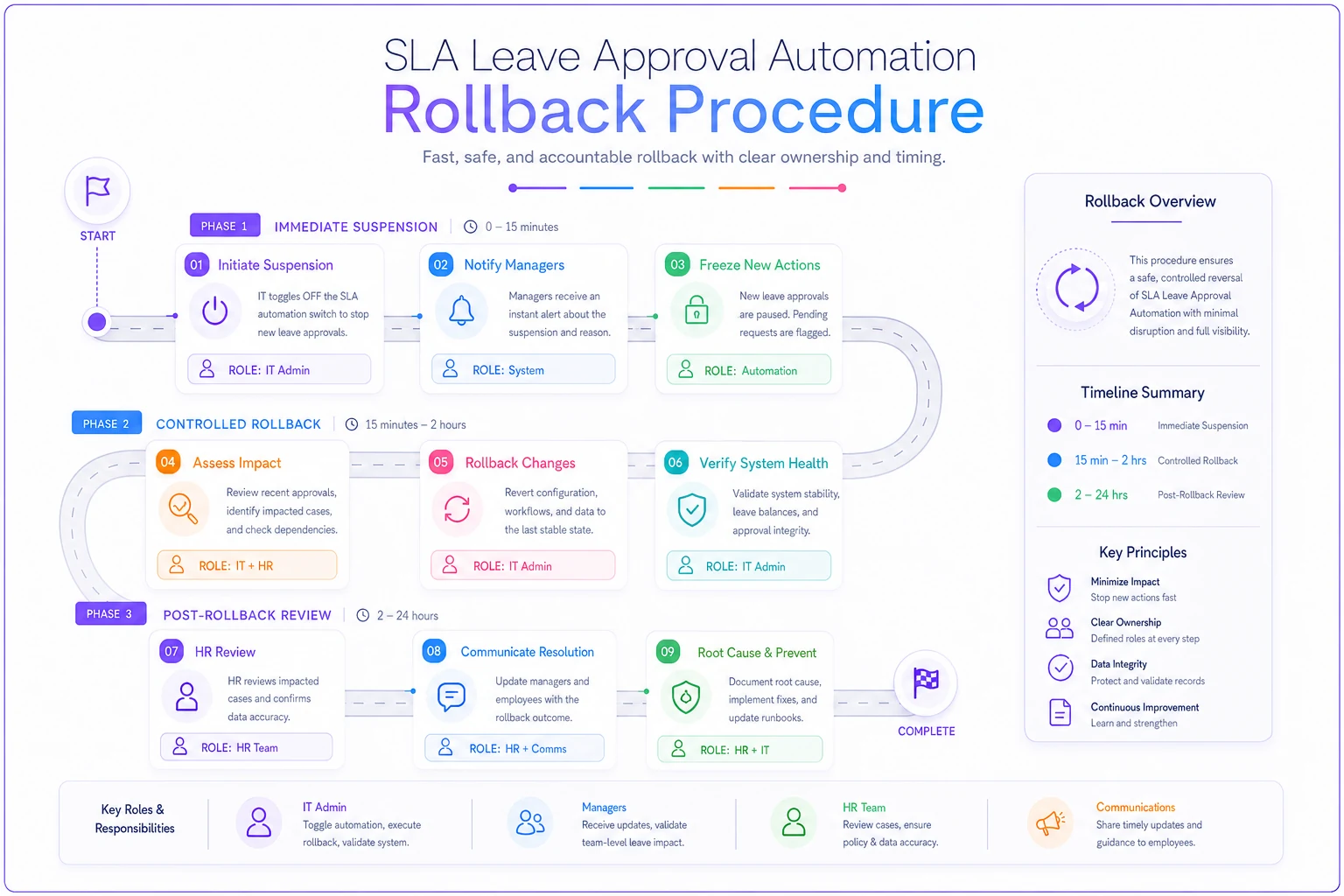
For immediate suspension, they toggle automation flag to "Manual Override", alert all managers via SMS, queue all pending requests for human review, and generate suspension audit entry.
For controlled rollback, they export all automated approvals from past 30 days, flag questionable approvals for review, restore manual approval workflows, brief management team on interim process, and document rollback reason and timeline.
Post-rollback review involves auditing a sample of 10% of automated approvals, interviewing affected managers, calculating operational impact, and creating restoration plan with fixes.
They also built in graduated rollback options. Rather than killing all automation, they can selectively disable specific leave types, particular departments, certain threshold rules, or individual employees.
This granular control proved valuable when they discovered a policy interpretation error affecting only their California offices. They rolled back automation for California while keeping it running for other locations, fixing the issue without disrupting the entire company.
Implementation velocity and the phased approach
The temptation with SLA leave approval automation is to automate everything at once. Resist this urge.
A transportation company with 850 employees tried the "big bang" approach. They automated 12 leave types simultaneously. Within a week, they had 47 incorrectly approved leaves, 3 union grievances, 1 very angry CFO (his direct report got 3 weeks auto-approved), and 0 credibility with managers.
They rolled everything back and started over with a phased approach:
-
Phase 1 (Months 1-2) Single department, single leave type—chose accounting's religious observance leaves with 15 employees and highly predictable patterns
-
Phase 2 (Months 3-4) Expand within same department—added compressed schedule days with same 15 employees but different patterns
-
Phase 3 (Months 5-6) Cross-department expansion—kept same leave types, added operations and customer service for 120 total employees
-
Phase 4 (Month 7+) Additional leave types—medical appointments under 4 hours, shift swaps within teams, pre-approved training days
This measured pace let them build confidence while catching edge cases early. More importantly, it gave employees time to understand and trust the system.
The metrics that matter vs the metrics that don't
Companies often measure SLA leave approval automation success using the wrong metrics. They track approval speed and volume, missing the operational outcomes that actually matter.
Vanity metrics that don't matter include number of auto-approvals, average processing time, system uptime percentage, and user satisfaction scores.
Metrics that actually indicate success include coverage gaps eliminated, payroll corrections reduced, manager time recovered (in hours, not percentages), compliance violations caught, and exception requests trending down.
A distribution center tracked their real impact over six months. Before automation, they had 3.2 coverage gaps per week from delayed approvals, 19% of leaves required payroll adjustment, managers spent 6.3 hours weekly on approvals, and 4 compliance near-misses monthly. After automation, they had 0.4 coverage gaps per week, 3% of leaves required payroll adjustment, managers spent 1.1 hours weekly on exceptions only, and 0 compliance issues (2 prevented by red flags).
The surprising discovery: employee satisfaction with the leave process actually dropped initially. Employees were suspicious of instant approvals, assuming they'd gone into a black hole. Adding email confirmations with clear "APPROVED BY AUTOMATED SYSTEM" headers restored confidence.
Risk zones most companies ignore until too late
Three risk categories consistently blindside companies implementing SLA leave approval automation: legal evolution risk, pattern manipulation risk, and integration cascade risk.
Employment law changes faster than most automation rules. A technology company discovered this when New Jersey modified their family leave act. Their automation continued approving based on old thresholds for four months before anyone noticed. The manual cleanup and retroactive adjustments cost $45,000 in staff time alone.
Build in quarterly policy review triggers. Create a legal change log that maps specific law changes to automation rule updates. Date-stamp your rules with policy version numbers.
Employees figure out automation rules quickly. A manufacturing plant watched helplessly as workers optimized their leave requests to trigger auto-approval while maximizing time off. One enterprising employee discovered requesting 3 hours 55 minutes kept them under the 4-hour review threshold while getting essentially a half day off.
Your defense: variable thresholds and random audits. Randomly flag 5% of auto-approved requests for human review. Vary thresholds slightly by department or time period to prevent gaming.
SLA leave approval automation rarely operates in isolation. It feeds payroll, scheduling, compliance reporting, and benefits systems. When automation fails, these downstream systems can create compounding errors. A healthcare provider learned this when their automation approved overlapping FMLA and short-term disability leaves. Their benefits system paid both, their scheduling system showed the employee as available, and payroll processed regular wages. The employee received triple compensation for two weeks before anyone noticed.
When automation makes things worse
Not every organization should implement SLA leave approval automation. Some scenarios where manual approval remains superior:
Small teams under 50 employees often have more complexity than scale. Their leave patterns might seem predictable but actually involve too many informal agreements and special circumstances to codify. The overhead of maintaining automation exceeds the efficiency gains.
High-variability operations like event companies, seasonal businesses, or project-based consultancies struggle with automation. Their "predictable" patterns shift too frequently. A wedding planning company tried automating their compressed schedules, but client events made every week unique. They spent more time overriding automation than they saved.
Union environments with complex contracts need extreme caution. One manufacturing company discovered their automation violated a clause requiring shop steward notification for certain leaves. The grievance process cost more than five years of potential automation savings.
Building your implementation roadmap
Your path to SLA leave approval automation should follow this sequence:
Month 1: Data gathering Pull six months of leave approval history. Identify your true patterns, not what you think they are. Calculate current processing costs including manager time, HR overhead, and error corrections.
Month 2: Rule design Define your green/yellow/red tracks. Set initial thresholds conservatively—you can loosen them later. Design your exception process with deliberate friction.
Month 3: Technical setup Whether building internally or implementing operational software, focus on audit capabilities first. Test rollback procedures before going live. Create clear automated messages.
Month 4: Pilot program Start with your most stable, predictable leave type in your most organized department. Run parallel processing—automate but verify manually. Gather feedback actively.
Month 5: Gradual expansion Add one new leave type or department monthly. Watch for pattern gaming and threshold manipulation. Adjust rules based on actual behavior.
Month 6+: Optimization Review your metrics monthly. Reduce exception requests through threshold refinement. Expand automation where patterns prove stable.
The operational reality check
After implementing SLA leave approval automation across hundreds of organizations, clear patterns emerge about what works and what doesn't.
The companies that succeed treat automation as an operational enhancement, not a replacement for judgment. They invest heavily in governance structures, audit capabilities, and rollback procedures before automating a single leave. They phase implementation carefully, measuring real operational impact rather than vanity metrics.
The companies that fail chase efficiency at all costs. They automate too much too fast, skip exception governance, and ignore audit requirements until something goes wrong. They treat automation as set-and-forget technology rather than an operational system requiring active management.
Most importantly, successful implementations acknowledge that some friction in leave approval serves a purpose. The goal isn't to approve everything instantly—it's to remove repetitive work while maintaining necessary oversight. Your compressed schedule employees shouldn't wait three days for predictable Friday approvals, but your complex FMLA cases still deserve human review.
The question isn't whether to implement SLA leave approval automation—it's whether you're prepared to govern it properly. With the right thresholds, exception handling, audit trails, and rollback procedures, automation can eliminate thousands of hours of repetitive work while actually improving compliance.
Without that governance framework, you're just creating faster ways to make mistakes at scale.
Ready to optimize your workforce absence management?
Join 2,000+ HR teams using Absencely to reduce administrative burden, improve compliance, and boost employee satisfaction.