


Unlimited PTO looks clean on paper. No accrual tables, no carryover liabilities, no year-end payout math. But the policy that removes accrual tracking also removes the guardrails that used to tell you when something was going wrong. When someone was burning through their balance too fast, the balance told you. When someone hadn't taken a day in eight months, the zero-usage flag told you. Strip that out and you're flying without instruments.
The chaos doesn't show up in month one. It shows up around month seven — when one team has quietly taken 22 days each and another has taken four, when a manager approves a two-week trip during your busiest quarter because nothing flagged it, and when payroll processes a mid-month departure and realizes nobody defined what "unused PTO" even means under a policy with no accrual.
This is about the operational layer underneath the policy — the monitoring, the approval structure, the blackout mechanics, and the payroll exception rules that keep unlimited PTO from quietly becoming a fairness problem and a liability surprise. If you want to operationalize unlimited PTO monitoring without rebuilding your whole HR stack, this is where the real work lives.
Why unlimited PTO breaks quietly (and where)
The failure isn't usually "people take too much time." That's the fear everyone leads with, and it almost never plays out that way. In practice the opposite is more common — under-usage. People take less time under unlimited policies because there's no balance reminding them they've earned it, and no clear signal about what "normal" even looks like.
The actual breakages are subtler:
-
Fairness drift. Two people, same team, same role — one takes 18 days, the other takes six. Nobody planned it. It happened one approval at a time and now it's a resentment issue.
-
Coverage collisions. Without a blackout structure, three people from a five-person team can all be off the same week because each request was approved in isolation.
-
Manager inconsistency. One manager treats unlimited as "basically take anything," another treats it as "prove you deserve it." Same policy, wildly different employee experience.
-
The termination gap. Someone leaves. Payroll asks what to pay out. Under accrual there's a number. Under unlimited there's often nothing written down — and depending on your state, that ambiguity can cut against you.
None of these are visible in real time. They surface as a complaint, a coverage crisis, or a payroll dispute — always after the fact. Monitoring is what pulls them forward.
The one dashboard that actually matters: cohort burn-rate
Forget individual balances — there aren't any. The metric that replaces them is cohort burn-rate: how much time a comparable group of people is taking, tracked against the calendar, so you can see who's drifting high, who's drifting low, and whether coverage is quietly at risk.
Stop managing absences manually.
Absencely simplifies leave requests, approvals, and absence monitoring for your entire workforce.
- Automated leave tracking
- Manager approval workflows
- Compliance & reporting tools
No credit card required
The trick is choosing the right cohort. Comparing an individual against the whole company is useless — a warehouse lead and a senior engineer don't have comparable rhythms. Compare people against their own team, role level, and tenure band. That's where "fair" actually means something.
A workable dashboard tracks four things per cohort:
| Metric | What it tells you | Rough trigger point |
|---|---|---|
| Days taken YTD (cohort average) | Baseline for "normal" | Reference line, not a limit |
| Individual variance from cohort | Who's drifting high or low | ±40% from cohort average |
| Zero-usage streak | Burnout / under-usage risk | No PTO in 90+ days |
| Concurrent-absence density | Coverage risk by week | >30% of a team off same week |
The numbers above are starting points, not gospel — tune them to your team size. On a five-person team, "30% off at once" is one person plus someone out sick, so you'd want the density trigger tighter.
On very small teams, lower the concurrent-absence density trigger so single absences don't mask coverage problems.
The burn-rate view isn't about policing high users. It catches two problems at once: the person taking so little they're heading for burnout (which we've written about separately in the context of detecting absence patterns and thresholds), and the weeks where too many approvals stacked up without anyone noticing.
A typical example: a support team of nine, unlimited policy, six months in. The dashboard shows the cohort average around 9 days YTD — healthy. But two people are at 2 days and one is at 17. The 17 isn't the problem; it's within reason. The two people at 2 days are the flag. One of them quit four weeks later, citing "never felt like I could actually take time off." That's the signal you want before the resignation, not in the exit interview.
Manager approval templates: making consistency mechanical
The biggest fairness killer under unlimited PTO is that approval quality depends entirely on which manager you report to. You can't fix that with a memo. You fix it by giving managers a template that makes the decision structured instead of gut-feel.
A good approval template forces the manager to check the same things every time, in the same order:
-
Coverage check — Is anyone else on the team already off during this window? Pull the concurrent-absence view before deciding.
-
Blackout check — Does this request overlap a declared blackout period? If yes, it needs the exception path, not standard approval.
-
Burn-rate context — Where does this person sit relative to their cohort? Not to deny high users, but to notice if someone at 2 days is finally requesting time (approve fast, don't nitpick).
-
Notice check — Was the request submitted with the expected lead time for its length? (More on notice tiers below.)
-
Decision + reason — Approve, approve-with-adjustment, or decline-with-alternative. Every decline needs a proposed alternative window.
That last rule matters more than it looks. "Denied" with no alternative is how unlimited PTO earns a reputation as fake-unlimited. "I can't approve the 12th–16th because Maria's already out, but the 19th–23rd is wide open" keeps the policy credible.
Managers don't want to be inconsistent — they're inconsistent because nobody gave them a consistent process. A five-step template removes most of the drift because discretion gets narrowed to the parts that genuinely need judgment.
Notice tiers that scale with request length
-
1–2 days
48 hours notice, manager approves solo
-
3–5 days
two weeks notice, coverage check required
-
6+ days
30 days notice, second-level sign-off if it hits a blackout
This does most of the coverage-protection work quietly, before any request reaches the collision stage.
Blackout mechanics: how to say "not this week" without killing the policy
Blackouts are where unlimited policies either mature or collapse. Handled badly, they feel like the company clawing back the freedom it just promised. Handled well, they're just honest scheduling.
The key distinction is between hard blackouts and capacity caps — and most teams only need the second one.
A hard blackout is a full freeze — nobody off, no exceptions. Retail during the two weeks before a major holiday. A SaaS team during a known launch. Accounting during close week if you're small. Use these sparingly, publish them a quarter ahead, and keep the list short. If you have more than a handful of hard-blackout days a year, people stop believing the policy is real.
A capacity cap is softer and does most of the real work: during defined high-load windows, only a set number of people per team can be off at once. Not zero — just a ceiling. First-come approval, and once the cap's hit, the next request gets the alternative-window treatment.
The mechanic that keeps capacity caps fair: publish the cap and the current count. If the summer cap for a team is "two off at a time," people should be able to see that both slots for the week of July 14th are already taken before they get their hopes up. The unfairness in blackout systems almost always comes from invisibility — someone requests, gets denied, and assumes favoritism because they couldn't see the slots were genuinely full.
A real-world example: a 30-person agency moved to unlimited PTO and had a brutal first summer — client work slipped because approvals had no capacity logic. The next year they set a simple cap of two-per-team during June–August and published the running count. Complaints about "unfair denials" essentially disappeared, not because they approved more, but because people could see the math. Same policy, visible mechanics.
Payroll exception handling: the part everyone forgets until it hurts
This is the section that gets skipped in the excitement of "no more accrual tracking," and it's the one that generates the ugliest disputes.
Unlimited PTO removes the balance, but it doesn't remove every payroll question. The exceptions still exist — they just don't have obvious answers anymore. The four that reliably cause trouble:
1. Termination payout. With no accrual balance, most unlimited policies pay out nothing at separation — and in a lot of jurisdictions that's exactly why companies chose unlimited. But this only holds if your policy explicitly states it and your state permits it. The exception you must handle: an employee who requested and was approved for PTO that they hadn't taken yet at termination. Was that time "earned"? Write the rule now, not during the offboarding.
2. Negative-drift terminations. Someone took 20 days in the first four months, then left. Under accrual you'd have paid negative balance rules. Under unlimited there's usually no clawback — but managers ask anyway, and people expect one. The clean answer is "unlimited means we don't track a balance to claw back," documented so nobody freelances a deduction that creates a wage-and-hour problem.
3. Leave-type overlap. Unlimited PTO is discretionary personal time. It is not FMLA, sick leave, or disability. When someone flips from vacation to a protected leave mid-absence, payroll has to reclassify the days correctly — and this is exactly where accrual-adjacent mistakes creep back in. If your team also runs mixed hourly/salaried populations, the reconciliation logic gets tricky fast; we covered the mechanics of that in common PTO accrual mistakes and reconciliation checks.
4. Partial-day and salaried-nonexempt handling. For exempt employees, docking pay for partial days can jeopardize the exemption. Unlimited PTO doesn't change that rule; it just makes people forget it because there's no balance to deduct from. Your exception rule should state plainly how partial days are treated for each classification.
A minimum payroll exception checklist
-
[ ] What happens to approved-but-not-taken time at termination?
-
[ ] Is there any payout at separation, and does state law permit your answer?
-
[ ] How are protected-leave days reclassified out of "unlimited PTO"?
-
[ ] How are partial days handled for exempt vs. nonexempt staff?
-
[ ] Who has authority to approve a payroll exception, and where is it logged?
-
[ ] What's the audit trail when an exception is granted?
If any box is blank, the policy isn't ready — it's just untested.
When unlimited PTO is a bad idea
Worth saying plainly, because the policy gets recommended reflexively.
It works badly for shift-coverage roles where absence directly stops production — a two-person front desk, a small clinic, a warehouse team running lean. There, "unlimited" without hard caps just means constant coverage scrambles, and the caps get so aggressive the policy becomes unlimited in name only.
It also struggles in states with strong vacation-as-wages rules if you haven't papered the policy carefully — the payout ambiguity becomes a liability instead of a simplification.
And it's a poor fit for teams where trust is already thin. Unlimited PTO amplifies existing culture. Healthy team, people take reasonable time. Anxious team, people take almost nothing and quietly burn out while leadership congratulates itself on "low usage."
Making the monitoring actually happen
The honest problem with everything above is that it's a lot of small checks running continuously — burn-rate variance, concurrent-absence density, zero-usage streaks, blackout counts, exception logging. Done in spreadsheets, this system lasts about two months before someone stops updating the tab.
Here's a simple depiction of the workflow those monitoring checks should follow and where automation helps.
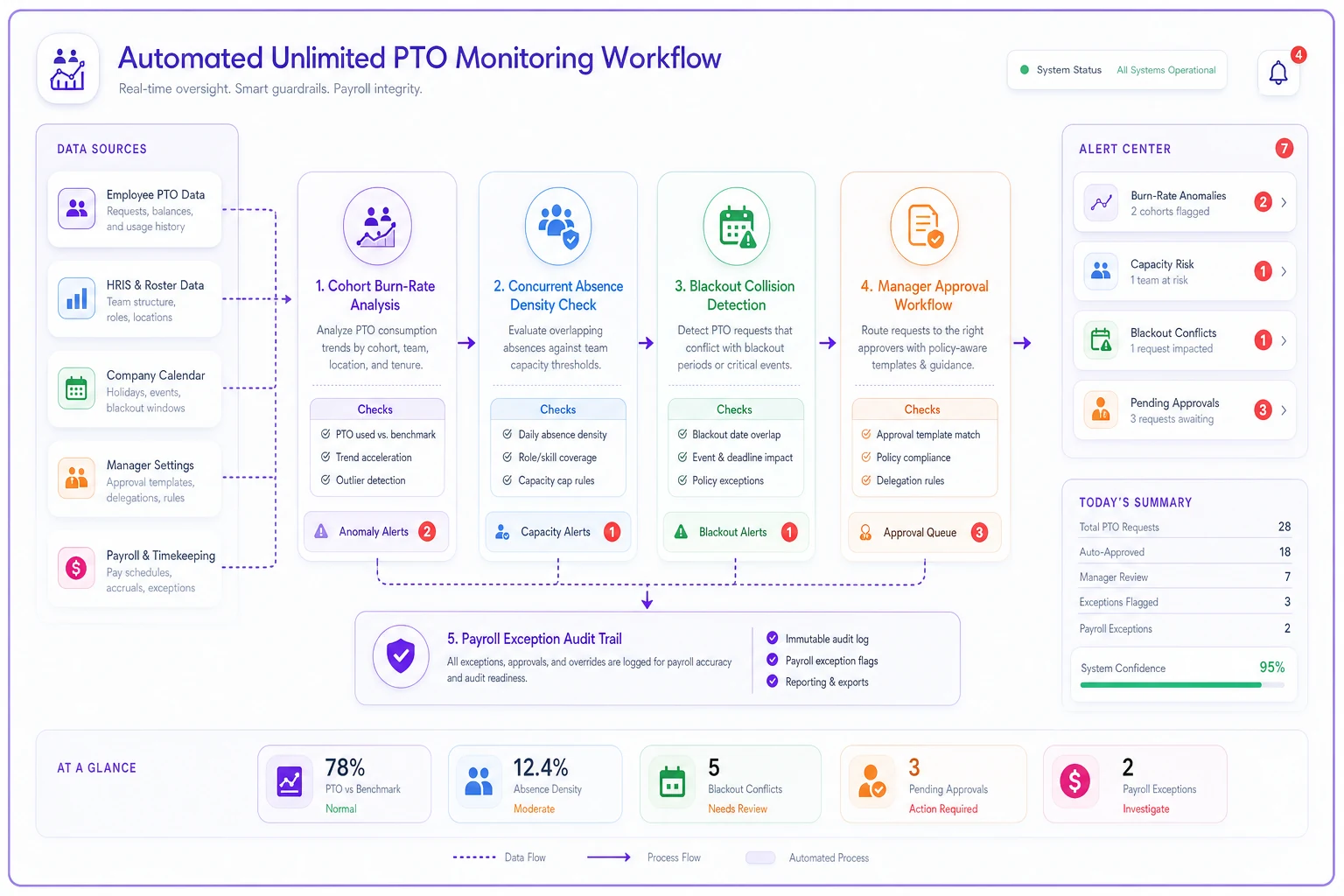
This is the narrow spot where a workflow platform earns its place: not to make the PTO decisions, but to surface the signals automatically — flagging the cohort outlier, showing the live capacity count against the cap, alerting when a request collides with a blackout, and keeping the payroll-exception audit trail in one place instead of an email thread. The judgment stays with your managers. The instrumentation just stops depending on someone remembering to look. Teams that already run structured manager absence workflows and escalation triggers tend to bolt PTO monitoring onto the same rails for exactly this reason.
Where to start
Don't try to stand up all four systems at once.
The sequence that tends to work: get the cohort burn-rate view running first, because it tells you whether you even have a fairness problem yet. Then add manager approval templates to stop new drift. Blackout mechanics come next, ahead of your busy season. Payroll exception rules should honestly be written before the policy goes live — but if you've already launched without them, that's the fire to put out this week, because it's the one that turns into a legal dispute rather than a grumble.
Unlimited PTO isn't the freedom to stop managing time off. It's the same management job with the training wheels — the balances — removed. The teams that do it well aren't the ones with the most generous policy. They're the ones who rebuilt the instruments they gave up, so they can still see when something's drifting before it becomes someone's resignation letter or a payroll argument nobody can win.
Ready to optimize your workforce absence management?
Join 2,000+ HR teams using Absencely to reduce administrative burden, improve compliance, and boost employee satisfaction.