
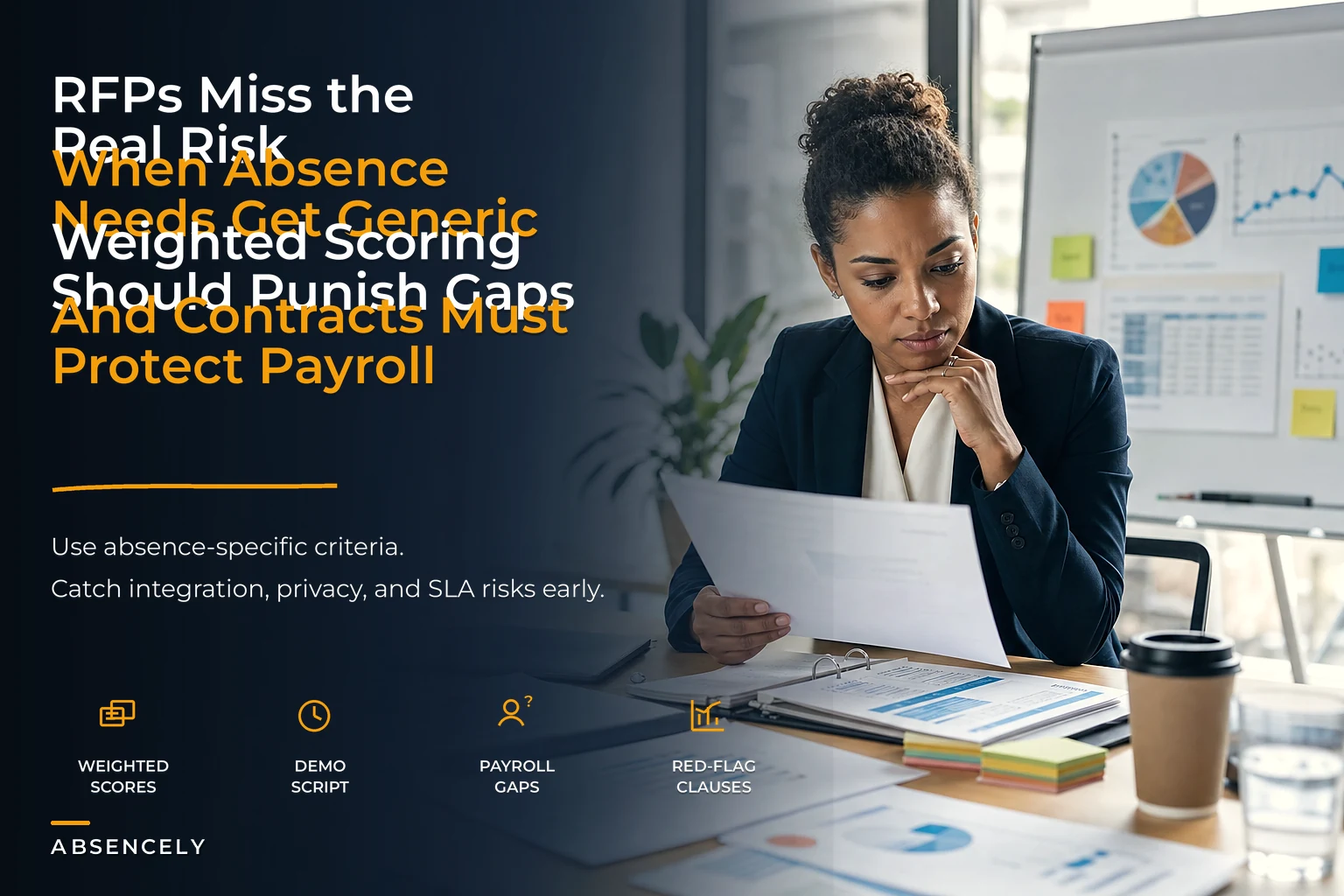

Most absence system RFPs are written backwards. They start as a wishlist of features copied from a competitor's brochure, get padded with compliance boilerplate, and end up scoring vendors on things that barely matter once the software goes live. Then eighteen months later, payroll is running manual reconciliation spreadsheets every cycle because the "integration" everyone demoed turned out to be a nightly CSV export nobody owns.
The gap between what an absence system looks like in a demo and how it actually behaves wired into your payroll, HRIS, and scheduling stack is enormous. And the RFP is where you either catch that gap or walk straight into it. So this is less about how to write a pretty procurement document and more about how to build an absence management system RFP playbook that stress-tests the parts most likely to hurt you: the payroll handoff, the integration seams, and the contract language that decides who pays when things break.
Why absence RFPs go wrong in the first place
The core problem is that absence software touches three departments — HR, payroll, and operations — but the RFP is almost always owned by one of them. Whoever holds the pen scores vendors against their own priorities.
When HR runs it, the RFP is heavy on leave-type configuration, compliance tracking, and manager self-service. All reasonable things. But nobody deeply pressure-tests how an approved intermittent leave day actually lands in the payroll register, or what happens when a leave is retroactively adjusted after the pay period closes. When finance runs it, you get the opposite: exhaustive payroll integration requirements and thin coverage of the messy real-world edge cases HR deals with daily.
The failures tend to cluster in the seams — the places where one team assumes another team validated something. The absence system "handles FMLA," so HR checks the box. Payroll assumes any hours the system tracks will flow cleanly into gross pay. Nobody tests the actual data path from a mid-week intermittent leave entry through accrual deduction and into the pay run. That untested path is where the money leaks.
The other reason these go sideways: vendors are exceptionally good at demoing the happy path. Every demo shows a full-day vacation request, approved by a manager, flowing to a clean dashboard. Full-day vacation is the one absence type that basically never causes problems. The problems live in partial days, overlapping leaves, jurisdiction-specific accrual rules, and mid-period corrections — none of which surface unless you force them into the evaluation.
Build the evaluation around weighted scoring, not feature counts
A feature checklist that tallies yes/no answers rewards the vendor with the longest feature list, not the one that will actually protect your payroll. Weighted scoring fixes this by forcing you to decide — before you see a single demo — what actually matters.
Stop managing absences manually.
Absencely simplifies leave requests, approvals, and absence monitoring for your entire workforce.
- Automated leave tracking
- Manager approval workflows
- Compliance & reporting tools
No credit card required
Here's a weighting structure that reflects where real operational risk lives rather than where marketing effort goes:
| Evaluation category | Suggested weight | What you're actually testing |
|---|---|---|
| Payroll integration accuracy | 25% | Does absence data reach payroll correctly, on time, and survive corrections? |
| Data integrity & audit trail | 15% | Can every change be traced, and does history stay intact after edits? |
| Leave-rule & accrual configurability | 15% | Can it model your real policies without custom code or workarounds? |
| Integration architecture & reliability | 15% | API vs. batch, error handling, retry logic, ownership of failures |
| Compliance & multi-jurisdiction handling | 10% | Rules by location, retroactive rule changes, documentation |
| Manager & employee usability | 10% | Adoption risk — will people actually use it correctly? |
| Vendor stability & support model | 5% | Response SLAs, escalation, roadmap ownership |
| Total cost including integration & maintenance | 5% | Not just license — the true annual cost of keeping it running |
Payroll integration accuracy and integration architecture together carry 40% of the score. That's deliberate. In practice, that's where the vast majority of post-go-live pain comes from, so it deserves the weight.
One insight worth sitting with: usability and price tend to get over-weighted in RFPs because they're the easiest things for a committee to have opinions about. Everyone can look at a screen and say "that looks clean." Almost nobody in the room can evaluate whether the vendor's accrual engine handles a retroactive policy change without recalculating balances incorrectly. The easy-to-judge categories crowd out the ones that determine whether the project actually succeeds. Weighting is your protection against your own committee.
Before you finalize any weights, get your data definitions straight, because a scoring model built on fuzzy record definitions produces fuzzy results. If your organization hasn't nailed down what each leave type means and who owns it, working through your absence data governance first will make the entire evaluation sharper — you can't test whether a vendor handles your data model correctly if your own data model is undefined.
Integration test-cases: the part vendors hope you'll skip
This is the single highest-leverage thing you can add to an absence RFP, and almost nobody does it. Instead of asking "do you integrate with our payroll system?" — a question every vendor answers yes to — you give them a set of concrete test-cases and require them to demonstrate each one live, using your actual data shapes.
A test-case isn't a feature question. It's a scenario with a defined starting state, an action, and an expected result you can verify. The point is to expose the difference between "technically integrates" and "integrates in a way that won't create payroll rework."
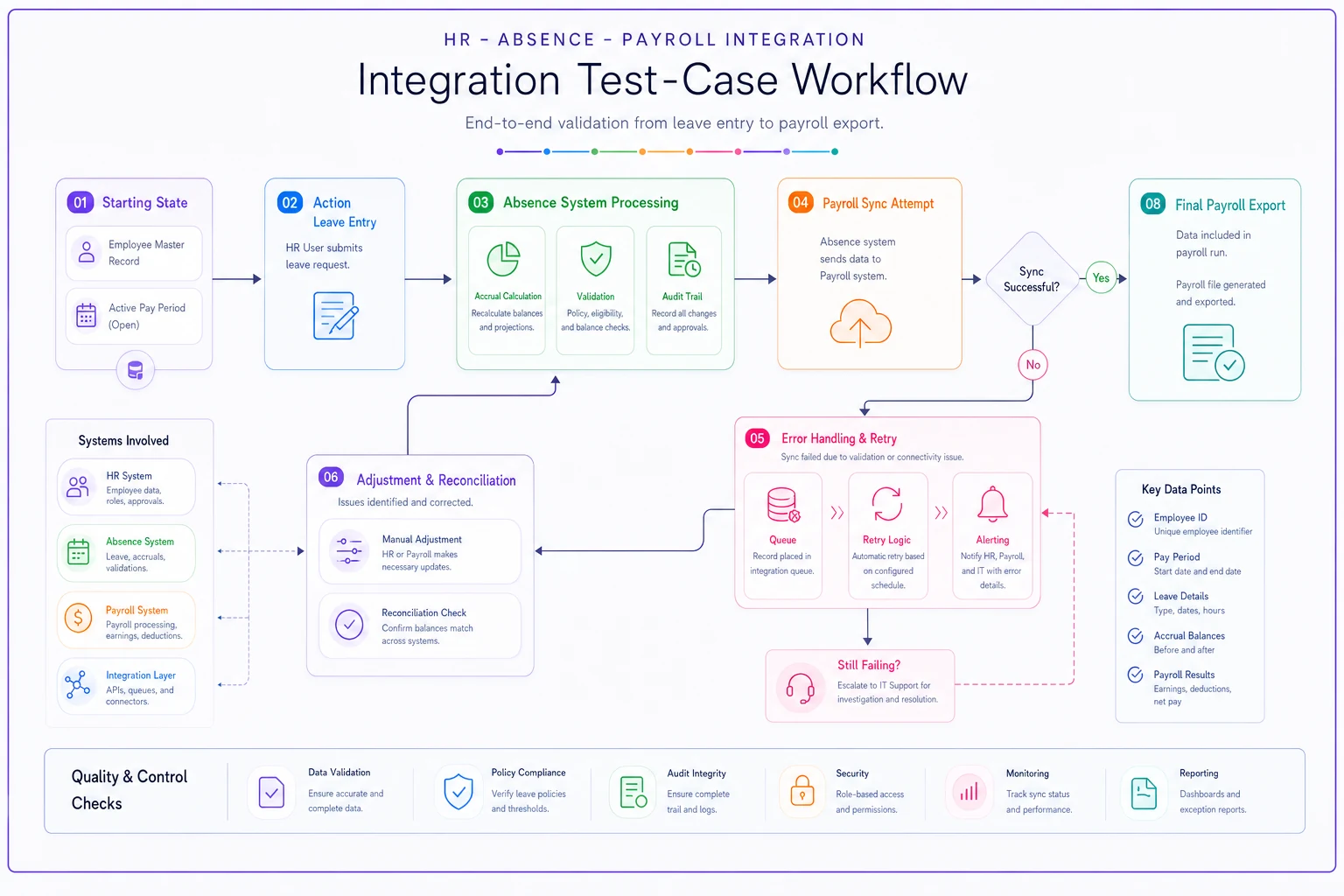
Run these test-cases live during demos with your actual data shapes — paper answers won't reveal the manual work behind the scenes.
Require vendors to run the retroactive correction and failed-handoff test-cases live with your payroll data shapes.
-
Mid-period intermittent leave. An employee takes 3 hours of FMLA leave on a Wednesday. Show the entry flowing into the correct pay period, deducting from the correct leave bucket, and appearing in the payroll export with the right earnings code — without a manual touch.
-
Retroactive correction after period close. The Wednesday leave above was entered wrong and gets corrected two days after payroll ran. Show how the adjustment is captured, flagged, and reconciled in the next cycle. This is the one that breaks most systems.
-
Overlapping leave types. An employee is on approved intermittent leave and also requests a partial vacation day in the same week. Show how the system prevents double-counting and which bucket takes priority.
-
Accrual across a policy change. A PTO policy changes mid-year. Show that balances before and after the change calculate correctly and that the audit trail preserves both rule versions.
-
Failed integration handoff. Deliberately break the connection — simulate the payroll system being unavailable during a scheduled sync. Show what happens: does data queue and retry, does someone get alerted, or does it silently fail?
-
Multi-jurisdiction accrual. Two employees, same role, different states with different accrual rules. Show both calculating correctly from the same policy framework.
Make vendors run these live during the demo, not answer them on paper. The paper answer is always "yes, we support that." The live demo is where you find out the retroactive correction requires a support ticket and a two-day turnaround.
A pattern worth watching for: when a vendor asks to "take that offline" or "get back to you" on test-case #2 or #5, that's your answer. Strong systems handle corrections and failure states as designed behavior. Weaker ones treat them as exceptions handled by the support team — which means you're buying a manual process wearing a software costume.
Vendor demo scripts that stop the sales theater
Left to their own devices, vendors run the demo they've rehearsed a hundred times. To evaluate fairly, you write the script and send it in advance, and every vendor performs the same one. This makes vendors comparable and forces them onto terrain they haven't polished.
Your demo script should allocate time by risk, not by what's fun to watch. A rough allocation for a 90-minute session:
-
10 minutes — vendor's standard overview (let them have this, it's harmless)
-
35 minutes — the integration test-cases above, run live
-
20 minutes — payroll reconciliation workflow
show a full cycle from leave entry to payroll export to correction
-
15 minutes — configuration walkthrough
have your leave policy built in front of you, not a pre-built demo policy
-
10 minutes — audit trail and reporting
pull the history on a record that's been edited three times
The configuration segment is underrated. Ask them to configure one of your actual, slightly weird leave policies during the call. If every policy tweak requires their professional services team, you'll feel that for years — each change becomes a paid request and a scheduling delay.
Also, insist the demo is driven by a solutions engineer who can go off-script, not an account executive clicking through slides. The moment you ask an unscripted question, you learn a lot from whether the answer is "let me show you" or "let me follow up."
The payroll-risk red flags hiding in the contract
Data accuracy disclaimers. Watch for language where the vendor disclaims responsibility for the accuracy of data processed or transmitted. If absence data drives payroll and the vendor's system corrupts or drops it, "we're not liable for data accuracy" leaves you holding a payroll error that affects real paychecks. Push for accuracy warranties tied to the integration specifically.
Integration "as-is." Vague language like "standard integration provided" with no spec attached is a trap. Require the actual field mapping, sync frequency, error-handling behavior, and support ownership as a contract exhibit. If it's not in writing, it's not in the product.
Support SLA carve-outs for integrations. Many vendors offer strong SLAs on their core product but exclude integration issues, classifying them as "third-party" problems. When your payroll sync breaks, you don't care whose side of the API failed — you care that paychecks are wrong. Make sure integration failures fall under a defined response SLA.
Uncapped or heavily capped liability relative to payroll exposure. A liability cap set at "fees paid in the prior 12 months" sounds normal until you realize a payroll error affecting a few hundred employees can dwarf your annual license fee. The cap should have carve-outs for data-integrity failures that cause payroll damages.
Ambiguous data ownership and export rights. You need a clear right to export your full absence and accrual history, in a usable format, at any time and on exit. Absence records carry compliance retention obligations for years. If leaving the vendor means losing history, you're locked in regardless of how the product performs.
Auto-renewal with long notice windows. A 90-day notice requirement on an annual auto-renew means one missed calendar reminder locks you in for another year. Negotiate this down and set the reminder the day you sign.
A quick contract red-flag checklist to keep on hand during review:
-
- [ ] Data accuracy warranty covers the payroll integration, not just the core app
-
- [ ] Full integration spec attached as an exhibit, not referenced vaguely
-
- [ ] Integration failures included under a defined support SLA
-
- [ ] Liability cap has carve-outs for data-integrity and payroll damages
-
- [ ] Unconditional data export rights, on-demand and at exit, in usable format
-
- [ ] Auto-renewal notice window is reasonable and reminder is scheduled
-
- [ ] Correction and reconciliation behavior is documented as committed functionality
Keep this checklist handy during contract review and push to include specific integration behaviors and remedies in the exhibit.
A real scenario: where the missing test-case cost real money
A mid-sized logistics company — around 600 employees across four states — ran a clean-looking RFP and picked a well-reviewed absence platform mostly on usability and price. The demo looked great. Full-day leaves flowed to payroll perfectly.
What they never tested was the retroactive correction path. Their operation runs a lot of intermittent leave and partial days, and corrections after period-close were routine. The system captured corrections fine internally — but it didn't push adjustment records back to payroll automatically. Every correction became a manual line item on a spreadsheet the payroll team maintained by hand.
Within a couple of quarters, payroll was spending roughly 12–15 hours per pay cycle on manual absence reconciliation. They caught a handful of paycheck errors that had already gone out — the kind that generate employee complaints and, in one case, a wage-claim inquiry. The annual cost in labor alone landed somewhere in the $18k–$22k range, before counting the risk exposure from the errors themselves. All of it traced back to one test-case that never made it into the RFP.
They eventually forced the vendor to build a proper adjustment feed, but retrofitting an integration you should have specified up front is slow and expensive, and you have almost no leverage once the contract is signed and the money's spent.
When a heavyweight RFP process makes sense — and when it doesn't
Not every organization needs this level of rigor, and it's worth being honest about that.
When the full weighted-scoring, test-case-driven process makes sense: you're processing a meaningful volume of intermittent or partial-day leave, you operate across multiple jurisdictions, you have 200+ employees, or your absence data feeds directly into payroll gross pay. In those cases, the integration seams carry real financial exposure and the up-front effort pays for itself.
When it's overkill: a small single-location team with straightforward full-day PTO and a simple, manual payroll handoff probably doesn't need a six-category weighted model. A lighter evaluation focused on usability and basic accuracy is fine — the operational risk just isn't large enough to justify the process.
Who should absolutely not shortcut it: anyone whose absence data flows automatically into payroll without a human checkpoint. Automation is only as safe as the accuracy of the data feeding it, and the RFP is your one chance to verify that accuracy before you're committed. If you can't validate the payroll path in the RFP, you'll validate it in production — with real paychecks.
Tie the evaluation back to what the system is supposed to produce
One last point that's easy to lose in the procurement weeds: you're not buying an absence system to track absences. You're buying it to produce reliable operational and payroll outcomes — accurate pay, defensible compliance records, and data clean enough to actually forecast staffing from. A system that tracks beautifully but hands payroll bad data has failed at its actual job.
That's why the evaluation should trace every requirement back to an outcome. If a feature doesn't improve payroll accuracy, reduce manual reconciliation, protect compliance, or produce trustworthy data, it doesn't deserve much weight — no matter how good it looks on screen. The data quality point compounds over time too: the same clean absence data that keeps payroll accurate is what lets you eventually turn absence data into staffing outcomes instead of just recording history. A sloppy integration doesn't just cost you payroll rework — it poisons every downstream decision you'd want to make from that data.
The RFP is the cheapest place to catch all of this. Every problem you don't test for here, you'll test for later — in production, under time pressure, with a signed contract and no leverage. Spend the effort on the seams now, and the software will earn its keep quietly for years. Skip it, and you'll be running a reconciliation spreadsheet you thought you were buying software to eliminate.
Ready to optimize your workforce absence management?
Join 2,000+ HR teams using Absencely to reduce administrative burden, improve compliance, and boost employee satisfaction.