

If you're evaluating absence management vendors for a retail chain in the 1,000-employee range, you've probably already noticed the uncomfortable truth: most "enterprise" platforms were built for office workers who sit at desks and request vacation two weeks out. Retail doesn't work that way. Your floor staff request time off from their phones on a break, your store managers need to approve and backfill coverage in the same motion, and your payroll runs catch retro adjustments that nobody tested during the demo.
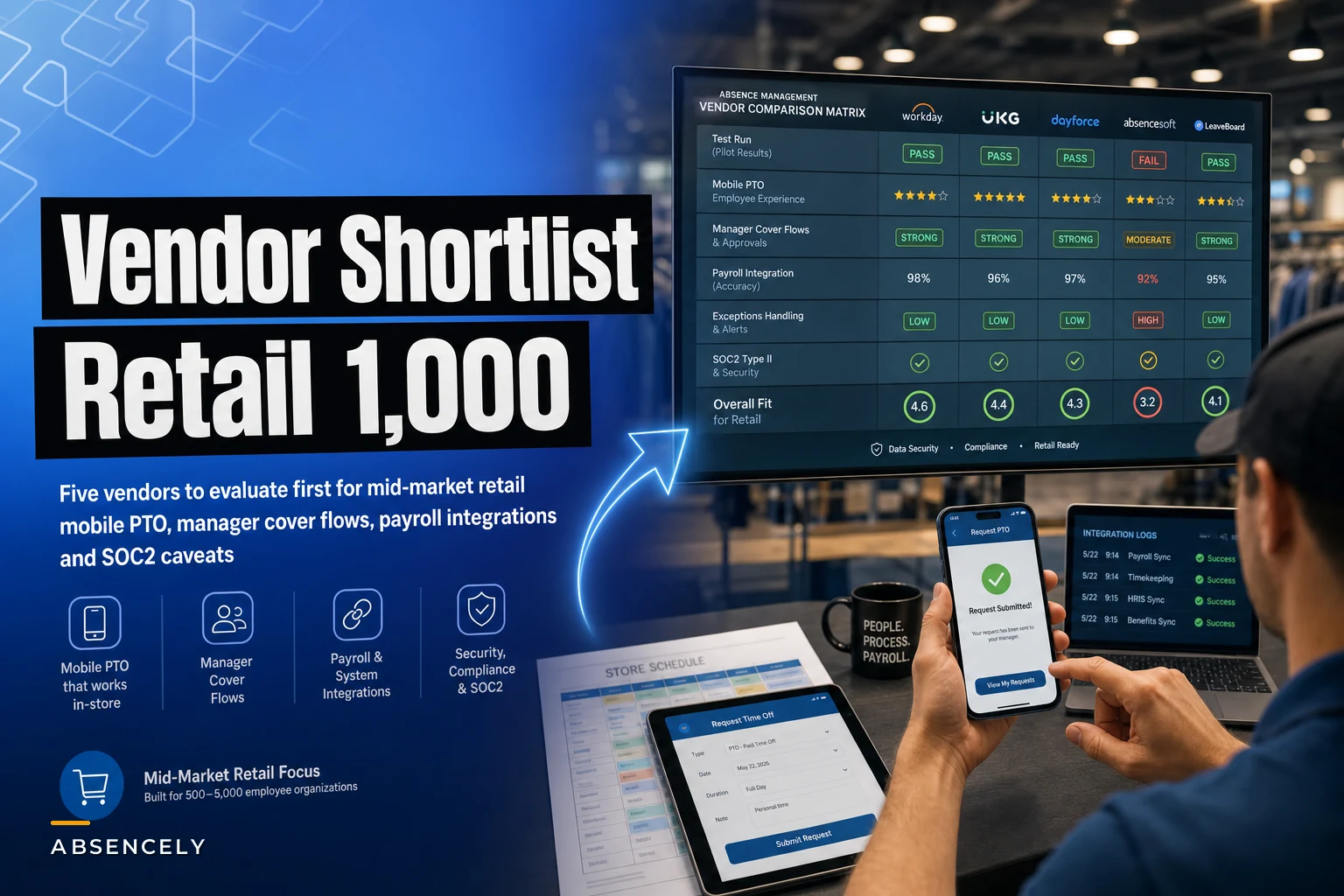
This shortlist is narrow on purpose. Five vendors, each judged against what actually matters at retail scale: mobile time-off experience, store-level cover and shift flows, payroll integration depth, and security posture. For each one I've included a rough pricing band and — more importantly — the specific contract and implementation traps that tend to surface after the ink dries.
One caveat before we start: pricing in this space is negotiated, opaque, and changes constantly. Treat the bands below as directional. And if you haven't already built your evaluation scoring framework, read Avoid costly RFP mistakes for absence systems first — it covers the integration test cases and payroll-risk red flags that vendor conversations will try to gloss over.
How to read this shortlist
The five vendors below split into two camps, and knowing which camp you're in saves months.
The first is workforce-management-first platforms where absence is a module bolted onto scheduling and time-and-attendance. These shine for hourly, shift-based retail because the time-off request and the coverage gap live in the same system. The second is HCM/leave-specialist platforms where absence and compliance — FMLA, state leave, ADA accommodation — are the core product, and scheduling is weaker or handed off to an integration.
| Vendor | Best fit for | Mobile TO UX | Store cover/shift flow | Payroll integration | Security posture | Est. annual band (1,000 EE) |
|---|---|---|---|---|---|---|
| UKG Ready | WFM-first retail, blended hourly/salaried | Strong | Strong | Native + certified | SOC 2 Type II, ISO 27001 | ~$120k–$190k |
| Dayforce (Ceridian) | Single-system payroll + absence | Strong | Good | Native (same platform) | SOC 2 Type II | ~$150k–$240k |
| Workday | Compliance-heavy, multi-state leave | Good | Weak (needs add-on) | Native if Workday Payroll | SOC 2, ISO, FedRAMP-adjacent | ~$200k–$350k+ |
| isolved | Mid-market budget-conscious | Good | Moderate | Native | SOC 2 Type II | ~$70k–$130k |
| ADP Workforce Now | Existing ADP payroll shops | Moderate | Moderate | Native (ADP payroll) | SOC 2, ISO 27001 | ~$90k–$160k |
Now the detail the table can't hold.
1. UKG Ready
Why it fits. For shift-based retail, UKG Ready is usually the strongest all-around fit because scheduling, time-and-attendance, and time-off live in one engine. When a cashier requests a Saturday off from the mobile app, the system already knows the schedule, the minimum staffing threshold for that store, and whether approving it drops coverage below the floor. The store manager gets the request and the coverage consequence on the same screen. That tight loop is exactly what retail needs and what generic leave tools can't replicate.
Stop managing absences manually.
Absencely simplifies leave requests, approvals, and absence monitoring for your entire workforce.
- Automated leave tracking
- Manager approval workflows
- Compliance & reporting tools
No credit card required
The mobile time-off UX is genuinely built for frontline workers — fast request, visible balances, push notifications for approvals. Manager cover flows let you post an open shift the moment a request is approved, which closes the gap between "approved time off" and "who's actually covering."
Pricing band. Roughly $120k–$190k annually for 1,000 employees, depending on which modules you light up — scheduling, advanced leave compliance, analytics.
Contract and implementation traps:
-
Module unbundling. The demo shows you the full suite. The quote often excludes advanced leave case management or the compliance module you assumed was included. Confirm in writing exactly which modules are in the per-employee rate.
-
Implementation is not fast. A 1,000-EE multi-store rollout runs several months. Scope the configuration of store-level staffing rules carefully — this is where timelines slip.
-
Accrual engine complexity. UKG's accrual rules are powerful but fiddly. If you have mixed hourly/salaried accrual policies plus multiple state sick-leave rules, budget real configuration time and test retro scenarios before go-live.
Per-employee-per-month pricing with module stacking.
2. Dayforce (Ceridian)
Why it fits. Dayforce's main selling point is that payroll and absence sit on literally the same record, continuously calculated. There's no nightly sync between an absence system and a payroll system because it's one platform. For retail chains burned by payroll-sync failures — the classic "PTO approved but never hit the paycheck" problem — this architecture removes an entire category of integration risk.
Mobile is strong, and the shift/cover flows are solid for retail, though a notch behind UKG in deep scheduling optimization. Where Dayforce pulls ahead is retro handling: because calculation is continuous, retroactive adjustments from a corrected leave entry flow into the next pay calc without a separate reconciliation job.
Pricing band. Roughly $150k–$240k annually at this headcount.
Contract and implementation traps:
-
All-or-nothing gravity. The single-platform benefit becomes a lock-in cost. Migrating off Dayforce later is painful because payroll and absence are entangled. Negotiate data export rights and termination assistance up front.
-
Implementation partner variance. Outcomes depend heavily on the team you draw. Ask for named consultants with retail multi-location experience and put their involvement in the SOW.
-
"Continuous calc" needs clean data. The continuous-calculation architecture only works if your store staffing rules and policy config are right. Garbage policies produce continuously wrong paychecks. Front-load policy validation.
Dayforce tends to price as a bundled platform, which can look expensive line-by-line but often replaces two or three separate contracts.
3. Workday
Why it fits. Workday earns its place for retail chains where multi-state leave compliance and sophisticated absence analytics outweigh scheduling needs. The leave-of-absence module is mature, the reporting is excellent, and the security and audit posture is enterprise-grade. If your legal exposure spans a dozen states with different sick-leave accrual rules and FMLA interplay, Workday handles that complexity well.
Where it struggles for retail. Store-level shift coverage is Workday's weak spot. Out of the box it doesn't do granular retail scheduling or the fast approve-and-backfill cover flow that hourly operations need — you'll be looking at an add-on or a third-party scheduling integration, which reintroduces the sync risk you were trying to avoid.
Pricing band. Roughly $200k–$350k+ annually, and realistically higher once you add scheduling capability and implementation.
Contract and implementation traps:
-
Scheduling gap. Don't assume retail shift management is included. Price the scheduling solution — native add-on or integration — as part of total cost, not an afterthought.
-
Implementation cost dwarfs license. Workday implementations for a chain this size frequently cost as much as or more than the first year of subscription. Get the full multi-year total, not just the license number.
-
Over-buying. A lot of 1,000-EE retailers don't need Workday's full depth. If you're buying it for one or two compliance features, you're probably overpaying. Be honest about whether the complexity matches your actual need.
This is the premium option, and the price reflects it.
4. isolved
Why it fits. isolved is the value play. For a budget-conscious retail chain that wants native payroll plus a solid absence module without enterprise pricing, it covers the fundamentals well.
The gap versus UKG and Dayforce is depth — it's "good enough" rather than "best in class" on complex scheduling and advanced leave case management.
Pricing band. Roughly $70k–$130k annually for 1,000 employees, meaningfully below the big WFM platforms.
Contract and implementation traps:
-
Depth ceiling on cover flows. The store-manager coverage flow is more basic. If last-minute no-show backfill is a daily fire drill, test that specific workflow hard during evaluation before committing.
-
Partner/reseller channel. isolved is often sold and serviced through partners, so service quality varies by reseller. Vet the specific partner, not just the product.
-
Scaling headroom. It fits well at 1,000 employees. If you expect to be at 3,000+ in two years with more complex multi-state needs, confirm the platform scales before you're locked in.
It fits well at 1,000 employees. If you expect to be at 3,000+ in two years with more complex multi-state needs, confirm the platform scales before you're locked in.
5. ADP Workforce Now
Why it fits. The honest reason ADP makes most shortlists: the chain already runs ADP payroll. If that's you, Workforce Now's absence module gives you native payroll integration and avoids a payroll migration — which is its own expensive, risky project. The absence and time-off functionality is competent, mobile is serviceable, and payroll reliability is the main draw.
Where it's middling. Mobile UX and store-level cover flows are functional but not class-leading. ADP is a payroll company first; the absence and scheduling experience reflects that. It's a defensible choice for ADP shops, a weaker one if you're switching payroll anyway.
Pricing band. Roughly $90k–$160k annually depending on modules, often bundled with existing payroll pricing.
Contract and implementation traps:
-
Module sprawl and add-on fees. ADP's pricing is notoriously module-by-module. Scheduling, enhanced time, advanced reporting — each can carry a separate fee. Get a single all-in number before you sign anything.
-
The "we already have ADP" trap. Staying with ADP for convenience can mask a weaker absence and coverage experience. If coverage gaps are your real pain, a slightly harder switch to a WFM-first vendor may actually pay off. Don't let payroll inertia pick your absence platform by default.
-
Support tiers. Service experience varies by support package. Confirm which tier you're getting and the SLA in writing.
Confirm which tier you're getting and the SLA in writing.
When each camp actually makes sense
Choose WFM-first (UKG, Dayforce) when your dominant pain is coverage: no-shows, last-minute call-outs, and the scramble to backfill shifts across stores. The integrated schedule-plus-absence loop is worth the premium because it directly attacks your operational problem.
Choose compliance-first (Workday) when your legal and audit exposure is the thing keeping you up at night — multi-state leave stacking, accommodation tracking, defensible documentation — and scheduling is handled well enough elsewhere.
Choose value (isolved) when you need the fundamentals solved cleanly at a sane price and your absence operation isn't yet complex enough to justify enterprise tooling.
Choose ADP Workforce Now when you're already on ADP payroll and a migration isn't worth the disruption for the incremental absence gains.
If you can't yet articulate whether your pain is coverage or compliance, don't start vendor demos.
You'll get sold the thing each vendor is best at, not the thing you actually need. Spend a week getting clear on that first.
A quick note on security posture
All five carry SOC 2 Type II at minimum; several add ISO 27001. For a 1,000-EE US retailer, SOC 2 Type II is table stakes — ask for the current report (not the Type I, not an expired one) and read the exceptions section, not just the cover page. Confirm encryption at rest and in transit, role-based access controls granular enough for store-manager-level visibility only, and data residency if you have any cross-border employees.
Where leave data includes medical detail, verify how that data is segregated and who on the vendor side can actually see it.
Quick test scenarios to run before you sign
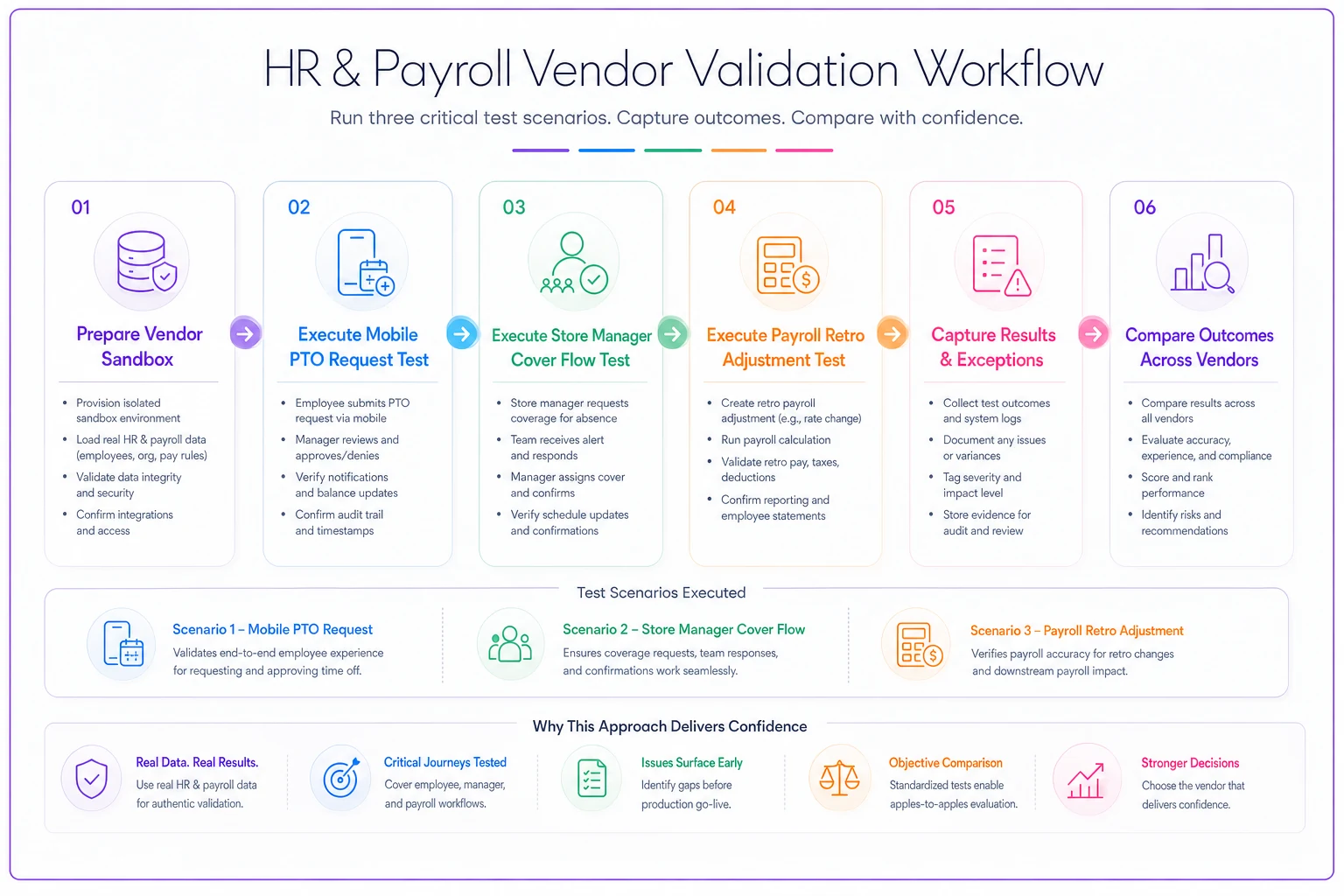
Demos are staged. The only way to find the cracks is to run your own scenarios in a sandbox or structured proof-of-concept. Make each vendor execute these three, with your data and your rules:
-
Mobile PTO request, frontline reality. Have a test employee request time off from a phone, mid-shift-week, against a realistic balance. Measure: how many taps, does the balance show correctly, does the approver get a usable notification, and does the approved request immediately reflect in the schedule?
-
Store manager cover flow. Approve that request as the store manager and watch what happens to coverage. Does the system flag that the store drops below minimum staffing? Can the manager post and fill the open shift in the same flow, or do they have to jump to a separate screen? Time the whole loop.
-
Payroll sync with a retro adjustment. This is the one vendors hate. Approve a leave entry, run a pay calc, then correct the leave retroactively — wrong date, wrong hours — and run the next cycle. Confirm the retro adjustment flows correctly, doesn't double-pay, and produces a clean auditable record. A lot of post-go-live pain lives in this exact scenario.
A simple workflow for running the three sandbox tests.
These three tests take a few hours to set up properly. They're worth it. The scenarios that feel contrived in a sandbox are usually the ones that become expensive problems six months into production.
A short real scenario
A regional apparel chain, around 40 stores and roughly 1,100 employees, ran exactly these three tests across three finalists. Two vendors nailed the mobile request. Only one handled the retro payroll adjustment without producing a duplicate line that would've needed a manual clawback — a problem that, across a year of corrections, was quietly costing them several thousand dollars in overpayments and a lot of payroll-team hours chasing fixes.
The vendor with the smoothest demo was not the one that passed the retro test. They picked the one that passed the test. That's the whole point of running your own scenarios.
Bringing it together
The right absence platform for a 1,000-employee retail chain is rarely the one with the slickest demo. It's the one that handles your specific split of coverage pain versus compliance pain and survives the retro-adjustment payroll test with your actual rules loaded. Weight your scorecard toward the pain you actually have, run the three test scenarios above against every finalist, and read the contract for module-unbundling and lock-in traps before you negotiate.
For the detailed evaluation matrices, integration test cases, and the payroll-risk red flags that should kill a deal, work through the full RFP playbook on avoiding costly absence-system mistakes before your first vendor call. The shortlist gets you to five names fast; the RFP work is what keeps you from signing the wrong one.
The right absence platform for a 1,000-employee retail chain is rarely the one with the slickest demo. It's the one that handles your specific split of coverage pain versus compliance pain and survives the retro-adjustment payroll test with your actual rules loaded. Weight your scorecard toward the pain you actually have, run the three test scenarios above against every finalist, and read the contract for module-unbundling and lock-in traps before you negotiate.
For the detailed evaluation matrices, integration test cases, and the payroll-risk red flags that should kill a deal, work through the full RFP playbook on avoiding costly absence-system mistakes before your first vendor call. The shortlist gets you to five names fast; the RFP work is what keeps you from signing the wrong one.
Ready to optimize your workforce absence management?
Join 2,000+ HR teams using Absencely to reduce administrative burden, improve compliance, and boost employee satisfaction.