


Most HR teams don't have audit resources. They have one or two people who already spend half their week chasing managers for approvals, fixing payroll handoffs, and answering "why was my PTO balance wrong" emails. The idea of running a formal leave audit sounds like something only a 5,000-person company with an internal controls function would do.
But the problems that audits catch — the same accrual glitch repeating across 40 employees, the manager who approves everything retroactively, the leave codes that quietly map to the wrong pay rule — don't wait for you to have resources. They compound monthly. And by the time Finance flags them, you're explaining a five-figure variance to people who don't care that you were understaffed.
The good news: you don't need a heavy audit program to surface these patterns. You need a tight, repeatable monthly pass that samples the right records, runs a handful of queries, and routes exceptions through a playbook that tells people exactly what to do. That's what this is.
Why monthly beats annual (and why most teams get the cadence wrong)
The instinct is to batch audit work. Do it once a year, get it over with, pull a big sample, write a report. That's how internal audit traditionally operates, and it's the wrong model for leave data.
Leave exceptions aren't static errors sitting in a file. They're recurring process failures. A misconfigured accrual rule doesn't produce one bad record — it produces a bad record every pay period until someone fixes the config. If you only check annually, you're looking at twelve months of the same mistake replicated across however many employees hit that code path.
A monthly pass changes the whole economics. You're not trying to find every error. You're trying to detect patterns early enough that the fix is cheap. Catch an accrual rule problem in month one, you fix a handful of balances. Catch it in month eleven, you're reprocessing a year of payroll and writing apology emails.
What tends to happen with smaller HR teams is that monthly also keeps the work small enough to actually happen. A 30-record sample reviewed in ninety minutes is a calendar item someone will honor. A 400-record annual audit gets scheduled, deferred, and eventually skipped in favor of open enrollment.
What a "lightweight" audit actually samples
The trap here is trying to review everything. You can't, and you shouldn't. The goal of sampling is to make recurring problems visible, not to achieve statistical certainty about every record.
Stop managing absences manually.
Absencely simplifies leave requests, approvals, and absence monitoring for your entire workforce.
- Automated leave tracking
- Manager approval workflows
- Compliance & reporting tools
No credit card required
| Sample bucket | Why it's included | Rough share of sample |
|---|---|---|
| Risk-weighted (high-exposure records) | Where errors cost the most — intermittent leave, retroactive edits, overlapping leave types | ~50% |
| Random baseline | Catches problems you aren't specifically looking for | ~30% |
| Targeted (prior-month exceptions) | Confirms last month's fixes actually held | ~20% |
For a team of around 300–800 employees, a sample of 25–35 records per month is usually enough to surface recurring issues. If the same exception type shows up three months running, you don't have bad luck — you have a process defect.
The risk-weighted portion is where most of the value lives. Random sampling alone will mostly return clean records, because most records are clean. Weighting toward the categories that historically break — intermittent FMLA day logging, manual balance adjustments, leaves that cross a pay-period boundary — is what makes a 30-record sample punch above its size.
Prioritize the risk-weighted bucket when you're short on review time — it's where recurring defects surface fastest.
One pattern worth calling out: teams that let the sample run fully random get discouraged fast. They review 30 records, find one minor issue, and conclude the audit "isn't finding anything." It's not that the data is clean. It's that random sampling buried the problems in a sea of normal approvals.
The SQL queries that do the heavy lifting
You don't need a BI platform for this. If you can export leave records and run queries against a flat table, you can run the whole monthly pass. The queries below assume a simplified leaverecords table with columns like employeeid, leavetype, startdate, enddate, hours, status, approvedby, approvedat, createdat, and payperiodid.
1. Retroactive approvals (approved well after the leave occurred)
SELECT employeeid, leavetype, startdate, enddate, approvedat, approvedby, DATEDIFF(approvedat, enddate) AS dayslate FROM leaverecords WHERE status = 'approved' AND approvedat > DATEADD(enddate, INTERVAL 7 DAY) AND createdat >= DATESUB(CURRENTDATE, INTERVAL 1 MONTH) ORDER BY days_late DESC;
Anything over a 7-day lag gets flagged. A manager who consistently shows up here isn't being malicious — usually they're approving in bulk at month-end without checking dates. But that habit is exactly what produces payment timing problems.
2. Overlapping leave records for the same employee
SELECT a.employeeid, a.leavetype AS typea, b.leavetype AS typeb, a.startdate AS astart, a.enddate AS aend, b.startdate AS bstart, b.enddate AS bend FROM leaverecords a JOIN leaverecords b ON a.employeeid = b.employeeid AND a.id < b.id AND a.startdate <= b.enddate AND b.startdate <= a.end_date WHERE a.status = 'approved' AND b.status = 'approved';
3. Leave-type to pay-rule mismatches
SELECT lr.employeeid, lr.leavetype, lr.hours, lr.status, pm.expectedpaid, lr.ispaid FROM leaverecords lr JOIN paymapping pm ON lr.leavetype = pm.leavetype WHERE lr.ispaid <> pm.expectedpaid AND lr.createdat >= DATESUB(CURRENT_DATE, INTERVAL 1 MONTH);
4. Round-number manual adjustments
SELECT employeeid, adjustmenthours, adjustedby, reason, createdat FROM balanceadjustments WHERE ABS(adjustmenthours) IN (8, 16, 24, 40) AND (reason IS NULL OR reason = '') AND createdat >= DATESUB(CURRENT_DATE, INTERVAL 1 MONTH);
That last filter — blank reason — is what separates signal from noise. A documented 40-hour adjustment is fine. An undocumented one is a future dispute.
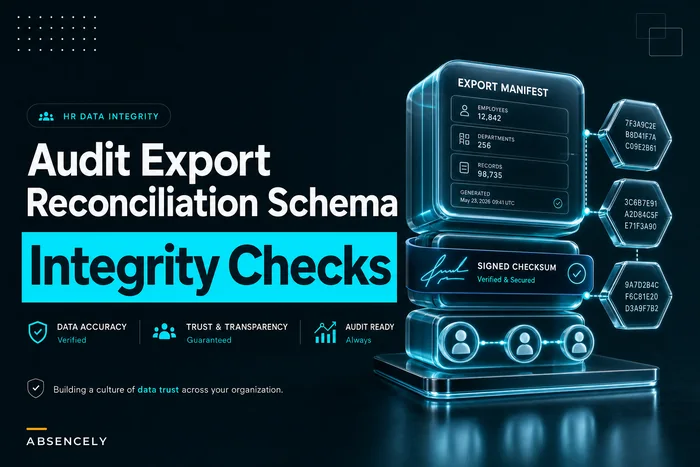
If you're exporting data to run these, it's worth getting the export format stable and checksummed so your month-over-month comparisons mean something. The thinking in this audit export and reconciliation schema for absence platforms pairs well with a sampling program — consistent manifests make the "did last month's fix hold" check trivial.
The reviewer checklist
Queries surface candidates. A human still has to decide whether each one is a real exception or an explained edge case. The point of a checklist is to make that decision consistent across whoever happens to be reviewing that month — because inconsistent reviewers are how the same issue gets waved through one month and escalated the next.
-
- [ ] Leave type matches what the documentation actually supports
-
- [ ] Dates on the record match the dates in any supporting notes or certifications
-
- [ ] Paid/unpaid flag is correct for the leave type
-
- [ ] Approval happened within policy timing (not retroactively unless justified)
-
- [ ] No overlapping approved leave for the same window
-
- [ ] Any manual adjustment has a documented reason and an approver
-
- [ ] The record flows to the correct pay period
-
- [ ] If this record was flagged last month, confirm the fix is still in place
Keep it to one screen. The moment a reviewer checklist spills onto a second page, the review gets rushed and the last items get rubber-stamped.
One thing worth holding onto: the most valuable checkbox is the last one. Confirming prior-month fixes actually held is what turns a sampling exercise into a control. Teams skip it because it feels redundant. It's not — a surprising share of "fixed" issues quietly reappear because the fix addressed the symptom, not the config.
Remediation playbook: what to do when you find something
Finding an exception is useless if there's no agreed path to resolution. The playbook below maps each common exception type to an owner and an action, so nobody has to improvise mid-audit.
-
1. Retroactive approval pattern from one manager → Route to that manager's HRBP with the specific records. Action: confirm legitimacy, then coach on approval timing. If it repeats next month, escalate.
-
2. Leave-type / pay-rule mismatch → Route to payroll config owner. Action: correct the individual records and check whether the mapping itself is wrong (if it is, this is a systemic fix, not a one-off).
-
3. Overlapping records → Route to the HR coordinator who owns that employee group. Action: determine which record is correct, void the other, verify no double payment reached payroll.
-
4. Undocumented manual adjustment → Route to whoever made the adjustment. Action: supply the missing reason and approver, or reverse the adjustment if it can't be justified.
-
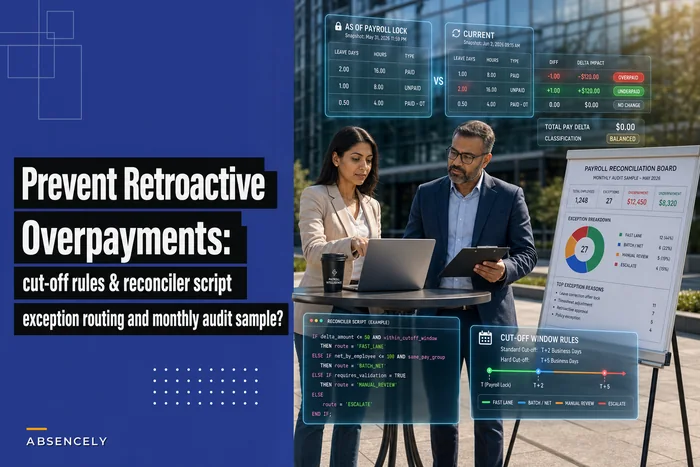
5. Overpayment already through payroll → This is its own track. Correcting a leave record after pay has run needs careful handling to avoid creating new problems — the cut-off and routing logic in preventing retroactive overpayments from leave corrections is the safer path than ad-hoc clawbacks.
The distinction in item 2 is the one most teams miss. They fix the individual records and move on, and the mapping keeps generating the same error. Every exception should carry a quick judgment: is this an instance, or a pattern? Instances get corrected. Patterns get a config change and a ticket.
Here's a quick visualization of how a found exception should flow from detection to resolution.
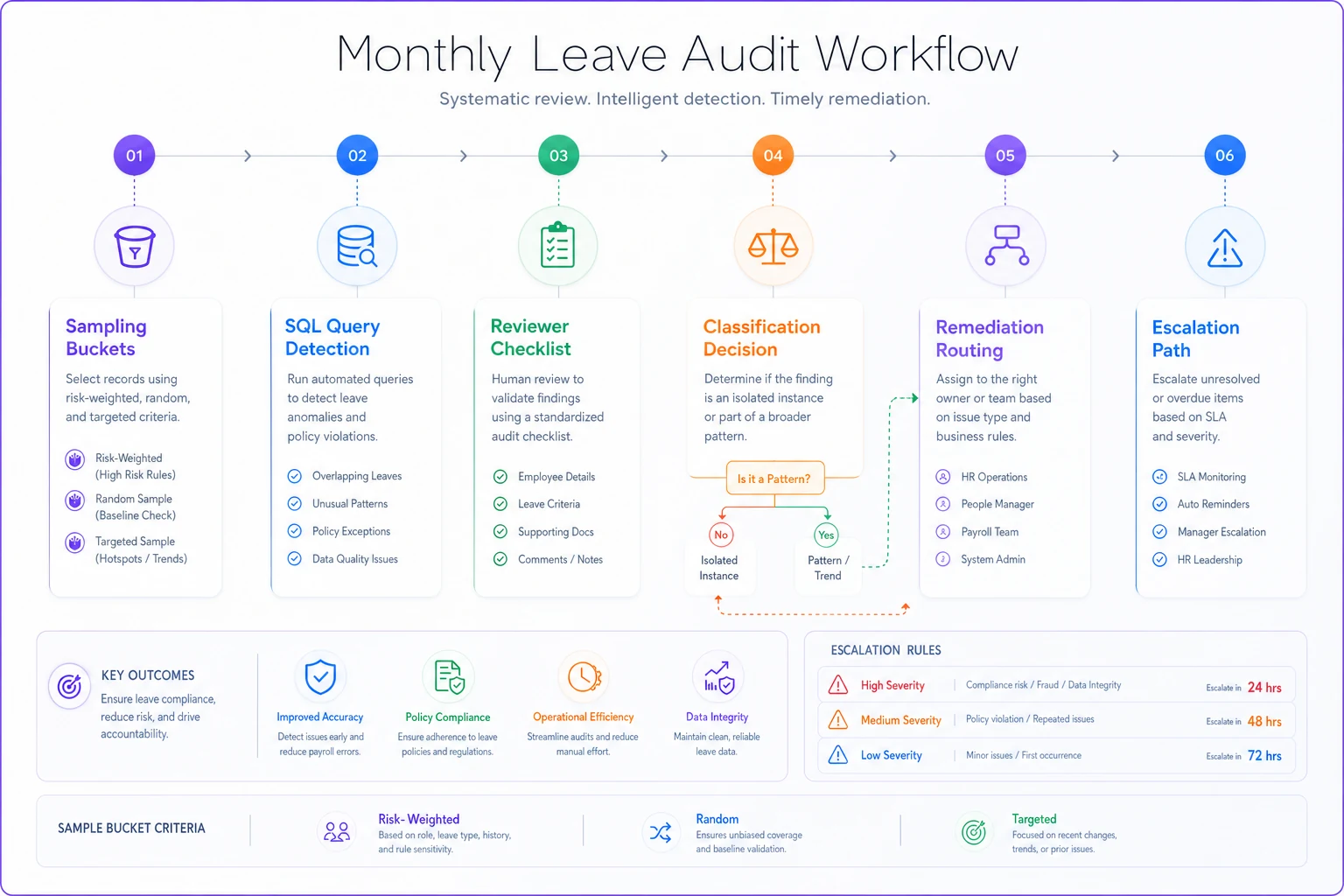
The visual shows the detection steps, the reviewer decision points, and the owners the exception is routed to — use it to align the team on who does what when a flag appears.
Escalation thresholds
Not every exception deserves the same response. Thresholds keep the program proportional — small stuff gets fixed quietly, and real risk gets visibility fast.
| Trigger | Response |
|---|---|
| Single isolated record error | Correct it, log it, no escalation |
| Same exception type appears 3 months running | Flag as systemic; open config/process fix |
| Any overpayment over roughly $500 through payroll | Notify payroll lead same week |
| Same manager flagged 2+ months for retroactive approvals | Escalate to their manager + HRBP |
| Any record touching active legal/leave dispute | Immediate escalation; do not auto-correct |
That last row matters more than its placement suggests. Auto-correcting a record tied to an active dispute or complaint can destroy the timeline you'd need to defend the decision later. When a sampled record is attached to anything contested, the audit's job is to flag and freeze, not fix.
A realistic look at what this surfaces
Consider a mid-sized home-services company, around 450 employees, mix of hourly field techs and salaried office staff. No audit function — leave was managed by one HR generalist and a shared mailbox.
They started running the monthly pass mostly to catch PTO balance complaints before employees did. What the first two months actually surfaced was a leave-type mapping issue: a "floating holiday" code had been set to accrue but was being paid out as regular PTO at termination. Around 30 employees were affected, and the drift was small per person — but it was quietly producing overpayments at every exit.
Caught at month two, the fix was a config change plus corrections on a handful of recent terminations. The exposure they avoided over the following year ran somewhere in the low five figures, mostly in termination payouts that would otherwise have gone out wrong and been near-impossible to claw back. Not a dramatic number. But it came from about three hours of review a month, and it was exactly the kind of slow leak that annual audits consistently miss because the per-record error looks too small to notice.
The second-order benefit was quieter: managers who knew retroactive approvals were being sampled started approving on time. The flag rate on that query dropped off within a couple of months without anyone being formally coached.
When this makes sense — and when it doesn't
This approach fits teams in the 150–1,500 employee range who have real leave volume but no dedicated controls function. Below that, you can usually eyeball the whole thing. Above it, you probably need a more formal program with its own staffing, though the sampling logic still applies.
It's a bad fit if your leave data lives in three disconnected systems with no reliable way to export and join it. The queries assume you can get a clean table. If you can't, your first project isn't the audit — it's getting the data into a queryable, consistent shape. Running sampling against unreliable exports produces false exceptions that burn reviewer trust fast, and once reviewers stop trusting the flags, the program is effectively dead.
And if nobody owns remediation, skip it. An audit that surfaces problems no one is accountable for fixing just generates a monthly list of things that make everyone feel bad. The playbook and the escalation thresholds aren't optional add-ons — they're the part that makes the finding worth anything.
Starting small
You can stand this up in an afternoon. Pick the three queries most relevant to your pain — retroactive approvals and leave-type mismatches are usually the highest yield — pull a 25-record risk-weighted sample, and route whatever you find through a basic owner map. Don't wait for perfect data or a formal charter.
The teams that get value from this aren't the ones with the most sophisticated tooling. They're the ones who run the same small pass every single month, compare against last month, and actually close the loop on what they find. The compounding works in your favor: three months in, you're mostly confirming fixes held, and the genuinely new exceptions are rare enough to handle in the time it takes to drink a coffee.
The teams that get value from this aren't the ones with the most sophisticated tooling. They're the ones who run the same small pass every single month, compare against last month, and actually close the loop on what they find. The compounding works in your favor: three months in, you're mostly confirming fixes held, and the genuinely new exceptions are rare enough to handle in the time it takes to drink a coffee.
Ready to optimize your workforce absence management?
Join 2,000+ HR teams using Absencely to reduce administrative burden, improve compliance, and boost employee satisfaction.