

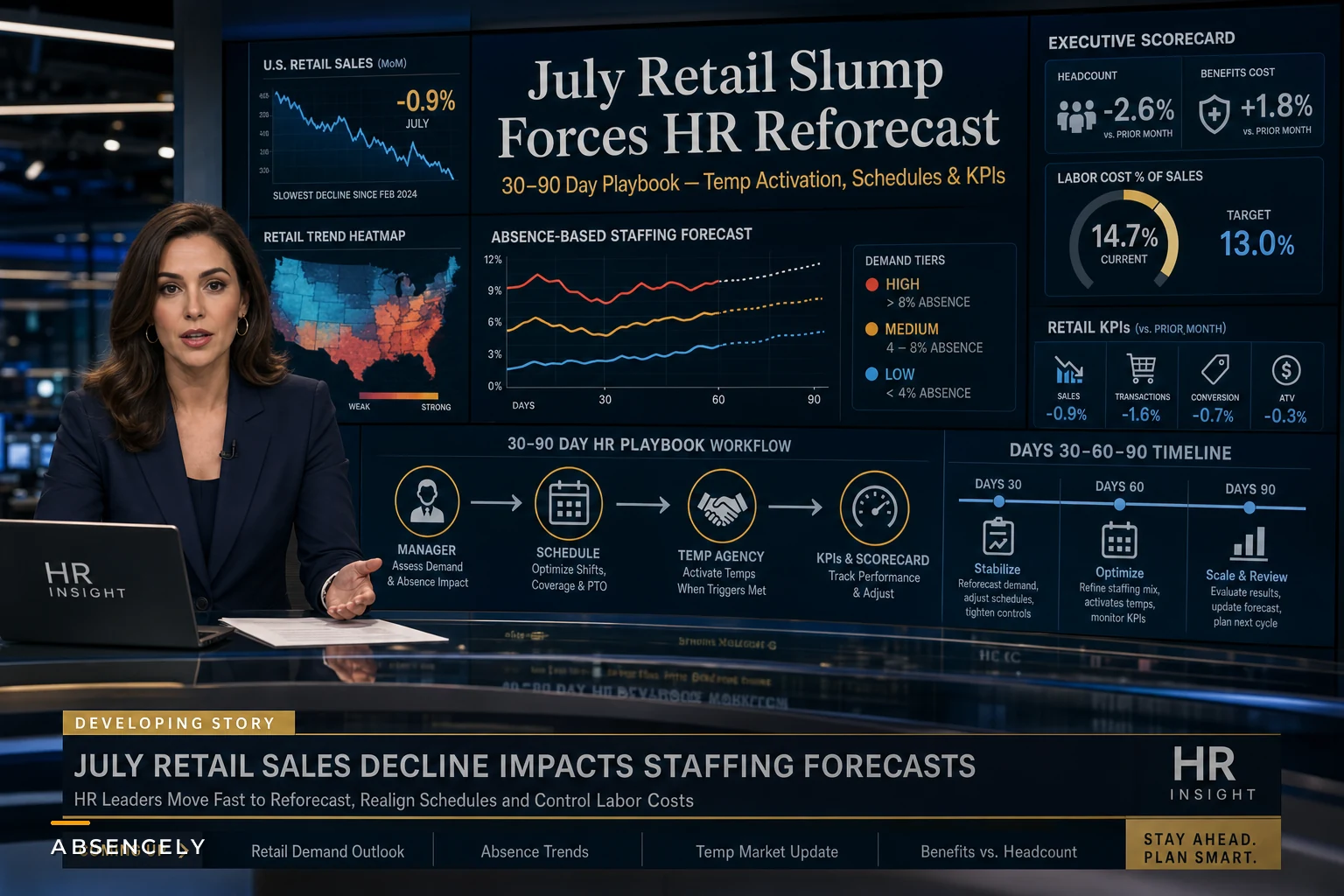

The advance retail estimate for July 2026 came in at a 0.6% drop — the first monthly decline in nine months, according to the Census Bureau's retail sales report. On its own, a soft month isn't a crisis. Retail bounces around. But it landed on top of a July jobs report that CNBC described as an unexpected loss of 23,000 jobs, with visible softening in retail and leisure hiring.
For HR teams, that combination is what actually stings. Weaker demand plus cooling hiring means the labor buffer you built during a growth cycle is now sitting on the wrong side of the ledger. You're carrying scheduled hours and absence assumptions calibrated for a busier store than the one you'll actually be running come September.
This isn't about slashing headcount. It's about re-running your short-term forecast before payroll drift and stale scheduling rules quietly eat your margin for a quarter. Below is how to think about the next 30, 60, and 90 days — including the parts most teams get wrong.
The trap: freezing hiring but leaving everything else on autopilot
The reflex when sales dip is pretty predictable — pause backfills, tighten overtime, maybe delay a temp contract. Leadership feels like it acted. But hiring freezes are the slowest-moving lever you have, and they're usually the only one people pull.
What gets ignored is that your entire staffing model is still tuned to peak assumptions. Your absence coverage thresholds, your surge-roster triggers, your scheduled hours per shift, your "call in a temp when two people are out" rules — all of it was set when foot traffic justified it. Freeze hiring and leave those untouched, and you end up overstaffed on quiet days and still scrambling on the odd busy one, because your rules never re-baselined.
Worth naming directly: in a soft-demand month, absence costs actually go up as a percentage of labor spend, even when total absences stay flat. Fewer productive hours means each covered shift is a bigger share of a smaller pie. So the thing to reforecast first isn't headcount — it's the cost-per-covered-hour math underneath your absence plan.
First 30 days: re-baseline before you cut
Rebuild your demand baseline, store by store. A chain-wide 0.6% drop hides enormous variance. In real operations, one location is down 4% while another is flat. Cutting hours uniformly across both is how you gut your best store's service level while barely touching the underperformer.
Stop managing absences manually.
Absencely simplifies leave requests, approvals, and absence monitoring for your entire workforce.
- Automated leave tracking
- Manager approval workflows
- Compliance & reporting tools
No credit card required
Recalculate your absence coverage break-even. This is the number most teams don't have documented. At what point does covering an absence with overtime, a temp, or a shift-swap cost more than the revenue that shift protects? During a slump, that break-even shifts — some shifts genuinely aren't worth backfilling anymore.
| Shift type | Peak-season rule | Soft-demand rule (reforecast) |
|---|---|---|
| Weekday mid-day, 1 absence | Auto-backfill with temp | Redistribute, no backfill |
| Weekend peak, 1 absence | Backfill + OT if needed | Backfill, no OT unless service SLA breached |
| Two+ absences, any shift | Activate temp SLA | Cover internally first, temp only if 3+ |
| Predictable/approved leave | Pre-scheduled coverage | Pre-scheduled, but review roster size |
The point isn't these exact thresholds — it's that your rules should have a peak column and a soft-demand column, and you should know which one you're actually operating in this week.
The 30-day checklist HR should run right now
Most teams skip straight to cuts and miss the groundwork that makes those cuts actually land correctly. Before anything else, work through this:
-
Pull store-level sales variance for July vs. your forecast — flag any location off by more than 3%
-
Recalculate scheduled hours per shift against updated traffic patterns
-
Review every open req and sort into
freeze, delay 60 days, or genuinely critical
-
Audit temp-agency contracts for minimum-hour commitments and cancellation windows before you delay activation
-
Recompute absence coverage break-even by shift type
-
Flag any surge-roster triggers still calibrated to peak volume
-
Brief finance on the headcount-vs-benefits trade-off in dollar terms, not headcount terms
-
Tighten leave documentation cadence — soft periods are exactly when audit discipline slips
Keep a simple weekly checklist for leave documentation to prevent lapses when teams get lean.
That last one gets skipped constantly. When teams get lean, documentation quality drops right when you can least afford a compliance surprise. Keep the cadence even as everything else compresses.
Days 30–60: fix the temp and surge logic, don't just pause it
The instinct is to cancel temp activation entirely. Sometimes that's right. Often it's expensive. If your temp SLA has a minimum-hour clause or a short cancellation window, "pausing" can cost as much as running it. Read the contract before you touch the switch.
The smarter move is re-tiering when temps activate rather than whether they exist. In a softer period, you can usually raise the activation threshold — cover the first absence internally, only pull external labor at the second or third. But that only works if your internal redistribution logic actually holds, and this is where most schedules fall apart.
When someone calls out during a soft-demand month, here's what the decision flow should actually look like — not the peak-era default that most managers are still running on:
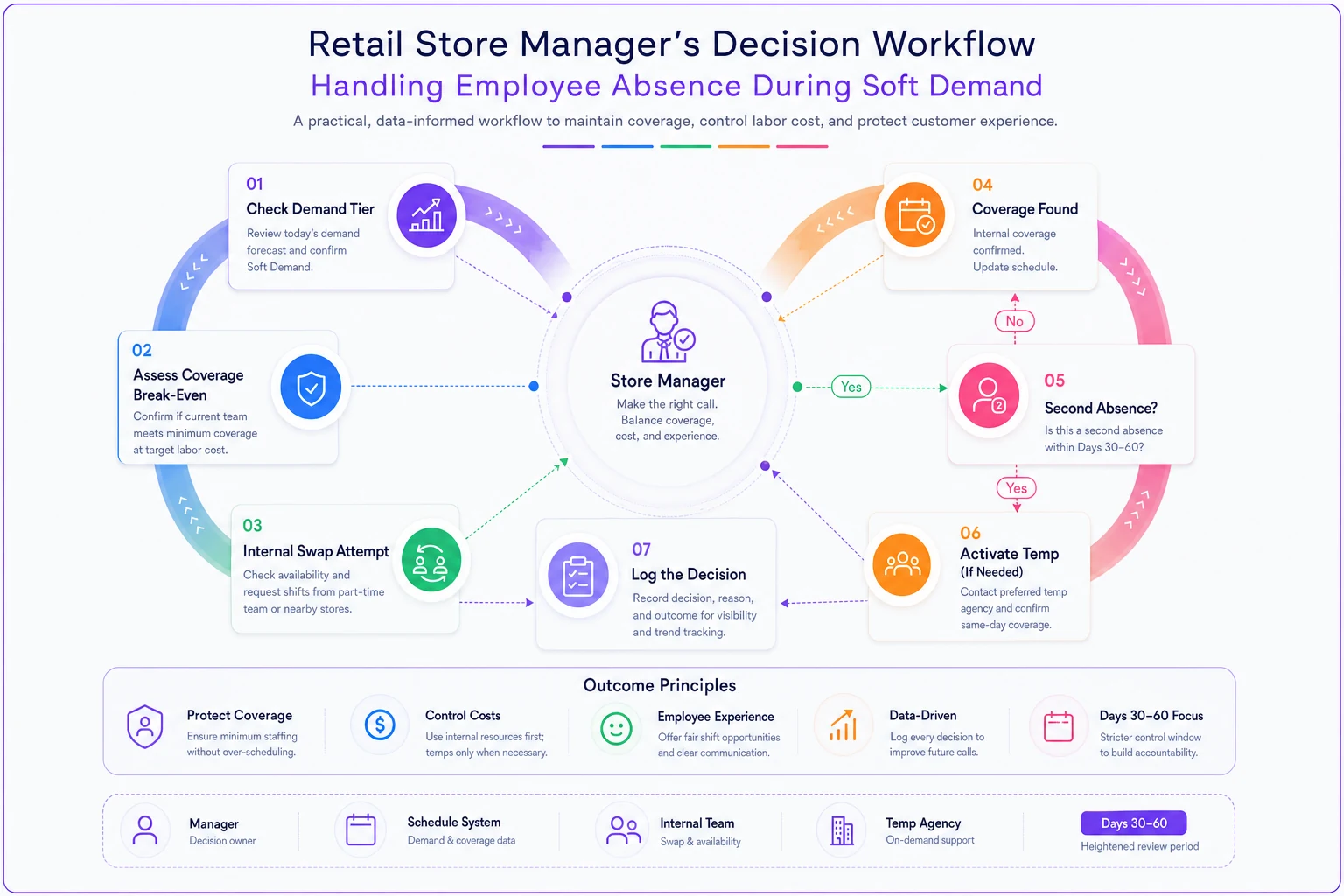
Here's the decision flow managers should follow during Days 30–60.
-
Manager logs the absence and checks the current demand tier for that day (not the default assumption)
-
Check whether the shift is above the reforecast coverage break-even
-
If below break-even → redistribute remaining staff, no backfill
-
If above break-even → attempt internal swap first
-
Only if internal coverage fails and it's a second absence → activate temp per SLA
-
Log the decision so the pattern is visible next week
The failure point is almost always step 1. Managers keep running peak-era instincts — someone's out, call a temp — because nobody updated the rule they operate by day to day. Your reforecast is worthless if it lives in a spreadsheet the floor manager never opens.
Days 60–90: turn the adjustment into a repeatable forecast, not a one-off cut
By now you should have real data on how the soft-demand rules performed. This is where you either lock in a smarter forecast or snap back to old habits the moment sales tick up.
The teams that handle downturns well treat absence and demand as one connected model rather than two separate reports. Absence patterns feed staffing need, staffing need feeds coverage cost, coverage cost feeds the reforecast — and it all has to update on a weekly cadence during volatile periods, not quarterly. If you want the deeper mechanics of connecting absence signals to concrete staffing decisions and thresholds, the guide on turning absence data into staffing outcomes walks through the decision logic in detail.
This is also where operational software starts earning its place. Not as a magic fix, but as the thing that keeps store-level demand, absence logs, and coverage rules in one view instead of scattered across three tools and a manager's memory. When AI-assisted scheduling flags that a location's absence-adjusted staffing is running above its reforecast need, that's a decision surfaced before payroll closes rather than one you discover in the month-end variance report. The value isn't automation for its own sake — it's shrinking the lag between "demand changed" and "the schedule changed."
A real scenario
A regional home-goods retailer with 11 locations saw July sales dip roughly 5% overall, but the pain wasn't distributed evenly — three suburban stores drove most of it while the flagship held steady. Their first move was the usual one: a chain-wide hiring freeze and a blanket 10% cut to scheduled hours.
Within three weeks it backfired in both directions. The flagship started missing service SLAs on weekends, while the soft suburban stores were still auto-backfilling weekday absences with temps because nobody changed the coverage rule. They were overspending on unneeded temp hours at slow stores and understaffing their one reliable earner at the same time.
The fix wasn't dramatic. They re-baselined per store, raised the temp activation threshold to "second absence" at the soft locations, restored weekend hours at the flagship, and moved their coverage break-even review to weekly. Over the following two months, temp spend dropped somewhere in the $6k–$8k range per month across the soft stores, weekend service complaints at the flagship basically disappeared, and they did it without the layoffs they'd been quietly discussing.
When aggressive cuts actually make sense — and when they don't
Cut deeper when: the demand drop is broad-based across every location, your cash position is tight, and you have clear signal the softness is structural rather than a one-month blip. In that case, protecting runway beats protecting service levels.
Don't over-cut when: variance is concentrated in a few locations, your absence coverage is already lean, or you're in a labor market where rehiring will be slow and expensive when demand returns. Over-cutting into a shallow dip means you rehire at a premium and eat onboarding costs three months later — often more than the softness ever cost you.
Who should be especially careful: any team that hasn't separated store-level variance from the headline number. If all you have is "sales down 0.6%," you don't have enough resolution to cut intelligently. Get the store-level picture first, then decide.
The through-line
A single soft month is a signal, not a verdict. The teams that come through it well aren't the ones who cut fastest — they're the ones who re-baselined their assumptions store by store, updated the rules their managers actually operate by, and kept demand and absence data connected instead of frozen in separate reports.
The freeze-hiring reflex feels decisive but leaves most of your staffing model untouched. The real work is quieter: recalculating coverage break-evens, re-tiering temp activation, and tightening the loop between what demand is doing this week and what your schedule looks like next week. Do that, and a 0.6% dip becomes a forecasting adjustment — not a scramble you're still cleaning up in Q4.
The freeze-hiring reflex feels decisive but leaves most of your staffing model untouched. The real work is quieter: recalculating coverage break-evens, re-tiering temp activation, and tightening the loop between what demand is doing this week and what your schedule looks like next week. Do that, and a 0.6% dip becomes a forecasting adjustment — not a scramble you're still cleaning up in Q4.
Ready to optimize your workforce absence management?
Join 2,000+ HR teams using Absencely to reduce administrative burden, improve compliance, and boost employee satisfaction.