

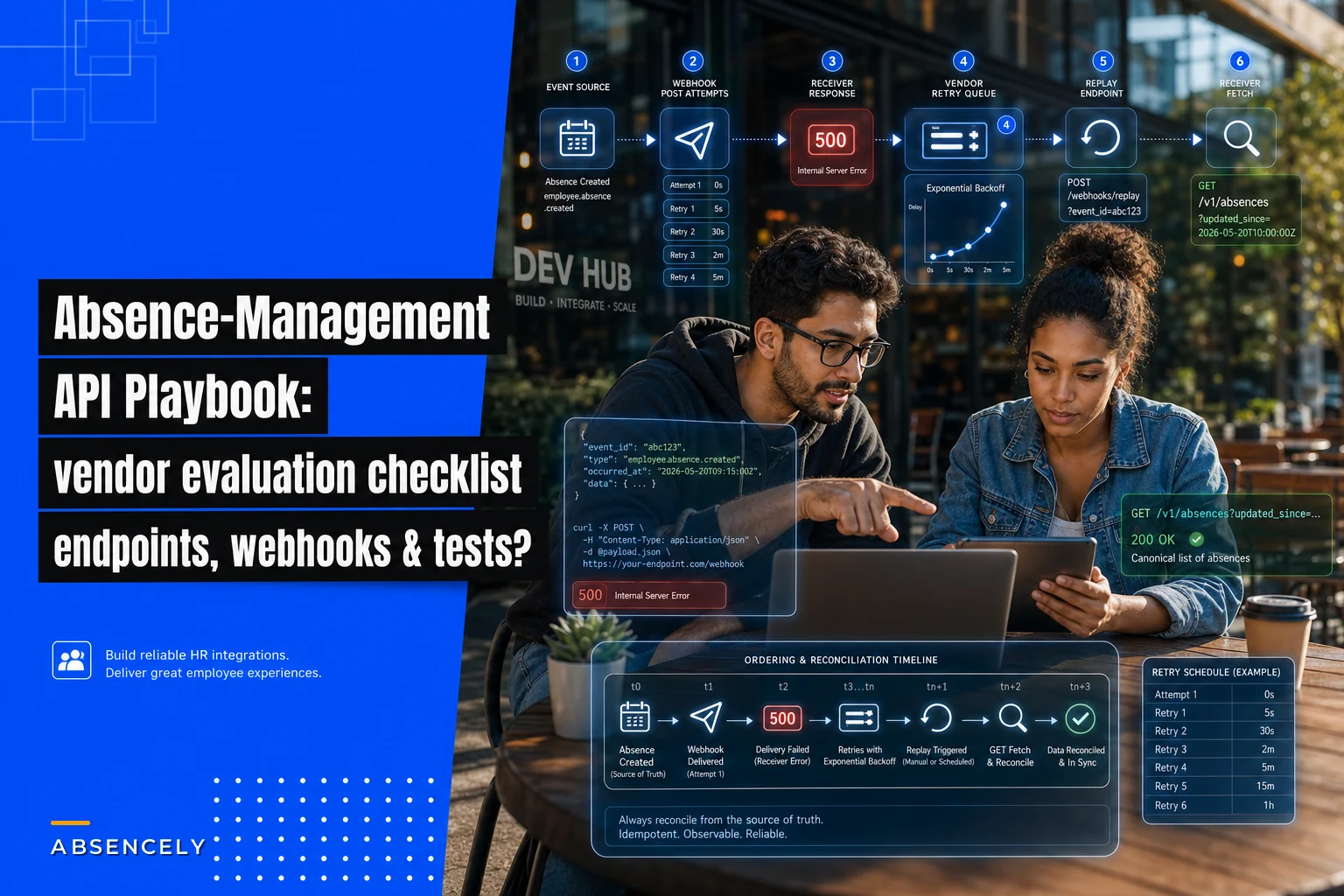

Most absence vendor demos look great until you ask the one question that actually matters: "Show me the endpoint that posts an approved intermittent FMLA day to payroll, and show me what happens when that POST fails halfway through." The polished UI melts away and you're suddenly talking to a sales engineer who promises to "loop in the integrations team."
That gap — between the demo and the actual plumbing — is where integration projects go to die. This playbook gives you the exact questions, endpoints, payload shapes, and acceptance tests to pin a vendor down before procurement, not six months into a stalled implementation. If you're the HR leader running the evaluation, hand this to whoever owns your integrations and make them score each vendor against it.
A quick note on scope: this is specifically about the absence management API endpoints that connect your leave system to the five systems it always has to touch — payroll, occupational health providers, time clocks / T&A, ATS/onboarding, and finance cost‑allocation. We're not covering the absence policy logic itself. We're covering the wires.
Start with the five integration surfaces, not the feature list
Vendors love to sell features. What breaks in production is integration. The first thing to map is which of your systems the absence platform must exchange data with, and in which direction. In the implementations that stall, the failure almost never happens inside the absence system — it happens at the handoff to payroll or the silent dropped webhook to the T&A system.
Here's the breakdown of what each surface actually needs to move:
| Surface | Primary direction | What moves | The thing that breaks |
|---|---|---|---|
| Payroll | Absence → Payroll | Approved absence days, pay codes, dock amounts, retro adjustments | Retro corrections after payroll cutoff |
| Occupational health | Bidirectional | Referrals out, RTW clearances + restrictions back | PHI leaking into general absence records |
| Time clocks / T&A | T&A → Absence | Raw punches, no‑shows, schedule exceptions | Timezone + partial‑day mismatches |
| ATS / onboarding | ATS → Absence | New hire IDs, start dates, accrual eligibility | Employee ID mismatch before first paycheck |
| Finance cost‑allocation | Absence → Finance | Cost‑center tagged absence hours, showback splits | Cost center changes mid‑leave |
Insist on the
updated_sincecursor and theGET /v1/costing/mappingendpoint.
The pattern worth internalizing: every one of those "breaks" is a timing or identity problem, not a data‑format problem. Keep that in mind as you read the endpoint recommendations — the schema is the easy part.
Concrete REST endpoints to ask every vendor for
Below are the endpoints a competent absence platform should expose or consume. For each, I'm giving the verb, an example path, and what it's for. If a vendor can't map their API to roughly this shape, that's a signal — not necessarily a dealbreaker, but something to probe.
Stop managing absences manually.
Absencely simplifies leave requests, approvals, and absence monitoring for your entire workforce.
- Automated leave tracking
- Manager approval workflows
- Compliance & reporting tools
No credit card required
Core absence resources
-
GET /v1/absences?employeeid=...&status=approved&updatedsince=...— pull absences changed since a timestamp. Theupdated_sincecursor is non‑negotiable for reconciliation. -
POST /v1/absences— create an absence record (for systems feeding into the platform). -
GET /v1/absences/{absence_id}— fetch a single canonical record. -
PATCH /v1/absences/{absence_id}— apply a correction (status change, date adjustment). -
GET /v1/absences/{absence_id}/days— day‑level breakdown, which matters enormously for intermittent leave.
Payroll surface
-
GET /v1/payroll/export?payperiodid=...— the payroll‑ready view: absence days already mapped to pay codes. -
POST /v1/payroll/adjustments— post a retro correction with an effective date and a reason code. -
GET /v1/pay-codes— the vendor's pay code catalog, so you can confirm it maps to yours.
Occupational health surface
-
POST /v1/oh/referrals— send a referral out to an OH provider. -
GET /v1/oh/clearances?employee_id=...— pull back clearance status and work restrictions. -
POST /v1/oh/attachments— upload supporting documents (handled separately from the clinical record; more on PHI below).
If you're setting up this surface, the referral and clearance field expectations are worth standardizing in advance — our occupational health integration playbook covers the referral forms and RTW clearance templates that these endpoints should carry.
Time & attendance surface
-
POST /v1/timeclock/events— ingest raw punch or exception events. -
GET /v1/timeclock/exceptions?date=...— pull no‑shows and unscheduled absences for triage.
ATS / onboarding surface
-
POST /v1/employees— create the employee record (idempotent on your external ID). -
PATCH /v1/employees/{employee_id}— update start date, eligibility, cost center.
Finance cost‑allocation surface
-
GET /v1/costing/allocations?period=...&cost_center=...— absence hours tagged by cost center for showback. -
GET /v1/costing/mapping— the current employee → cost center mapping the platform is using.
The two endpoints people consistently forget to ask for are GET /v1/costing/mapping and the updated_since cursor on absences. Without the mapping endpoint, finance can't audit why a cost landed where it did. Without the cursor, every sync becomes a full‑table pull, and that stops scaling somewhere around a few thousand employees.
A field‑level data dictionary (this is where vendors get vague)
Endpoints are the skeleton. The data dictionary is where most integrations actually fail, because two systems can both say "date" and mean completely different things. Insist on canonical field names, types, and formats in writing.
Below is a baseline dictionary for the core absence record. Use this as the thing you diff a vendor's spec against.
| Canonical field | Type | Required | Format / notes |
|---|---|---|---|
absence_id | string | yes | Vendor's stable ID, immutable |
externalemployeeid | string | yes | Your HRIS ID, not theirs |
absence_type | enum | yes | e.g. fmlacontinuous, fmlaintermittent, std, pto, sick, unpaid |
status | enum | yes | pending, approved, denied, cancelled, closed |
start_date | string | yes | ISO‑8601 date, YYYY-MM-DD, no time component |
end_date | string | conditional | required unless open‑ended intermittent |
hoursperday | decimal | conditional | required for partial‑day; 8.00 style |
timezone | string | yes | IANA tz, e.g. America/Chicago |
pay_code | string | conditional | required before payroll export |
cost_center | string | yes | as of the absence effective date |
reason_code | string | no | internal reason, not clinical |
updated_at | string | yes | ISO‑8601 timestamp with offset |
{ "absenceid": "abs9f31c", "externalemployeeid": "E-10492", "absencetype": "fmlaintermittent", "status": "approved", "startdate": "2027-03-14", "enddate": "2027-03-14", "hoursperday": 4.00, "timezone": "America/Chicago", "paycode": "FMLAUNPAID", "costcenter": "CC-220", "updatedat": "2027-03-10T09:21:44-06:00" }
{ "externalemployeeid": "E-10492", "absencetype": "sick", "startdate": "2027-03-20", "enddate": "2027-03-20", "hoursperday": 8.00, "timezone": "America/Chicago", "idempotencykey": "req-2027-03-20-E10492-sick" }
Two field‑level details that cause real pain if you skip them: separating start_date (a plain date) from any timestamp, and making timezone mandatory. A partial‑day absence that arrives without a timezone will land on the wrong calendar day for West Coast employees roughly as often as you'd expect given the offset — and those misfires surface as payroll disputes weeks later, when nobody remembers the original punch.
Webhook events and retry design
Polling the updated_since cursor is your safety net. Webhooks are your real‑time path. You want both, and you want to pressure‑test the webhook retry behavior specifically — a dropped webhook with no retry is how an approved leave silently never reaches payroll.
Ask the vendor to document these event types at minimum:
-
absence.approved -
absence.status_changed -
absence.dayadded/absence.dayremoved(critical for intermittent) -
oh.clearance_received -
payroll.adjustment_posted
A webhook payload should be thin — an event type, an ID, and a timestamp — not the full record. The receiver fetches the canonical record via GET. This avoids stale data when webhooks arrive out of order:
{ "eventid": "evt7723a", "eventtype": "absence.approved", "absenceid": "abs9f31c", "occurredat": "2027-03-10T09:21:44-06:00" }
-
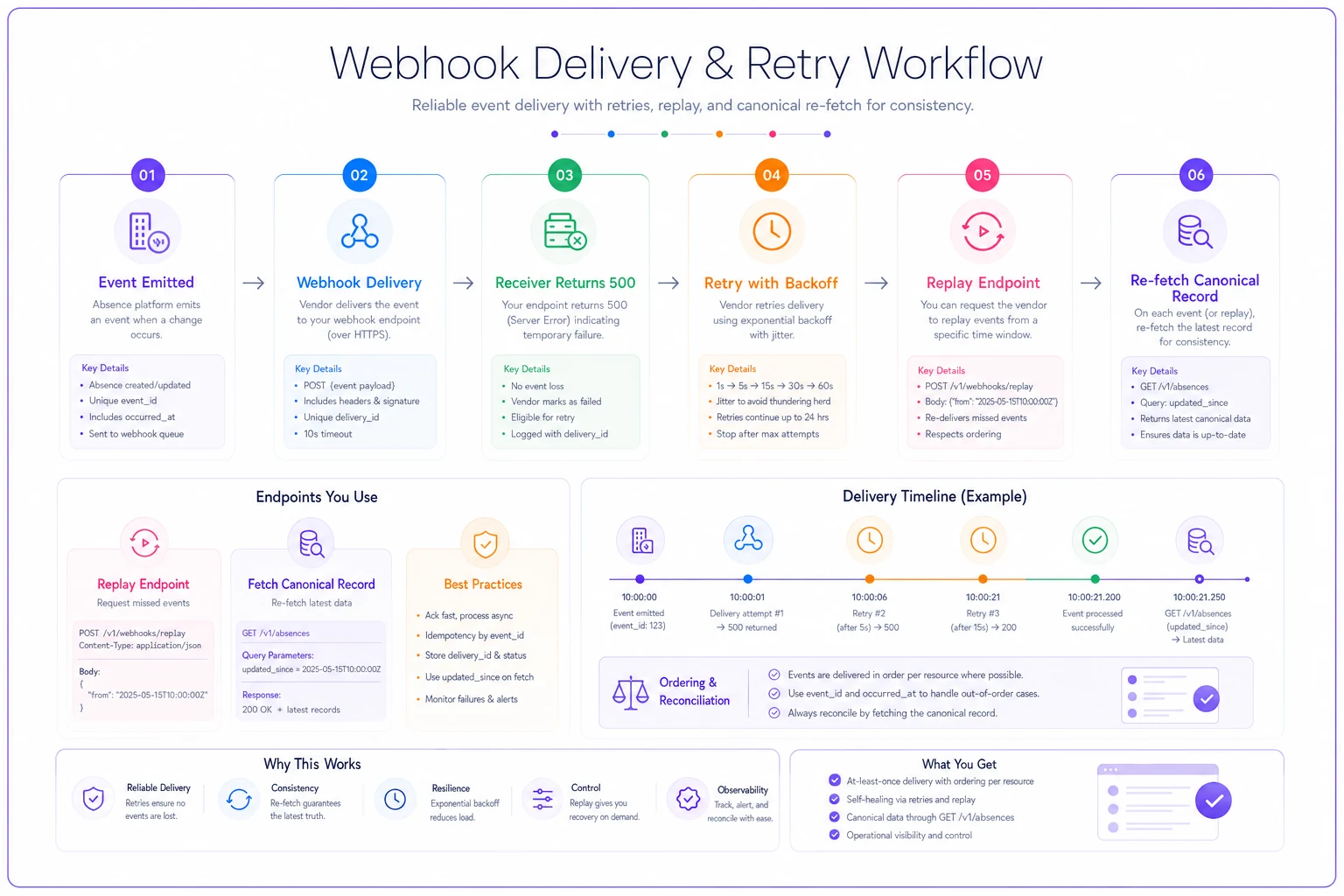
What's the retry schedule? You want exponential backoff over at least 24 hours, not three attempts in five minutes.
-
Is there a replay endpoint?
POST /v1/webhooks/{event_id}/replayor an events log you can query after an outage. Without replay, a two‑hour outage on your side means permanent data loss unless you reconcile by polling. -
Are deliveries signed? An HMAC signature header you can verify, so you're not accepting spoofed events.
-
Is ordering guaranteed? It usually isn't — which is exactly why payloads should be thin and the receiver re‑fetches.
The failure mode we see most: a vendor has webhooks, delivers them once, and treats a 500 from your endpoint as "delivered, their problem." Three weeks later an absence is approved in their system and simply absent from payroll. Make the retry and replay behavior a written SLA line, not a verbal assurance.
Here's a simple retry and replay workflow to visualize.
The failure mode we see most: a vendor has webhooks, delivers them once, and treats a 500 from your endpoint as "delivered, their problem." Three weeks later an absence is approved in their system and simply absent from payroll. Make the retry and replay behavior a written SLA line, not a verbal assurance.
Auth, security, and BAA guidance
Once occupational health data enters the picture, you're handling PHI, and the security review stops being optional paperwork. A few concrete requirements to hold the line on:
-
OAuth 2.0 client‑credentials for service‑to‑service, with scoped tokens. Avoid long‑lived static API keys for anything that touches clinical data. If a vendor's only auth option is a single bearer key that never expires, that's a finding.
-
Scoped access so the payroll integration token literally cannot read OH clearance details. Least privilege at the token level.
-
A signed BAA before any sandbox test with real‑shaped data. Ask specifically whether sub‑processors (their cloud host, any OH clearinghouse) are covered.
-
TLS 1.2+ enforced, and no PHI in query strings or URLs — because URLs end up in logs. This is why the OH clearance endpoint takes
employee_idas a lookup key and returns clinical detail in the body, never the reverse.
The under‑asked question: where do attachments live, and who can retrieve them? A doctor's note uploaded via POST /v1/oh/attachments should be stored separately from the general absence record, retrievable only with an OH‑scoped token, and ideally returned as a short‑lived signed URL rather than inline. If the attachment is reachable by the same token payroll uses, you've got a PHI exposure sitting in your architecture diagram.
Idempotency, error semantics, and versioning
These three are the "boring" parts that quietly determine whether your integration is stable or whether you're firefighting duplicates every month‑end.
Idempotency. Every POST that creates or adjusts financial data must accept an Idempotency-Key header. Retried requests with the same key return the original result, not a second record. Without this, a network blip during a payroll adjustment post becomes a duplicate dock — and reversing those is painful and employee‑facing.
{ "error": { "code": "paycodeunmapped", "message": "No paycode mapping for absencetype 'std' in cost_center CC-220", "retryable": false } }
The retryable flag matters. A 429 or a transient 503 is retryable; an unmapped pay code is not — retrying it forever just buries the real problem. Ask the vendor for their full error code list up front.
Versioning. Insist on explicit versioning in the path (/v1/) or a version header, plus a written deprecation policy with a minimum notice window. The silent breaking change — a vendor tightens field validation with no notice and your nightly sync starts failing — is a genuinely common and avoidable disaster. Get the notice window in the contract.
Sandbox and test harness requirements
A vendor without a usable sandbox is a vendor you're integrating against in production, which is exactly as bad as it sounds. What a real sandbox needs:
-
Seed data you can reset, so your automated tests start from a known state.
-
The ability to trigger webhooks on demand —
POST /v1/sandbox/emit?event_type=absence.approvedor equivalent — so you can test your receiver without manually creating absences. -
Simulated failure modes
a way to force a
500, a delayed webhook, a duplicate delivery. -
Clearly fake PHI, never real patient data, so your developers can work without a signed BAA covering them personally.
If the sandbox only produces happy‑path data, your test coverage will only ever cover the happy path, and your first 500 will happen in production against real paychecks.
Reconciliation and mapping endpoints
This is the surface that saves you at month‑end. Even with perfect webhooks, systems drift. You need endpoints that let you prove the absence platform and payroll agree.
-
GET /v1/reconciliation/absences?period=...— a period summarytotal absence hours by type and cost center, with record counts.
-
GET /v1/mapping/pay-codes— the full absencetype → paycode map the vendor is applying. -
GET /v1/mapping/employees?external_id=...— confirm the platform's internal employee resolves to your HRIS ID.
The reconciliation workflow that actually catches problems: nightly, pull GET /v1/absences?updatedsince= into a staging table, compare hour totals against what payroll received, and flag any absenceid present in one system and missing in the other. The mapping endpoints then explain why a mismatch exists — nine times out of ten it's an employee whose cost center changed mid‑leave, or an absence type with no pay code mapping. Without GET /v1/mapping/employees, that investigation turns into a spreadsheet archaeology project.
Acceptance tests and KPIs for end‑to‑end validation
Don't sign off on an integration because the demo worked. Sign off when these pass. Here's a concrete acceptance checklist to run in the sandbox before go‑live:
-
[ ] Create an intermittent FMLA absence, approve it, and confirm the
absence.approvedwebhook fires and the record appears inGET /v1/payroll/export. -
[ ] Add a single intermittent day via
absence.day_added; confirm payroll export reflects exactly one additional day, not a duplicated range. -
[ ] Post a retro adjustment after a simulated payroll cutoff; confirm it routes to
POST /v1/payroll/adjustmentswith an effective date, not into the current period. -
[ ] Send the same create request twice with an identical
Idempotency-Key; confirm one record exists. -
[ ] Force your webhook endpoint to return
500; confirm the event is retried and that areplayrecovers it. -
[ ] Upload an OH attachment; confirm the payroll‑scoped token cannot retrieve it.
-
[ ] Change an employee's cost center mid‑leave; confirm
GET /v1/costing/allocationssplits the hours correctly across cost centers. -
[ ] Run a full reconciliation for a period and confirm zero unexplained mismatches.
The KPIs worth tracking once live, with rough targets to anchor on:
-
Sync completeness
approved absences that reach payroll. Target 100%; anything under that is lost pay, not a rounding error.
-
Reconciliation mismatch rate
unexplained discrepancies per period. A healthy integration sits near zero; a persistent 1–2% usually points to one broken mapping rule.
-
Webhook delivery success after retry
should be essentially 100% with replay available.
-
Retro adjustment volume
trending down over time. A rising count usually means a timing bug upstream, often a timezone or cutoff issue.
-
Mean time to reconcile a flagged record
if it's taking hours, your mapping endpoints are probably too thin.
Mean time to reconcile a flagged record: if it's taking hours, your mapping endpoints are probably too thin.
When this level of rigor makes sense — and when it doesn't
If you're running payroll for a few dozen employees with simple PTO and no intermittent leave, a full custom integration against these endpoints is overkill. A nightly CSV export and a human spot‑check will genuinely serve you better, and you'll spend your integration budget on something that matters more.
This playbook earns its keep when you have intermittent and statutory leave, occupational health referrals, multiple cost centers, and payroll that runs on a hard cutoff. That's the combination where silent drops and timing bugs turn into real money and real employee‑relations problems. The intermittent‑plus‑PHI‑plus‑cost‑allocation intersection is specifically where thin APIs fail, because each of those adds a timing or identity edge case the happy path never exercises.
Who should not attempt this solo: a team without a developer who can own the receiver, the reconciliation job, and the webhook replay logic. The endpoints don't integrate themselves. If you don't have that capacity in‑house, the right move is to make the vendor's professional services team pass this exact acceptance checklist as a contractual deliverable — and withhold a meaningful chunk of the implementation fee until they do.
A short real scenario
A regional healthcare employer, roughly 1,400 staff across several sites, kept finding that approved intermittent leave days were missing from payroll — not many, maybe a handful each pay period, but enough that grievances were piling up. The root cause wasn't the absence system at all. Their vendor delivered webhooks exactly once and treated any 500 as delivered. During a brief outage on the employer's side one afternoon, four absence.day_added events were dropped and never retried.
They fixed it by doing two things: adding a nightly reconciliation pull on the updated_since cursor to catch anything webhooks missed, and renegotiating the vendor contract to require a replayable event log. After that, the mismatch rate on their next few reconciliation cycles dropped from a handful per period to effectively zero, and the grievance queue for "missing leave pay" cleared out over the following couple of months. The integration schema never changed — only the retry and reconciliation plumbing did.
The takeaway
The questions that actually protect you during a vendor evaluation aren't about features — they're about what happens when a request fails, when a webhook drops, when a cost center changes mid‑leave, and when a correction lands after cutoff. Walk into every demo with the endpoint list, the data dictionary, and the acceptance checklist above,
and make the vendor's engineers — not their salespeople — answer them. The vendors who can answer cleanly tend to be the ones whose integrations you're not still debugging a year later.
The questions that actually protect you during a vendor evaluation aren't about features — they're about what happens when a request fails, when a webhook drops, when a cost center changes mid‑leave, and when a correction lands after cutoff. Walk into every demo with the endpoint list, the data dictionary, and the acceptance checklist above,
and make the vendor's engineers — not their salespeople — answer them. The vendors who can answer cleanly tend to be the ones whose integrations you're not still debugging a year later.
Ready to optimize your workforce absence management?
Join 2,000+ HR teams using Absencely to reduce administrative burden, improve compliance, and boost employee satisfaction.